 PH
PH#lifehäçk
How to restart the video driver in Windows 10
If the version of the video driver is unstable, it occasionally fails to work. You can restart the driver on the fly without having to reboot the operating system.
For this purpose, Windows 10 has a special key combination that allows you to restart graphics card drivers without terminating the user session. The method is supported by NVIDIA, AMD and Intel drivers.
Press WIN + CTRL + SHIFT + B to restart the video driver.
The screen will go blank for a second, you will hear a beep and then the image will reappear. This procedure is completely safe and has no effect on the applications running on your system.
Or
Step 1: Save & Close all the opening apps.
Step 2: Go to the desktop by pressing Windows Key + D button.
Step 3: Now use the following shortcut keys to restart or refresh the graphics driver.
Windows Key + CTRL + SHIFT + B
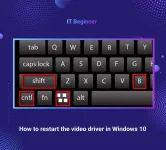
How to restart the video driver in Windows 10
If the version of the video driver is unstable, it occasionally fails to work. You can restart the driver on the fly without having to reboot the operating system.
For this purpose, Windows 10 has a special key combination that allows you to restart graphics card drivers without terminating the user session. The method is supported by NVIDIA, AMD and Intel drivers.
Press WIN + CTRL + SHIFT + B to restart the video driver.
The screen will go blank for a second, you will hear a beep and then the image will reappear. This procedure is completely safe and has no effect on the applications running on your system.
Or
Step 1: Save & Close all the opening apps.
Step 2: Go to the desktop by pressing Windows Key + D button.
Step 3: Now use the following shortcut keys to restart or refresh the graphics driver.
Windows Key + CTRL + SHIFT + B