PH
PHHere’s how to get Free Apple Music, Apple TV+, and iCloud+ for 3 months
Proof:
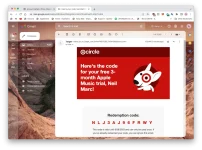
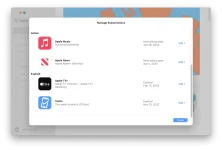
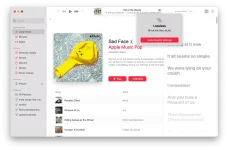
Requirements:
Steps:
1. Connect VPN to USA.
- Double check nyo po kung naka connect to USA by googling “What’s my IP”
2. Go to You do not have permission to view the full content of this post. Log in or register now. and Click on Sign In. After that, click nyo po “Create an Account”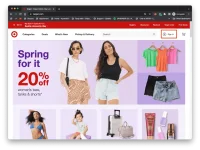
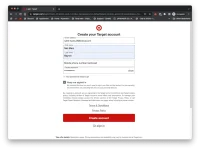
3. Enter your details, then click “Create Account”
4. IMPORTANT STEP: Click nyo po yang “Join Free” button pag lalabas po itong screen.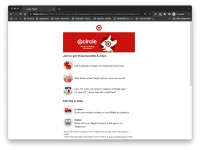
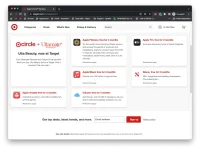
5. Account Creation done, now punta po kayo sa You do not have permission to view the full content of this post. Log in or register now. and enjoy free Apple Services
Select lang po kayo kung anong gusto nyo, then click redeem. Mag e-email po ng redeem code yung Target and steps on how to redeem it. Pwede po kayo mag claim ng multiple free trials. Once expired na yung free trial, you can't redeem another code. You must create another Target account to redeem.
Questions:
“I want to use this, pero hindi ko po gusto i-log out ang main Apple ID ko?”
- Media and Purchases po, logout lang po kayu dyan, then login the iCloud Account with Free Apple Services.
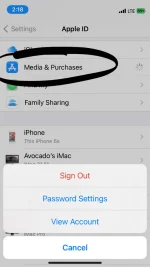
"Do I need to use VPN every time I open or use Apple Music/Services?"
- No, there's no need na po since USA Region na yung Apple ID.
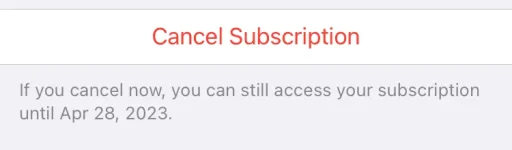
"Makukunan ba pera ko if ma-expire na yung trial?"
- Just to be safe, use a spare Apple ID with NO PAYMENT METHOD for this tutorial. Pwede nyo rin i cancel agad yung trial. I'm not held liable po if nakunan yung pera nyo ng $11 (P600) lol
"Android user po ako, can I still use this?"
- Apple Music? Yes (With limitation). Apple TV+? No, pero sa Smart TV (LG or Samsung) pwede.
"Ano po yung limitation?"
- Limited po ang features ng Apple Music for Android. There's no spatial audio and Apple Music Sing (Karaoke feature)
"Naka-claim o gamit na po ako ng Free Apple Music Trial noon, can I still use this?"
- Yes.
Enjoy
Proof:
Requirements:
- Legit VPN na macaca-connect sa USA (suggestion Tunnelbear or NørdVPN)
- Email Address (prefer iCloud Email para iwas detection)
- Change Apple ID region to USA (Tutorial Here)
Steps:
1. Connect VPN to USA.
- Double check nyo po kung naka connect to USA by googling “What’s my IP”
2. Go to You do not have permission to view the full content of this post. Log in or register now. and Click on Sign In. After that, click nyo po “Create an Account”
3. Enter your details, then click “Create Account”
4. IMPORTANT STEP: Click nyo po yang “Join Free” button pag lalabas po itong screen.
5. Account Creation done, now punta po kayo sa You do not have permission to view the full content of this post. Log in or register now. and enjoy free Apple Services
Select lang po kayo kung anong gusto nyo, then click redeem. Mag e-email po ng redeem code yung Target and steps on how to redeem it. Pwede po kayo mag claim ng multiple free trials. Once expired na yung free trial, you can't redeem another code. You must create another Target account to redeem.
Questions:
“I want to use this, pero hindi ko po gusto i-log out ang main Apple ID ko?”
- Media and Purchases po, logout lang po kayu dyan, then login the iCloud Account with Free Apple Services.
"Do I need to use VPN every time I open or use Apple Music/Services?"
- No, there's no need na po since USA Region na yung Apple ID.
"Makukunan ba pera ko if ma-expire na yung trial?"
- Just to be safe, use a spare Apple ID with NO PAYMENT METHOD for this tutorial. Pwede nyo rin i cancel agad yung trial. I'm not held liable po if nakunan yung pera nyo ng $11 (P600) lol
"Android user po ako, can I still use this?"
- Apple Music? Yes (With limitation). Apple TV+? No, pero sa Smart TV (LG or Samsung) pwede.
"Ano po yung limitation?"
- Limited po ang features ng Apple Music for Android. There's no spatial audio and Apple Music Sing (Karaoke feature)
"Naka-claim o gamit na po ako ng Free Apple Music Trial noon, can I still use this?"
- Yes.
Enjoy