 PH
PHAshampoo Privacy Inspector 1.0 is the name of a new, functional and useful tool in the field of collecting important and significant information during the work with the system. As you probably know, Windows is constantly recording and collecting logs in relation to system activities offline and online. What logs are registered and, more importantly, what you can do with it are among the things that this program can help you with. This software gives you the ability to access important and practical details of system logs and with a detailed review of your activities.
In general, logs or reports are recorded for any activity in the system, and in this way, Windows creators can constantly monitor user activities. Of course, this data is collected and used by the creators of this operating system with the aim of providing a better user experience for Windows users. If you're worried about this data and your privacy on the system, it's not bad to take a look at this data using a third-party tool. The software we have prepared for you in this article from Yas Download site allows you to see some remarkable details of your activity footprint online and offline with a few simple clicks. You can make decisions about any of this information, such as files downloaded from the Internet, credentials stored in web browsers, and web browser data (including visited websites, addresses, etc.).
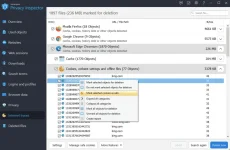
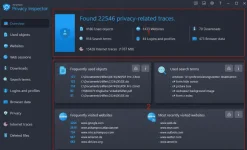
Key features of Ashampoo Privacy Inspector software:
– Ability to view the latest files achieved and log its changes
– Ability to delete excess and unused data
– Ability to analyze web browser data for all users
– Ability to view visited pages and time spent in each of them
– Ability to analyze users' search in the web
– Ability to clear user footprints in web space
– Ability to disable telemetry and tracking tools by Microsoft
– Prevent location tracking, sink data and annoying ads
– Having a simple and user-friendly graphical environment
DOWNLOAD: You do not have permission to view the full content of this post. Log in or register now.
PASSWORD: 123456789
In general, logs or reports are recorded for any activity in the system, and in this way, Windows creators can constantly monitor user activities. Of course, this data is collected and used by the creators of this operating system with the aim of providing a better user experience for Windows users. If you're worried about this data and your privacy on the system, it's not bad to take a look at this data using a third-party tool. The software we have prepared for you in this article from Yas Download site allows you to see some remarkable details of your activity footprint online and offline with a few simple clicks. You can make decisions about any of this information, such as files downloaded from the Internet, credentials stored in web browsers, and web browser data (including visited websites, addresses, etc.).
Key features of Ashampoo Privacy Inspector software:
– Ability to view the latest files achieved and log its changes
– Ability to delete excess and unused data
– Ability to analyze web browser data for all users
– Ability to view visited pages and time spent in each of them
– Ability to analyze users' search in the web
– Ability to clear user footprints in web space
– Ability to disable telemetry and tracking tools by Microsoft
– Prevent location tracking, sink data and annoying ads
– Having a simple and user-friendly graphical environment
DOWNLOAD: You do not have permission to view the full content of this post. Log in or register now.
PASSWORD: 123456789