 PH
PH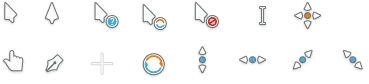
Breeze Snow Cursor
Cursor Info:This is a ported version of the "Breeze Snow" cursor theme from X11 to Windows format in CUR and ANI formats. It includes an INF file that lets you install the theme with secondary click on it and clicking the "Install" option on the context menu.
How to install:
METHOD 1
METHOD 21. Download and extract the rar file.
2. Go to the Control Panel and select Appearance and Themes on your shell, click Mouse Pointers. A window entitled Mouse Properties should appear on the Pointer Options tab.
3. Select the Pointers tab and to change the cursors double click the current cursors and go to where you extracted the rar file. Match each of the cursors to the proper place.
4. Click the OK or the Apply button when you're done.
1. Download and extract the rar file.
2. Go to You do not have permission to view the full content of this post. Log in or register now. and download the *.msi file that fits your computer (either 32-bit or 64-bit.)
3. Download the msi file and follow as it says.
4. When done, go to the folder where you extracted my file and right click the cursor file. Select Change Cursor and select where it fits.
Official/Deviantart Link:
You do not have permission to view the full content of this post. Log in or register now.
Download:
You do not have permission to view the full content of this post. Log in or register now.