PH
PHhoneyglaze0
Leecher
Hello po. Newbie po. Paano manood ng iptv sa laptop. Thank you po in advance
noice angas mo bossingYou do not have permission to view the full content of this post. Log in or register now. and follow the steps and Install VLC Media Player.
After you download and install VLC base on your Operating system you can start setup steps.
Step 1: When the application is opened press on "Media".
Step 2: Click on the "Open network stream".
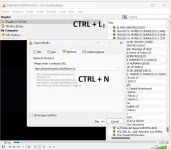
or SIMPLY press CTRL+N and select "Network" . Please refer to my attached image.
Step 3: Enter the Playlist URL provided from my threads and press "Play".
Step 4: Now your playlist is loaded, Press the combination between CTRL+L to bring up the playlist.
You may also Install You do not have permission to view the full content of this post. Log in or register now.provided your laptop meets the You do not have permission to view the full content of this post. Log in or register now.
Check out my threads to obtain FREE URL playlist and download M3U playlist files:
https://phcorner.org/threads/iptv-m3u-playlist-url-free-to-all-tons-of-vod_movies-channels.1591991/
https://phcorner.org/threads/iptv-playlist-url-free-to-all.1591923/
https://phcorner.org/threads/iptv-playlist-m3u-vod_movies-3-upload.1595503/
https://phcorner.org/threads/iptv-playlist-m3u-vod_movies-and-series-2-upload.1595510/
View attachment 2494079
wag ka maingay Idol,,,noice angas mo bossing
 post lang ako to maintain my status.