PH
PHNihilosphy
Eternal Poster
Dali Try Nyu To
1-Pokemon go App
2-Lucky Patcher
3-Gps Controller
4-Rooted Phone
Steps
1-iinstall ang tatlong app na nasabi
2-i open ang lucky patcher hanapin ang GPS controller
3-tapos click GPS controller tapos piliin young tools tapos moved to system/app
4-Tapos hintay nalng tapos lalabas yung "reboot now"click nyu
5-Pagkatapos magreboot open nyu gps controller punta kayu settings nya tapos enable nyu " Advanced" Mode at Auto Minimize"
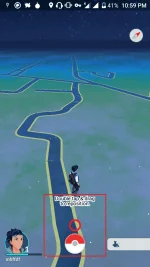
6-Tapos Balik Kayu sa Map hanapin nyu gusto nyu na start location tapos click red na play button sa ibaba
7-Tapos may lalabas na Control tapos double tap at drag nyu kung San nyu gusto open Pokémon go at may controller na kayu di nyu kailangan mag lakad
Links ng Apps
Lucky Patcher
You do not have permission to view the full content of this post. Log in or register now.
GPS Controller
You do not have permission to view the full content of this post. Log in or register now.
Pokemon go App
You do not have permission to view the full content of this post. Log in or register now.
For Question
My Gmail
deathdemon987@gmail.com
1-Pokemon go App
2-Lucky Patcher
3-Gps Controller
4-Rooted Phone
Steps
1-iinstall ang tatlong app na nasabi
2-i open ang lucky patcher hanapin ang GPS controller
3-tapos click GPS controller tapos piliin young tools tapos moved to system/app
4-Tapos hintay nalng tapos lalabas yung "reboot now"click nyu
5-Pagkatapos magreboot open nyu gps controller punta kayu settings nya tapos enable nyu " Advanced" Mode at Auto Minimize"
6-Tapos Balik Kayu sa Map hanapin nyu gusto nyu na start location tapos click red na play button sa ibaba
7-Tapos may lalabas na Control tapos double tap at drag nyu kung San nyu gusto open Pokémon go at may controller na kayu di nyu kailangan mag lakad
Links ng Apps
Lucky Patcher
You do not have permission to view the full content of this post. Log in or register now.
GPS Controller
You do not have permission to view the full content of this post. Log in or register now.
Pokemon go App
You do not have permission to view the full content of this post. Log in or register now.
For Question
My Gmail
deathdemon987@gmail.com