 PH
PH-
Welcome to PHCorner Forums! Sign up for free to unlock full access and exclusive privileges, including:
- Asking questions about computer and mobile issues
- Discovering internet tips for your mobile network and computer
You are using an out of date browser. It may not display this or other websites correctly.
You should upgrade or use an alternative browser.
You should upgrade or use an alternative browser.
🔒 Closed Pokemon go failed to detect location. patulong
- Thread starter henzking2
- Start date
- Status
- Not open for further replies.
Method 1 : Fix Failed to Detect Location/GPS Signal in Pokemon Go
This one is first method which is found from my previous experience. This happen mostly when your mobile automatically goes turn off your location settings. To fix this problem follow these steps to fix it.
This trick is another way to fix “Pokemon Go GPS Not Found and Failed to Detect Location” Errors.
by kingroot
This one is first method which is found from my previous experience. This happen mostly when your mobile automatically goes turn off your location settings. To fix this problem follow these steps to fix it.
- Go to Settings and Select Location Option.
- Now if you see its turned off just turn it “ON”.
- One more thing that is open Location Settings. Set high accuracy by click mode.
- If you done all steps above then just launch the app Pokemon Go, you won't see “Failed to Detect Location or GPS not found” Errors in Game any more.
This trick is another way to fix “Pokemon Go GPS Not Found and Failed to Detect Location” Errors.
- Turn off Mock Locations in Developer Settings.
- Restart the Phone after mock locations turned off .
- Set Location to High Security to fix it with ease.
- Now, Again launch the Game surely you wont see any errors this time.
by kingroot
Method 1 : Fix Failed to Detect Location/GPS Signal in Pokemon Go
This one is first method which is found from my previous experience. This happen mostly when your mobile automatically goes turn off your location settings. To fix this problem follow these steps to fix it.
Method 2: Pokemon Go “GPS Not Found” & “Failed to Detect Location”
- Go to Settings and Select Location Option.
- Now if you see its turned off just turn it “ON”.
- One more thing that is open Location Settings. Set high accuracy by click mode.
- If you done all steps above then just launch the app Pokemon Go, you won't see “Failed to Detect Location or GPS not found” Errors in Game any more.
This trick is another way to fix “Pokemon Go GPS Not Found and Failed to Detect Location” Errors.
- Turn off Mock Locations in Developer Settings.
- Restart the Phone after mock locations turned off .
- Set Location to High Security to fix it with ease.
- Now, Again launch the Game surely you wont see any errors this time.
by kingroot
san ito makikita? * turn off mock locations in developer settings
Settings->about device-> tap mo ng 7 times yung build number then balik ka ulit sa settings makikita mo na yung developer options. Dati nakalabas na yan itinago lang sa kitkatsan ito makikita? * turn off mock locations in developer settings
Method 1 : Fix Failed to Detect Location/GPS Signal in Pokemon Go
This one is first method which is found from my previous experience. This happen mostly when your mobile automatically goes turn off your location settings. To fix this problem follow these steps to fix it.
Method 2: Pokemon Go “GPS Not Found” & “Failed to Detect Location”
- Go to Settings and Select Location Option.
- Now if you see its turned off just turn it “ON”.
- One more thing that is open Location Settings. Set high accuracy by click mode.
- If you done all steps above then just launch the app Pokemon Go, you won't see “Failed to Detect Location or GPS not found” Errors in Game any more.
This trick is another way to fix “Pokemon Go GPS Not Found and Failed to Detect Location” Errors.
- Turn off Mock Locations in Developer Settings.
- Restart the Phone after mock locations turned off .
- Set Location to High Security to fix it with ease.
- Now, Again launch the Game surely you wont see any errors this time.
by kingroot
GPS Not Found parin, di ba to pwede sa DATA? ang POKEMON GO ?
depende po rin yan sa quality ng internet. pwedeng pwede po yan sa data, Kami ay naka pldt na pero nakakakita pa din kami ng ganyang error from time to timeGPS Not Found parin, di ba to pwede sa DATA? ang POKEMON GO ?
Method 1 : Fix Failed to Detect Location/GPS Signal in Pokemon Go
This one is first method which is found from my previous experience. This happen mostly when your mobile automatically goes turn off your location settings. To fix this problem follow these steps to fix it.
Method 2: Pokemon Go “GPS Not Found” & “Failed to Detect Location”
- Go to Settings and Select Location Option.
- Now if you see its turned off just turn it “ON”.
- One more thing that is open Location Settings. Set high accuracy by click mode.
- If you done all steps above then just launch the app Pokemon Go, you won't see “Failed to Detect Location or GPS not found” Errors in Game any more.
This trick is another way to fix “Pokemon Go GPS Not Found and Failed to Detect Location” Errors.
- Turn off Mock Locations in Developer Settings.
- Restart the Phone after mock locations turned off .
- Set Location to High Security to fix it with ease.
- Now, Again launch the Game surely you wont see any errors this time.
by kingroot
good job... nice info...
lawrenceee
Enthusiast
Thanks as info guys 
kline achxyl
Honorary Poster
Method 1 : Fix Failed to Detect Location/GPS Signal in Pokemon Go
This one is first method which is found from my previous experience. This happen mostly when your mobile automatically goes turn off your location settings. To fix this problem follow these steps to fix it.
Method 2: Pokemon Go “GPS Not Found” & “Failed to Detect Location”
- Go to Settings and Select Location Option.
- Now if you see its turned off just turn it “ON”.
- One more thing that is open Location Settings. Set high accuracy by click mode.
- If you done all steps above then just launch the app Pokemon Go, you won't see “Failed to Detect Location or GPS not found” Errors in Game any more.
This trick is another way to fix “Pokemon Go GPS Not Found and Failed to Detect Location” Errors.
- Turn off Mock Locations in Developer Settings.
- Restart the Phone after mock locations turned off .
- Set Location to High Security to fix it with ease.
- Now, Again launch the Game surely you wont see any errors this time.
by kingroot
Naayos ko na yung sakin... ang ginawa ko, gumawa ulit ako ng bagong account.... kasi yung ginamit kong account yun yung di pa narerelease dito sa ph. Mostly binoblock nila yung account.
Ayaw parin kahit gumawa ako Bago account
Attachments
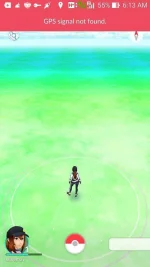
baka naman dahil naka injector ka, try mo muna maglegit, anyway pala sa pagkakaalam ko ay libre ngayon ang pokemon go kay smart or globeAyaw parin kahit gumawa ako Bago account
.Ayaw parin kahit gumawa ako Bago account
naka psiphon kayu sir?
hiddenwacky
Journeyman
Mahina lang ung gamit nyong third party connection. Yun lang yown.
- Status
- Not open for further replies.
About this Thread
-
44Replies
-
3KViews
-
28Participants
Last reply from:
vincem
vincem
New Topics
-
PES 2017 (Port for Android/Recompiled) - APK + DATA
- Started by KumaKuma
- Replies: 0
- 🎮 Android Games
-
WWE 12 (Recompiled Port for Android) - APK + DATA
- Started by KumaKuma
- Replies: 1
- 🎮 Android Games
-
The Legend of Zelda Breath of the Wild - APK + DATA
- Started by KumaKuma
- Replies: 1
- 🎮 Android Games
-
May Song hub na ba ang lahat?
- Started by WraithKing0831
- Replies: 0
- 🎮 Android Games
-
Metaphor Re:Fantazio - APK + ROM [Complete Game - Winlator]
- Started by KumaKuma
- Replies: 0
- 🎮 Android Games
-
Guitar Hero (Recompiled Port for Android) - APK + DATA [Full Game]
- Started by KumaKuma
- Replies: 0
- 🎮 Android Games
-
NARUTO X BORUTO Ultimate Ninja STORM CONNECTIONS APK
- Started by SHIFFUU
- Replies: 0
- 🎮 Android Games
Trending Topics
Online now
- Members online
- 395
- Guests online
- 7,622
- Total visitors
- 8,017