 PH
PHGreetings!
I thought this brief work around tutorial may be of helpful to you, OpenVPN users.
Did you know na downloadable din ang blank OVPN config sa ibang SSH server sites?
TCPVPN.com is one example. But it needs additional lines sa config files to work. You
need to open config file and swipe to settings.
See the succeeding images...
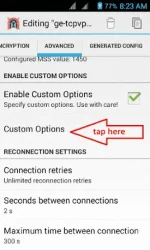

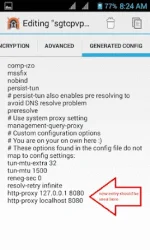

Nakuha ba? What you need to do is to assign the localhost+listen port and by
default that is 127.0.0.1:8080 sa smartphones. Puede namang mag assign ng ibang
listen port provided na walang conflict na mangyayari sa mga used ports. Make
sure lang na the same ports exists/assigned din sa eProxy. See above image.
The same procedure applies sa PC need pa rin edit ang localhost but assigned ports
is different but anyway....here are our kaPH members who started it all. KUDOS! sainyong
dalawa.
Eproxy for PC & Android by sir 0123456
https://phcorner.org/t/pc-android-eproxy-ovpn-fast-stable-tnt-sun-august-02-2016.153237/
Eproxy for Android by sir aimaro
https://phcorner.org/t/eproxy-for-android-smart-tnt-sun-august-4-2016-updated.156809/
and a big Thank You! to sir alist1986 a kaPH master guru!
If it so happen na inulit ko rin lang itong tut, then pardon my ignorance I was not aware of it.
Ciao!
I thought this brief work around tutorial may be of helpful to you, OpenVPN users.
Did you know na downloadable din ang blank OVPN config sa ibang SSH server sites?
TCPVPN.com is one example. But it needs additional lines sa config files to work. You
need to open config file and swipe to settings.
See the succeeding images...
Nakuha ba? What you need to do is to assign the localhost+listen port and by
default that is 127.0.0.1:8080 sa smartphones. Puede namang mag assign ng ibang
listen port provided na walang conflict na mangyayari sa mga used ports. Make
sure lang na the same ports exists/assigned din sa eProxy. See above image.
The same procedure applies sa PC need pa rin edit ang localhost but assigned ports
is different but anyway....here are our kaPH members who started it all. KUDOS! sainyong
dalawa.
Eproxy for PC & Android by sir 0123456
https://phcorner.org/t/pc-android-eproxy-ovpn-fast-stable-tnt-sun-august-02-2016.153237/
Eproxy for Android by sir aimaro
https://phcorner.org/t/eproxy-for-android-smart-tnt-sun-august-4-2016-updated.156809/
and a big Thank You! to sir alist1986 a kaPH master guru!
If it so happen na inulit ko rin lang itong tut, then pardon my ignorance I was not aware of it.
Ciao!
