❓ Help Yung magpapa openline ng pocket wifi and stick. "pasok" (100% free)

EZDaddyow

Honorary Poster
May Nakikita parin akong pending imei codes na Hindi nabibigyan ng unlock codes.

Tutulungan ko kayo Ka PHC. (y)

*Just Comment niyo nalang sa baba Ung Model at IMEI ng unit ninyo :)


Tested for Huawei All model and Globe T@ttoo.


*Requirements:

#1 Kung may pc, Laptop kayo mas Okay (y)
#2 Kung wala naman. Android phone nalang tapos download kayo sa playstore ng HiLink. (y)

INSTRUCTION:

#1 power off pocket wifi/stick. Salpak ka smart/sun/tnt na simcard sa pocket wifi. (Vice versa)
#2 conect mo laptop mo or computer or Android phone sa pocket wifi mo
#3 punta kasa browser mo. Then type 192.168.8.1 or 192.168.1.1
(Dipende yan sa unit mo) (kadalsan makikita mo naman to sa Likod ng unit mo)
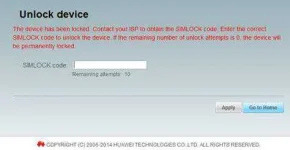
#4 may nakalagay jan na box. Ang nakalagay Input SimLock:
‪#‎5 Last‬ step: Lagay mo yung code na ibibigay ko sayo (y)

Note:

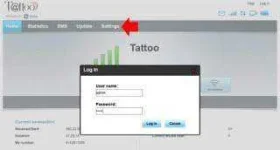
(If nanghingi ng username and password use default)

(Username: admin Password: admin)


DONE!


#Openline
#Globet@ttoo
#Huawei
#Unlockcodes
#100%free


Comment down your Model and Unit.


-----


Boss paano po gamitin hung unlock at flash code?
Dsnow0114
HOW TO USE UNLOCK CODE?
1) Insert Any UNACCEPTED SIM Card into WI-FI Router and Start it.
2) Connect your computer to your pocket wifi via wifi connection or usb cable .
3) Open You do not have permission to view the full content of this post. Log in or register now. to your browser.
1445082805844.webp

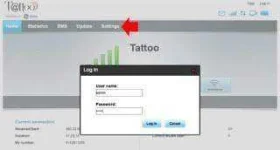
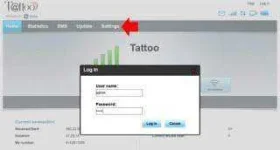
4) Click SETTINGS and Log in.

1445081530767.webp

--For Smart Bro Pocket Wifi Log in
(username: smartbro )(password: smartbro)

--For Globe Tattoo Pocket Wifi Log in
(username: admin)(password: admin)

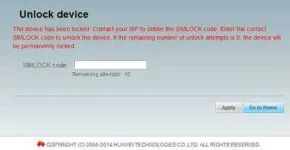
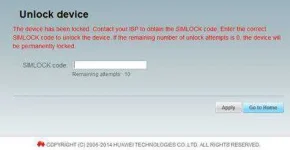
5) Now you can see the box which is asking to enter the SIMLOCK CODE,
simlockcodw.webp
6) Enter The SIMLOCK CODE
7) Click on APPLY. That’s It Your modem is unlocked successfully.

HOW TO USE FLASH CODE?
If you decide to upgrade downgrade, change Firmware Version, WebUI, or Dashboard for old modem it requires you to enter flash code, during the process automatically will prompt you, just input flash code and your done. (y)


boss paano paganahin ang sun sim sa smart pocket wifi?
jerzky1994
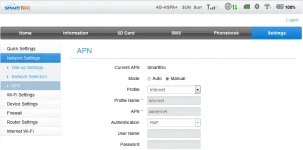
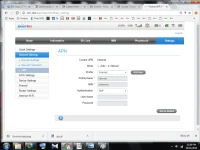
Of Course change sim & follow picture

sunsimused-png.87050
 

Attachments

  • SunsimUsed.webp
    SunsimUsed.webp
    40.7 KB · Views: 146
Dsnow0114
HOW TO USE UNLOCK CODE?
1) Insert Any UNACCEPTED SIM Card into WI-FI Router and Start it.
2) Connect your computer to your pocket wifi via wifi connection or usb cable .
3) Open You do not have permission to view the full content of this post. Log in or register now. to your browser.
1445082805844.webp

4) Click SETTINGS and Log in.

1445081530767.webp

--For Smart Bro Pocket Wifi Log in
(username: smartbro )(password: smartbro)

--For Globe Tattoo Pocket Wifi Log in
(username: admin)(password: admin)

5) Now you can see the box which is asking to enter the SIMLOCK CODE,
simlockcodw.webp
6) Enter The SIMLOCK CODE
7) Click on APPLY. That’s It Your modem is unlocked successfully.

HOW TO USE FLASH CODE?
If you decide to upgrade downgrade, change Firmware Version, WebUI, or Dashboard for old modem it requires you to enter flash code, during the process automatically will prompt you, just input flash code and your done. (y)


jerzky1994
Of Course change sim & follow picture

sunsimused-png.87050
 
Dsnow0114
HOW TO USE UNLOCK CODE?
1) Insert Any UNACCEPTED SIM Card into WI-FI Router and Start it.
2) Connect your computer to your pocket wifi via wifi connection or usb cable .
3) Open You do not have permission to view the full content of this post. Log in or register now. to your browser.
1445082805844.webp

4) Click SETTINGS and Log in.

1445081530767.webp

--For Smart Bro Pocket Wifi Log in
(username: smartbro )(password: smartbro)

--For Globe Tattoo Pocket Wifi Log in
(username: admin)(password: admin)

5) Now you can see the box which is asking to enter the SIMLOCK CODE,
simlockcodw.webp
6) Enter The SIMLOCK CODE
7) Click on APPLY. That’s It Your modem is unlocked successfully.

HOW TO USE FLASH CODE?
If you decide to upgrade downgrade, change Firmware Version, WebUI, or Dashboard for old modem it requires you to enter flash code, during the process automatically will prompt you, just input flash code and your done. (y)


jerzky1994
Of Course change sim & follow picture

sunsimused-png.87050
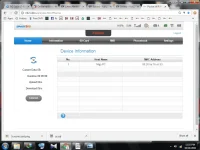
ayaw talaga
 

Attachments

  • Untitled.webp
    Untitled.webp
    72 KB · Views: 31
  • Untitled2.webp
    Untitled2.webp
    77.2 KB · Views: 30

About this Thread

  • 3K
    Replies
  • 191K
    Views
  • 1K
    Participants
Last reply from:
rocciniroque

Trending Topics

Online now

Members online
427
Guests online
914
Total visitors
1,341

Forum statistics

Threads
2,271,667
Posts
28,937,169
Members
1,238,768
Latest member
Nen22
Back
Top