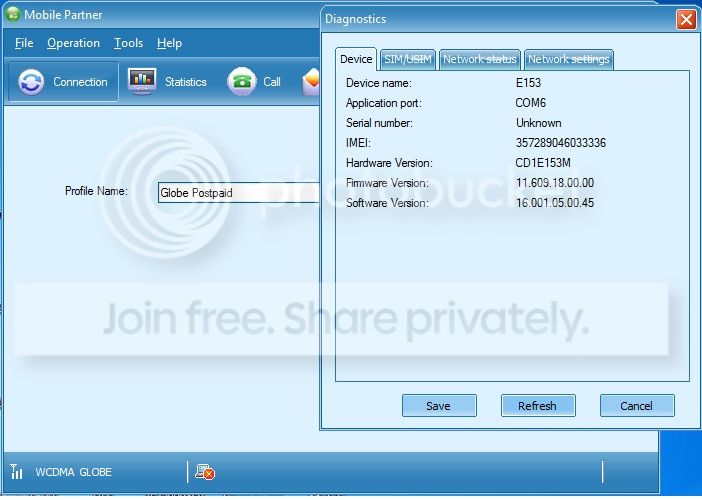
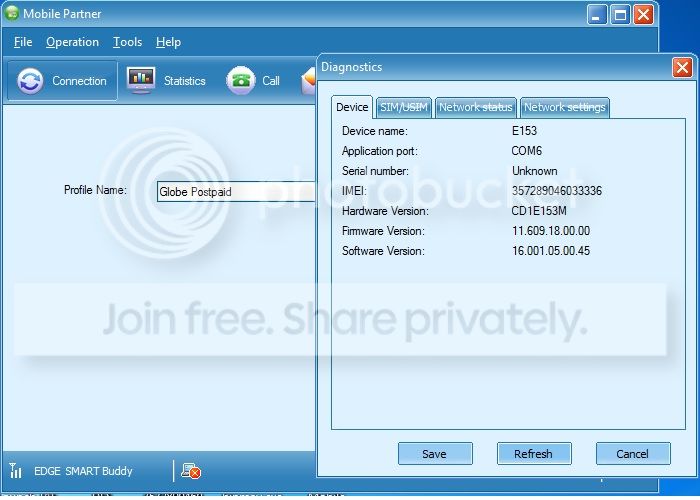
❓ Help Yung magpapa openline ng pocket wifi and stick. "pasok" (100% free)

EZDaddyow

Honorary Poster
May Nakikita parin akong pending imei codes na Hindi nabibigyan ng unlock codes.

Tutulungan ko kayo Ka PHC. (y)

*Just Comment niyo nalang sa baba Ung Model at IMEI ng unit ninyo :)


Tested for Huawei All model and Globe T@ttoo.


*Requirements:

#1 Kung may pc, Laptop kayo mas Okay (y)
#2 Kung wala naman. Android phone nalang tapos download kayo sa playstore ng HiLink. (y)

INSTRUCTION:

#1 power off pocket wifi/stick. Salpak ka smart/sun/tnt na simcard sa pocket wifi. (Vice versa)
#2 conect mo laptop mo or computer or Android phone sa pocket wifi mo
#3 punta kasa browser mo. Then type 192.168.8.1 or 192.168.1.1
(Dipende yan sa unit mo) (kadalsan makikita mo naman to sa Likod ng unit mo)
#4 may nakalagay jan na box. Ang nakalagay Input SimLock:
‪#‎5 Last‬ step: Lagay mo yung code na ibibigay ko sayo (y)

Note:

(If nanghingi ng username and password use default)

(Username: admin Password: admin)


DONE!


#Openline
#Globet@ttoo
#Huawei
#Unlockcodes
#100%free


Comment down your Model and Unit.


-----


ito po po sundan na lang yung posted earlier tutorial


E153 U1, U2 at U3 UNLOCK ---Free---
2013 Update
Semi break modems solution is here, yung natira lang ay Application Interface at Downloading Mode sa QPST ito po yung solution nyan.


Do this at your own risk.

Software Needed
1. QPST You do not have permission to view the full content of this post. Log in or register now.
2. Huawei Flasher Salamat sa tao na gumawa nito. Credits to "FrAnCeScO" You do not have permission to view the full content of this post. Log in or register now.
3. E153 Downgrde Firmware You do not have permission to view the full content of this post. Log in or register now.


1. Backup NVitem (very important)
*Follow nyo nlng kung paano mag backup ng NVitems using QPST sa thread nato.
https://phcorner.org/showthread.php?t=819100
2. Downgrading firmware using Huawei Flasher
*Plug your modem, Close dashboard
*Run "Huawei Flasher" (No need to install). Dapat my internet connection para gumana ang Flasher.
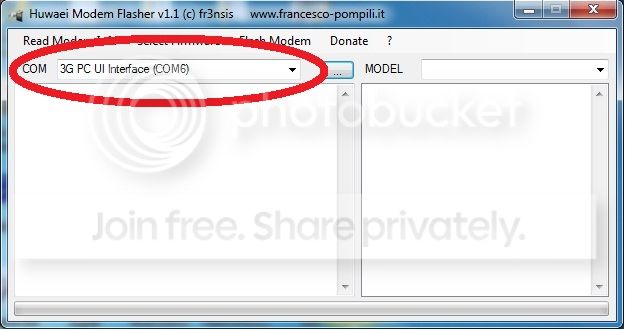
*See kung detected ang port ng modem
153-0.jpg

*Click "Select Firmware" at e point nyo sa na download na firmware
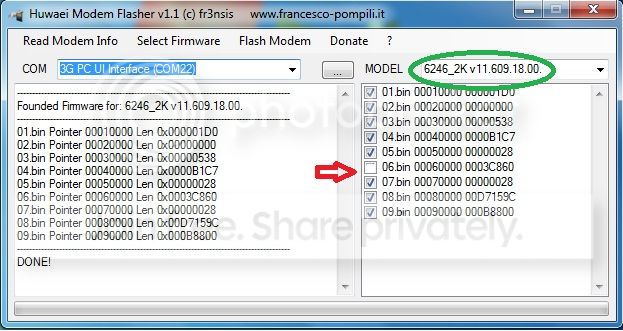
ganito ang mangyayari. Dapat 6246_K ang makikita ninyo dyan.
e1.jpg

^ e uncheck nyo po yung ika 6 na bin. (kailangan hindi maisama yan para hindi mag error)
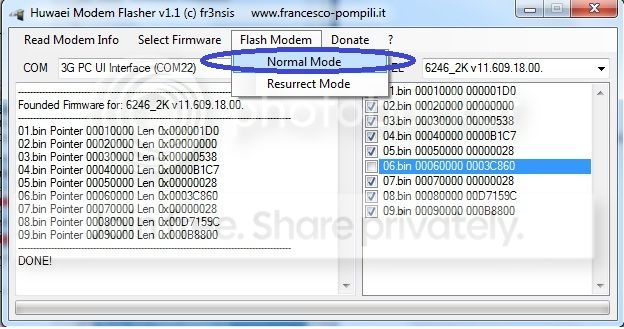
*Click "Flash Modem" then "Normal Mode" may popup na lalabas "Press OK if modem is connected" wait 10 sec bago e press ang "OK". Pag na press na ang OK mag lo-load na yung mga bin except bin6 kasi ina uncheck yun.
153-10-1.jpg

^hayaan nyo lng hangang matapos, it itakes several time para matapos yung ika 8 bin. mag error po yan sa huli ng bin 8 pero ok lang yan just replug modem with other sim. Wag nyo muna open dashboard kasi hindi pa yan tapos, mag restor muna.

3. Restore NVitems - pag hindi ninyo ito ginawa hindi successfull ang unlocking ninyo, mawawala pa IMEI ninyo. (A must)
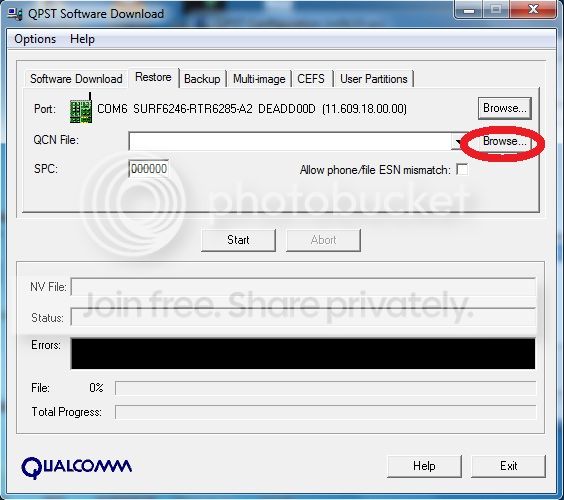
Re-insert lang po yung modem at gamitin ang QPST para ma restore yung NVitems na kinuha natin. Browse nyo lng po kung saan nyo tinago ang backup.
153-3.jpg


pag tapos na na ma restore re insert modem with other SIM.


SS

Globe
123-5.jpg

Smart
153-4.jpg


Say"thanks"

Your Free to update this kind of trick.

For Modems na hindi maka change ng profile like sa smartbro, change nlng ninyo to globe. Itopo link ng updater You do not have permission to view the full content of this post. Log in or register now.


Para sa mga modem na na semi brick at detected pa yung "3G UI Interface". Ito gawin nyo para back to Normal ang Modem nyo.
(Credits to Sir Badiding)

1.plug your bricked modem
2.open device manager.Ports(PORTS & LPT)
3.check if your huawei 3g pc ui interface(com#) is detected..take note of the com port #.
4.close globe dashboard
5.connect to internet using another connection(most preferred:smartbro modem or wimax..kz pg globe broadband gmitin mo minsan nagddc xa.if no other means just try to use another globe broadband as long as hnd xa mag dc.
6.open huawei flasher.wait until it detect your bricked modem(checked com port # if it corresponds with the one listed in device manager.
7.select firmware..point to the firmware you downloaded.
8.just uncheck bin 6
9.now this is important..press Flash Modem..then resurrect mode..wait until it reach bin 8 to load until it says failed.
10.close huawei flasher..wait until your modem is detected.and dashboard appear.then close dashboard..unplug modem..
11.reconnect your modem..now check device manager..3G PC UI interface detected and 3G Application interface detected..if both 2 interface are detected..your now ready to flash again your modem but beware plz follow sir moklo tutorials on first page but instead of unchecking bin 6 alone..unchecked nio rin yung bin 8..sa observation ko depende kz sa modem..yung iba ok yung mag error s bin 8..kya yung mga na brick when flashing at hnd na uncheck yung bin 8
plz uncheck bin 8..

AFTER SUCCESFULLY FLUSHING YOUR MODEM.UNPLUG IT AND RECONNECT AGAIN(no sim) .RESTORE MO NA YUNG BACKUP FILES MO..im sure alam mo how to restore back up files.

Pra sa mga nawalang imei eto how to write your imei:
1.QPST tool
2. Qpst configuration
3.add port.check device manager what com port # ang 3g pc ui interface.at yun ang i add mo
4.highlight it..then press Star Client..RF NV item manager..chec mo sa lower right kung tama ba ang com port #..kung hnd click mo yung Setting.,Comport then type yung com port # ng 3g pc ui interface mo.
5. click file.read supported nv items..click #550 NV_UE_
6.may pop up yan sa right corner.click hex.then input your old imei # (printed yan either sa loob or back portion ng modem mo)
ganito ang pag input ng old imei mo (credits to sir moklo):


example IMEI 357289041212679

1st box - just input "8"
2nd box - add letter "a" to the first number 3a
3rd box - invert - "75"
4th box - invert - "82"
5th box - when the next # is 0 like 90 just input "9"
6th box - invert "14"
7th box - invert "12"
8th box - invert "62"
9th box - invert "97"


follow it properly will unlock your stick po but risky kaya ingat po.


24177592


48138523


77766269
salamat master!!! working(y)(y)(y) more power po sa inyu!!;);););)
 
Pa help sir... thnks...

MODEL: E5330Cs

IMEI: 861303033048956

LA pa tau, unlock c para jan, BRO. No luck sa mga latest Model na low SPECS. Mga hi specs na new model lamang ang may way para ma-unlock, Update at downgrade sa firmware ang way mga BROS. ^_^

salamat master!!! working(y)(y)(y) more power po sa inyu!!;);););)

Galing mo BRO, Nasundan mo Long PROCESS. Ginawa ko rin dati sa old USB modem ko. SAme model jan sa USB modem mo ^_^

Di ko magawa pa unlock.namn po nung akinm ZTE pocket wifi kase e. baka alam nyo po kung pano

Di ko magawa pa unlock.namn po nung akin. Smart bro

Model:MF65M
imei:868330024255822

ρáíd service YAn MAAM.

YAn MEssage nya:
ρáíd service pa po ito wala pa free if gusto na i-unlock using ρáíd service guide po kita, through pm po.


contact LapidCarlito ^_^

sorry hindi pa po kaya backread po for some info po.

Tulungan kta d2 magbigay unlock code kung may TIME , BRO ^_^

Model:E5330Bs-2
Imei:868988027858692

Ito nalang po boss pocket wifi salamat

48138523

Pa open line po sir,

Huawei pocket wifi
Model:E5330Bs-2
IMEI:867637025382699

Maraming salamat po.

26194598
 
try too this earlier posted procedures baka makatulong po


Read here first:
You need to generate hash 1 code and hash 2 code to generate v4 unlock codes
send your hash 1 and hash 2 code , I can generate v4 code for you, BRO ^_^
Easy Steps To Unlock Huawei E 5573 Airtel 4G Wi-Fi Router 150 MBps With Huawei V4 Algo Calculator

UPdates BRO, NEW STEPS unlocking your modem 4G E5573s-856
You do not have permission to view the full content of this post. Log in or register now.

Downgrade Huawei E5573s-856 Update 21.200.13.00.00 (Universal)
You do not have permission to view the full content of this post. Log in or register now.


Huawei E5573s-856 Firmware Update 21.315.15.00.00
You do not have permission to view the full content of this post. Log in or register now.

Use to generate Flash COde or firmware updares/downgrades: You do not have permission to view the full content of this post. Log in or register now.

Use to generate hash1 and hash code 2: Buts you need to updates firmware then downgrade to used flash codes, watch the videos ^_^: You do not have permission to view the full content of this post. Log in or register now.

Upgrade firmware link: You do not have permission to view the full content of this post. Log in or register now.

downgrade firmware links: You do not have permission to view the full content of this post. Log in or register now.

Tuturial links: You do not have permission to view the full content of this post. Log in or register now.

http://freeunlockighuawei2015.phc.onl/#forbidden#/

Video guide:
View: You do not have permission to view the full content of this post. Log in or register now.


View: You do not have permission to view the full content of this post. Log in or register now.

Sundan tuts BRo, Medyo mahaba Explore mo to. Pag Nasundan mo lahat maa-unlock yan

Easy Steps To Unlock Huawei E 5573 Airtel 4G Wi-Fi Router 150 MBps With Huawei V4 Algo Calculator
Video guide:
You do not have permission to view the full content of this post. Log in or register now.

I download d2 kailangang Files dami rin ^_^. Panoorin videos para makita mga need na files
You do not have permission to view the full content of this post. Log in or register now.
http://unlock-huawei-zte.phc.onl/#forbidden#/2016/01/how-to-unlock-customized-airtels-huawei.html
http://freeunlockighuawei2015.phc.onl/#forbidden#/
You do not have permission to view the full content of this post. Log in or register now.

Unlock your Huawei E5573s-606 Airtel4g modem within 10 minutes

You do not have permission to view the full content of this post. Log in or register now.


thanks for the hard works *^* its very risky *^* downgrading firmware the upgrading again *^*
maybe i need to search for more guides *^* thank you sir.
 

About this Thread

  • 3K
    Replies
  • 191K
    Views
  • 1K
    Participants
Last reply from:
rocciniroque

Trending Topics

Online now

Members online
330
Guests online
1,610
Total visitors
1,940

Forum statistics

Threads
2,271,658
Posts
28,937,092
Members
1,238,762
Latest member
qweasd123
Back
Top