 PH
PH-
Welcome to PHCorner Forums! Sign up for free to unlock full access and exclusive privileges, including:
- Asking questions about computer and mobile issues
- Discovering internet tips for your mobile network and computer
You are using an out of date browser. It may not display this or other websites correctly.
You should upgrade or use an alternative browser.
You should upgrade or use an alternative browser.
🔒 Closed Queencee vpn v6 ultra lite (all networks)
- Thread starter queencee
- Start date
- Status
- Not open for further replies.
Ma'am ask lang po anu po pinaka effective Na gamitin sa talkntext video strêâmïng po ma'am salamat po
 Sir updated na po nasa 1st page ang mga new setting working ang mga proxy server,
Gamit ko h.facebook.com bilis sa youtube try po ninyo
san po ba linalahgay ang ehi file
Para po sa inyong kaalaman ang .ehi file po ay ginagamit sa http injectorAng queencee vpn v6 po ay vpn at ang mga setting tutorial po ay nasa 1st page sundan lang po ninyo
May bago na pala. Install ko na.
_TURBO_ , pwede pa share ng settings mo? Bagal kasi sa akin. Thank you.
 Ano pong sim mo?
erngums you are most welcome and thank you for the positive feedback.Connected po cxa mam tm po gamit ko salamat po
MacPogi081213
Leecher
may vpn options po ba for smart?? salamat!
jump-in sim po..
jump-in sim po..
alexeraser
Journeyman
ano po pinagkaiba ng queencee sa psiphon?
thanks
baguhan lang po.
thanks
baguhan lang po.

Sphinx CoLLin
Forum Veteran
Salamat po mahal na reyna  %
%
%kingjaja you are about to use our vpn on heavy streaming, incase you get capped here is what you can do :Ma'am ask lang po anu po pinaka effective Na gamitin sa talkntext video strêâmïng po ma'am salamat po
we cannot remove the capping because it is already normal nowadays but we can bypass it...
start by connecting to the best performance or in my vpn as the philippines flag, when you notice buffering or you get dc too often, that is the time to :
jump to regions/servers for a fresh set.
and to make your connection better for your location, you can do this:
on the first page there is a list of proxy servers and real proxy servers. mix match them until you get a good connection. there will be a right combination for your location. patience is required. goodluck.
Brucejae you are most welcome sir.pa try po mam.
schwartz those are real proxy servers ma'ampara san yung mga number after ng list of proxy server?
MacPogi081213 sir we only use the vpn options on globe and tm.may vpn options po ba for smart?? salamat!
jump-in sim po..
pistapis11
Leecher
Pa tray so boss
Madam bakit wlang link madam
Madam bakit wlang link madam
alexeraser they are pretty much the same sir.ano po pinagkaiba ng queencee sa psiphon?
thanks
baguhan lang po.
all you need to know is on page 1 sir. instructions,handler settings for sim in use. download links included.
https://phcorner.org/t/queencee-vpn-v6-ultra-lite-all-networks.157535/
steps:
1.read the thread and download queencee vpn v6 ultra lite.
2.install the vpn apk file from the file folder.
3.launch queencee vpn. make sure you input the correct handler settings for the sim in use.
4.turn mobile data on.once you turn it on,a choice between "tunnel whole device" and "browser only" will appear. click "tunnel whole device".
if the proceedures were done correctly,you will see a key icon beside the status icon on the top left.
this means you are connected successfully.the app itself has indicators to let the user know its connection status.
noblesse you are most welcome sir and thank you for the very positive feedback and review on QueenCee vpn v6 ultra lite sir.
sphimsphinx you are most welcome sir.Salamat po mahal na reyna
pistapis11Pa tray so boss
Madam bakit wlang link madam
all you need to know is on page 1 sir. instructions,handler settings for sim in use. download links included.
https://phcorner.org/t/queencee-vpn-v6-ultra-lite-all-networks.157535/
kiernat what is your sim in use sir?Maam bakit po ganun connected po yung vpn pero di makaconnect sa net?
kingjaja you ar most welcom sir.Salamat ma'am
kiernatGlobe po ako maam. Thank you po nakapagconnect na ako gumamit lang ako ng ibang proxy server.
you are a globe / tm sim user, ok...have you made an apn mgc on your phone settings before proceeding to the vpn app? if not, please do this first :
•mgc apn phone setting
create apn mgc on your phone.
you may follow these steps...
1. settings
2. more
3. mobile network
4. access point name
5. choose globe telecom
6. choose myglobe connect
7. name: my globe connect
8. apn: You do not have permission to view the full content of this post. Log in or register now.
9. proxy: 203.177.42.214 or 108.67.222.222
10. port 8080
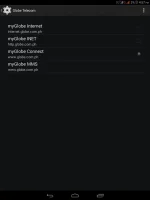
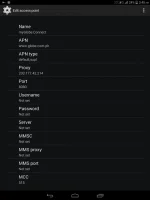
-do all of these on your cellphone's settings
and now let us proceed to queencee vpn v6 ultra lite, click on the vpn options.
•vpn options
connect trough an http proxy: check
use the following settings: check
host address: 203.177.42.214
port: 8080
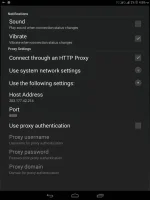 -input the correct globe/tm handler settings
-hit mobile data "on"
: if you can see the connected icon status and the key on top, those are the indications that you are successfully connected to the internet using the vpn via mgc. goodluck.
It is nice to know that you made it work by mix matching the proxy servers.

enocabijay
Journeyman
Di po gumagana
- Status
- Not open for further replies.
About this Thread
-
3KReplies
-
234KViews
-
965Participants
Last reply from:
specifichacker
specifichacker
New Topics
-
Pa sabit po Netflix kahit cookie lang master!
- Started by user215
- Replies: 1
- 🚀 Freenet & Tunneling
-
LOOKING FOR WIREGUARD SETUP IN MIKROTIK (WILLING TO PAY )
- Started by moreinformation
- Replies: 2
- 🚀 Freenet & Tunneling
-
MGa BOSS FREE VPN NA MAY PH SERVER PARA DITO SA AFRICA?
- Started by Junbiel 26
- Replies: 0
- 🚀 Freenet & Tunneling
-
PISOWIFI NO HULOG | (26-09-30) | NPV TUNNEL
- Started by Calcifeer
- Replies: 8
- 🚀 Freenet & Tunneling
-
[NOW WORKING] Youtube No Ads & Other Sites! via DNS
- Started by Lerps
- Replies: 33
- 🚀 Freenet & Tunneling
-
Free vpn can bypass captive portal
- Started by Darz2468
- Replies: 6
- 🚀 Freenet & Tunneling
-
Ano po gagawin pag ganto po?
- Started by jokejoke
- Replies: 3
- 🚀 Freenet & Tunneling
-
C pasabit pls need lang po sa edting
- Started by racetrack21
- Replies: 0
- 🚀 Freenet & Tunneling
Trending Topics
-
-
-
WIFI häçk using NodeMCU V3 ESP8266 Deauther + Evil Twin Attack (low badget 200 pesos)
- PHC H3XGAMING
Replies: 576 -
-
Multi-hop VLESS + Cloudflare WARP config (XHTTP + REALITY + TLS), privacy-focused
- Noahclanman
Replies: 4 -
ALL WIFI häçkING 5.4GHz and 2.4 GHZ With PCAP Logging ( For educational purposes only)
- PHC H3XGAMING
Replies: 155 -
Online now
- Members online
- 469
- Guests online
- 6,724
- Total visitors
- 7,193