 PH
PHRegie Ren you are most welcome sir.Thanks po sa pag shared.......
-
Welcome to PHCorner Forums! Sign up for free to unlock full access and exclusive privileges, including:
- Asking questions about computer and mobile issues
- Discovering internet tips for your mobile network and computer
You are using an out of date browser. It may not display this or other websites correctly.
You should upgrade or use an alternative browser.
You should upgrade or use an alternative browser.
🔒 Closed Queencee vpn v6 ultra lite (all networks)
- Thread starter queencee
- Start date
- Status
- Not open for further replies.
pairattats
Journeyman
Happy coc n nman ako...Maraming salamat uli Ms. Queencee
giovanni03Maam. Bat nung dinownload ko e sabi e cannot open file?
The file is safe and ready to install just :
Please locate your downloaded apk file on your File Manager or folders. Then install.
Also, if it does not install after doing so, you may have another modded app on your cp that is not Psiphon.
I would recommend that you uninstall that file before proceeding.
richardabarraBakit kaya ayaw na gumana sakin, tm user po
you are a globe / tm sim user, ok...have you made an apn mgc on your phone settings before proceeding to the vpn app? if not, please do this first :
•mgc apn phone setting
create apn mgc on your phone.
you may follow these steps...
1. settings
2. more
3. mobile network
4. access point name
5. choose globe telecom
6. choose myglobe connect
7. name: my globe connect
8. apn: You do not have permission to view the full content of this post. Log in or register now.
9. proxy: 203.177.42.214 or 108.67.222.222
10. port 8080


-do all of these on your cellphone's settings
and now let us proceed to queencee vpn v6 ultra lite, click on the vpn options.
•vpn options
connect trough an http proxy: check
use the following settings: check
host address: 203.177.42.214
port: 8080

-input the correct globe/tm handler settings
-hit mobile data "on"
: if you can see the connected icon status and the key on top, those are the indications that you are successfully connected to the internet using the vpn via mgc. goodluck.
giovanni03
Leecher
giovanni03
The file is safe and ready to install just :
Please locate your downloaded apk file on your File Manager or folders. Then install.
Also, if it does not install after doing so, you may have another modded app on your cp that is not Psiphon.
I would recommend that you uninstall that file before proceeding.
thanks okay na po
 ))))
))))yukoamatsu you are most welcome sir.Salamat sa pagshare madam queencee
jah-el you are most welcome sir.salamat po..rito
giovanni03
Leecher
thanks okay na po
Attachments
Maraming salamat po Ms. Queencee sa update po...
pairattats You are most welcome sir and I am glad you continue to enjoy playing online games on QueenCee VPN V6 Ultra Lite.Happy coc n nman ako...
giovanni03
Leecher
giovanni03
The file is safe and ready to install just :
Please locate your downloaded apk file on your File Manager or folders. Then install.
Also, if it does not install after doing so, you may have another modded app on your cp that is not Psiphon.
I would recommend that you uninstall that file before proceeding.
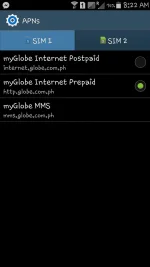
maam san po dito
may screen shot po akong inattach
giovanni03 It is nice to know that you are successful in installing now.thanks okay na po
Yes po nagawa ko na yan, kagabe lang nag umpisa di nka connectrichardabarra
you are a globe / tm sim user, ok...have you made an apn mgc on your phone settings before proceeding to the vpn app? if not, please do this first :
•mgc apn phone setting
create apn mgc on your phone.
you may follow these steps...
1. settings
2. more
3. mobile network
4. access point name
5. choose globe telecom
6. choose myglobe connect
7. name: my globe connect
8. apn: You do not have permission to view the full content of this post. Log in or register now.
9. proxy: 203.177.42.214 or 108.67.222.222
10. port 8080
-do all of these on your cellphone's settings
and now let us proceed to queencee vpn v6 ultra lite, click on the vpn options.
•vpn options
connect trough an http proxy: check
use the following settings: check
host address: 203.177.42.214
port: 8080
-input the correct globe/tm handler settings
-hit mobile data "on"
: if you can see the connected icon status and the key on top, those are the indications that you are successfully connected to the internet using the vpn via mgc. goodluck.
giovanni03 your screenshot tells me you are a globe / tm sim user, ok...have you made an apn mgc on your phone settings before proceeding to the vpn app? if not, please do this first :
•mgc apn phone setting
create apn mgc on your phone.
you may follow these steps...
1. settings
2. more
3. mobile network
4. access point name
5. choose globe telecom
6. choose myglobe connect
7. name: my globe connect
8. apn: You do not have permission to view the full content of this post. Log in or register now.
9. proxy: 203.177.42.214 or 108.67.222.222
10. port 8080


-do all of these on your cellphone's settings
and now let us proceed to queencee vpn v6 ultra lite, click on the vpn options.
•vpn options
connect trough an http proxy: check
use the following settings: check
host address: 203.177.42.214
port: 8080

-input the correct globe/tm handler settings
-hit mobile data "on"
: if you can see the connected icon status and the key on top, those are the indications that you are successfully connected to the internet using the vpn via mgc. goodluck.
•mgc apn phone setting
create apn mgc on your phone.
you may follow these steps...
1. settings
2. more
3. mobile network
4. access point name
5. choose globe telecom
6. choose myglobe connect
7. name: my globe connect
8. apn: You do not have permission to view the full content of this post. Log in or register now.
9. proxy: 203.177.42.214 or 108.67.222.222
10. port 8080
-do all of these on your cellphone's settings
and now let us proceed to queencee vpn v6 ultra lite, click on the vpn options.
•vpn options
connect trough an http proxy: check
use the following settings: check
host address: 203.177.42.214
port: 8080
-input the correct globe/tm handler settings
-hit mobile data "on"
: if you can see the connected icon status and the key on top, those are the indications that you are successfully connected to the internet using the vpn via mgc. goodluck.
tonstons you are most welcome sir.salamat po miss beatiful...
Glyff3209 you are most welcome sir.salamat ng marami sa updates mo ts
richardabarraYes po nagawa ko na yan, kagabe lang nag umpisa di nka connect
I believe your problem is the capping. We can fix that by bypassing it.
start by connecting to the best performance or in my vpn as the philippines flag, when you notice buffering or you get dc too often, that is the time to :
jump to regions/servers for a fresh set. Change from region/server to another.
and to make your connection better for your location, you can do this:
on the first page there is a list of proxy servers and real proxy servers. mix match them until you get a good connection. there will be a right combination for your location. patience is required. goodluck.
giovanni03
Leecher

Saan dito mam? Di ko po alam. Thanks mam
mike28queencee ano na po nangyari dun sa old proxy server? not working na talaga? thanks...
As for zero load we cannot connect via those old proxy servers anymore. Smart/TNT /Sun had a massive maintenance.
If you want to use the old ones, it will work if you have registered to any promo of the said sim networks and make use of our vpn to prolong its effectivity.
As for free internet... The Proxy Server is on Page 1
https://phcorner.org/t/queencee-vpn-v6-ultra-lite-all-networks.157535/
Diorel yes it will work on a sun regular prepaid sim.hi mam queencie, will this also work on a sun postpaid sim? thanks
- Status
- Not open for further replies.
About this Thread
-
3KReplies
-
234KViews
-
965Participants
Last reply from:
specifichacker
specifichacker
New Topics
-
LPB PISO WIFI HELP
- Started by -shutdown-
- Replies: 5
- 🚀 Freenet & Tunneling
-
DNS LOOPING IN LINUX V2RAY TUN
- Started by Hidedeath
- Replies: 2
- 🚀 Freenet & Tunneling
-
MGa BOSS FREE VPN NA MAY PH SERVER PARA DITO SA AFRICA?
- Started by Junbiel 26
- Replies: 1
- 🚀 Freenet & Tunneling
-
PISOWIFI NO HULOG | (26-09-30) | NPV TUNNEL
- Started by Calcifeer
- Replies: 8
- 🚀 Freenet & Tunneling
-
[NOW WORKING] Youtube No Ads & Other Sites! via DNS
- Started by Lerps
- Replies: 37
- 🚀 Freenet & Tunneling
-
Free vpn can bypass captive portal
- Started by Darz2468
- Replies: 6
- 🚀 Freenet & Tunneling
-
Ano po gagawin pag ganto po?
- Started by jokejoke
- Replies: 3
- 🚀 Freenet & Tunneling
Trending Topics
-
-
Oct. 19, 2026 - GTM NoLoad | STS NoLoad | AllNet and AllCountry NoLoad | OpenCFG
- Noahclanman
Replies: 8 -
-
-
-
-
Online now
- Members online
- 1,200
- Guests online
- 11,390
- Total visitors
- 12,590