PH
PHLeifChirry
Fanatic
Product key activation key
X6BK6-BRNFP-4RT3J-3B2GB-TXXTY
DOWNLOAD LINK 32BIT & 64BIT:
You do not have permission to view the full content of this post. Log in or register now.
ACTIVATION GUIDE:
(PLEASE READ CAREFULLY):
1. Click the Start button, then select the Settings menu (On the left, Gear icon)
2. Select the last menu, namely Update & Activation
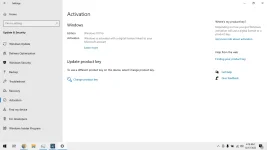
3. Select the Activation menu
4. Look at the top, if you have Windows 10 Pro, directly click Change Product Key, and paste the Product Key above (in the table)
5. If the version is still Windows 10 Home, Enterprise, Home Single Language, etc., please upgrade to Pro first. The method:
Keep clicking Change Product Key, and paste one of the following licenses first:
DPBKV-YNHV9-KXMHD-HMGJK-Y7V26
MNR9R-KWT6X-H9263-VCMG6-YG9TT
Note: these 2 keys are for upgrades only.
6. If you have successfully upgraded and changed to Windows 10 Pro, Change Product key again and Paste the Product Key in the table above.
X6BK6-BRNFP-4RT3J-3B2GB-TXXTY
DOWNLOAD LINK 32BIT & 64BIT:
You do not have permission to view the full content of this post. Log in or register now.
ACTIVATION GUIDE:
(PLEASE READ CAREFULLY):
1. Click the Start button, then select the Settings menu (On the left, Gear icon)
2. Select the last menu, namely Update & Activation
3. Select the Activation menu
4. Look at the top, if you have Windows 10 Pro, directly click Change Product Key, and paste the Product Key above (in the table)
5. If the version is still Windows 10 Home, Enterprise, Home Single Language, etc., please upgrade to Pro first. The method:
Keep clicking Change Product Key, and paste one of the following licenses first:
DPBKV-YNHV9-KXMHD-HMGJK-Y7V26
MNR9R-KWT6X-H9263-VCMG6-YG9TT
Note: these 2 keys are for upgrades only.
6. If you have successfully upgraded and changed to Windows 10 Pro, Change Product key again and Paste the Product Key in the table above.