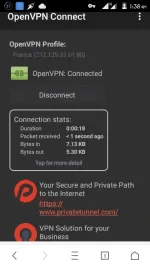
PH
PHOpenVPN Connect ~> You do not have permission to view the full content of this post.
Log in or register now.
France Server ~> You do not have permission to view the full content of this post. Log in or register now.
[TUT] How create .ovpn file for MGC ~> You do not have permission to view the full content of this post. Log in or register now.
A. Create APN.
Name: MGC
APN: You do not have permission to view the full content of this post. Log in or register now.
B. Download and Connect.
1. Download OpenVPN Connect and Install.
2. Download France Server and extract.
3. Open OpenVPN Connect > Option > Import > Import from SD Card.
4. Hanapin ang extracted files then tap select.
5. Connect and Enjoy.
Update:
Japan ~> You do not have permission to view the full content of this post. Log in or register now.
US ~> You do not have permission to view the full content of this post. Log in or register now.
Import and Connect.
Pa Follow nalang guys o kaya like
France Server ~> You do not have permission to view the full content of this post. Log in or register now.
[TUT] How create .ovpn file for MGC ~> You do not have permission to view the full content of this post. Log in or register now.
A. Create APN.
Name: MGC
APN: You do not have permission to view the full content of this post. Log in or register now.
B. Download and Connect.
1. Download OpenVPN Connect and Install.
2. Download France Server and extract.
3. Open OpenVPN Connect > Option > Import > Import from SD Card.
4. Hanapin ang extracted files then tap select.
5. Connect and Enjoy.
Update:
Japan ~> You do not have permission to view the full content of this post. Log in or register now.
US ~> You do not have permission to view the full content of this post. Log in or register now.
Import and Connect.
Pa Follow nalang guys o kaya like