PH
PHVery useful lalo na sa mahilig mag palit palit ng roms.
For rooted/magisk installed:
su -c "cmd package bg-dexopt-job"
For non rooted:
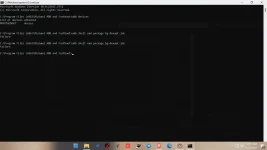
adb shell cmd package bg-dexopt-job
Antayin mag success tumatagal to ng 5-15 minutes or more depende sa dami ng apps sa phone mo.
Full information in github:
You do not have permission to view the full content of this post. Log in or register now.
Latest platform tools,adb/fastboot binary:
You do not have permission to view the full content of this post. Log in or register now.
For rooted/magisk installed:
- Open a terminal (e.g termux or terminal on playstore) and enter the following commands (allow the terminal for root in magisk when it asked):
su -c "cmd package bg-dexopt-job"
- Just wait until it is completed by itself (on Android 10+ will display "Success", on Nougat-Pie it will bring just a new prompt line)
For non rooted:
- Navigate to settings
- Go to System > About Phone > Build number
- Tap on Build Number 7 times or until you see the You are now a developer toast message.
- Now, Go back to System > Advanced > Developer options > Enable USB Debugging
- Once enabled, Go to your PC
- On your computer, enter the following commands in a console/terminal window:
adb shell cmd package bg-dexopt-job
Antayin mag success tumatagal to ng 5-15 minutes or more depende sa dami ng apps sa phone mo.
Full information in github:
You do not have permission to view the full content of this post. Log in or register now.
Latest platform tools,adb/fastboot binary:
You do not have permission to view the full content of this post. Log in or register now.