 PH
PHMartin Mystery
Eternal Poster
Hello po guys share ko lang po sa inyo yung nakita ko sa internet hahaha. So bali bumili po ako ng wireless controller (simple lang po parang clone, yung mga nasa lazada yung pang nintendo switch haha )
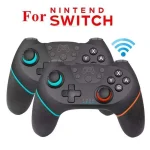
para sa laptop at cp ko tapos kapag iko-konek ko na sa laptop bluetooth is "connected" naman nakalagay pero di na rrecognize ng mga games like KOFXV pcsx2 etc... Need mo muna i bind yung controls isa-isa, bali nawala yung plug n play minsan ayaw pa talaga gumana as in walang response yung controller.
So ayun doon ko po natuklasan yung BetterJoy.
Link: You do not have permission to view the full content of this post. Log in or register now.
Tutorial: From github "How to use" section
Then boom guys pwede na ma gamit yung controller hahaha sa steps di na ako nag restart after ko ma install yung driver
"ViGEmBusSetup_x64.msi"
proceed agad ako sa
"BetterJoyForCemu.exe"
Tapos after opening BetterJoyForCemu.exe click Locate.
Ayun success naman haha nagamit ko rin siya sa laptop without cable nang walang problema.
Hindi ko alam kung meron mas better pero dahil ang sabi sa description nung binili kong controller is kelangan pala kapag ikokonek mo yung controller sa pc kaylangan may cable pa. Swerte andyan si BetterJoy haha sulit makakapaglaro na ako ng Sengoku Basara 2 heroes.
para sa laptop at cp ko tapos kapag iko-konek ko na sa laptop bluetooth is "connected" naman nakalagay pero di na rrecognize ng mga games like KOFXV pcsx2 etc... Need mo muna i bind yung controls isa-isa, bali nawala yung plug n play minsan ayaw pa talaga gumana as in walang response yung controller.
So ayun doon ko po natuklasan yung BetterJoy.
Link: You do not have permission to view the full content of this post. Log in or register now.
Tutorial: From github "How to use" section
- Install drivers
- Read the READMEs (they're there for a reason!)
- Run Drivers/ViGEmBus_Setup_1.16.116.exe
- Restart your computer
- Run BetterJoyForCemu.exe
- Run as Administrator if your keyboard/mouse button mappings don't work
- Connect your controllers.
- Start Cemu and ensure CemuHook has the controller selected.
- If using Joycons, CemuHook will detect two controllers - each will give all buttons, but choosing one over the other just chooses preference for which hand to use for gyro controls.
- Go into Input Settings, choose XInput as a source and assign buttons normally.
- If you don't want to do this for some reason, just have one input profile set up with Wii U Gamepad as the controller and enable "Also use for buttons/axes" under GamePad motion source. This is no longer required as of version 3
- Turn rumble up to 70-80% if you want rumble.
- As of version 3, you can use the pro controller and Joycons as normal xbox controllers on your PC - try it with Steam!
Then boom guys pwede na ma gamit yung controller hahaha sa steps di na ako nag restart after ko ma install yung driver
"ViGEmBusSetup_x64.msi"
proceed agad ako sa
"BetterJoyForCemu.exe"
Tapos after opening BetterJoyForCemu.exe click Locate.
Ayun success naman haha nagamit ko rin siya sa laptop without cable nang walang problema.
Hindi ko alam kung meron mas better pero dahil ang sabi sa description nung binili kong controller is kelangan pala kapag ikokonek mo yung controller sa pc kaylangan may cable pa. Swerte andyan si BetterJoy haha sulit makakapaglaro na ako ng Sengoku Basara 2 heroes.