PH
PHWindows 10
- On the Start screen, type Settings.
- Select or tap Settings.
- In the Settings window, select or tap Apps.
- In the Apps & features window, scroll down to your Office program, and select or tap it.
- Select or tap the Modify button.
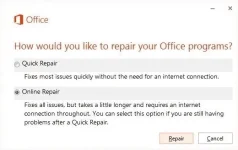
- In the How would you like to repair your Office programs window, select or tap the Online Repair radio button, then select or tap the Repair button.
Windows 8
- On the Start screen, type Control Panel.
- Select or tap Control Panel.
- Under Programs, select or tap Uninstall a program.
- Select or tap Microsoft 365, then select or tap Change.
- Select or tap Online Repair, then select or tap Repair. You may have to restart your computer after the repair process is finished.
Windows 7
- Select Start, then select Control Panel.
- double-click Programs and Features.
- Select Microsoft 365, then select Change.
- Select Online Repair, then select Repair.