 PH
PHPHC-Noobita
Elite
Para sa mga hindi pa nakakaalam, pwedeng paganahin si Disney (non-PH app) sa IOS. Basahin lang maigi ang instructions:
Requirements:
Paano ba gagawin?
1. Gawa ka ng account sa controld o getflix > Gawa ng sariling dns at iconfigure mo ito base sa iyong preference; or gamitin mo itong nasa thread ni boss koo
https://phcorner.org/threads/privat...amount-plus-hulu-hbo-max-disney-plus.1538309/
2. Open mo yung DNSecure. Ganito ang lalabas diyan.
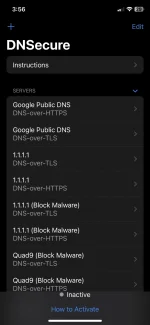
3. Pindutin mo yung + sa upper left side. Pwede ka naman pumili ng kahit alin sa dalawa: if TLS or HTTPS. Pero yung ginawa ko DNS-over-TLS.
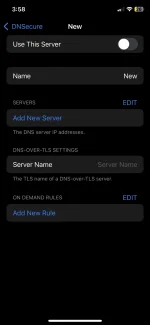
4. Ganito yung lalabas pagkapindot mo. Bale ang need mo lang galawin diyan ay yung “name” (optional), “servers”, at “DNS-over-TLS (or HTTPS) settings”
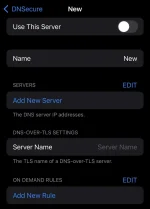
4. Bumalik ka sa site ng controld o getflix at kunin mo yung kailangan mong info. Similarly, balik ka sa thread ni boss koo at kunin mo yung kailangan mong info.
Note:
If you chose TLS, use android and legacy.
If you chose HTTPS, use web browser and legacy.
5. Ganito itsura after ko mapaste yung values.
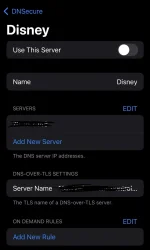
Ginamit ko diyan ay legacy dns (nasa server) at android (sa server name) dahil DNS-over-TLS pinili ko.
6. Pindutin ang use this server. At this point, inactive pa rin yan, kaya may ganito kayong makikita pag binack niyo.
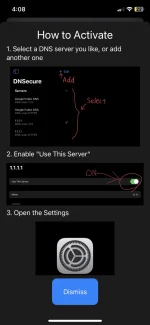
7. Pumunta sa settings > General > VPN, DNS, & Device Management > Piliin ang DNSecure
8. Close mo lahat ng apps, at icheck kung maaaccess mo na ang Disney without any VPN app. Yung DNS na ang magsserve as your vpn dahil irredirect nito ang traffic sa country na sinet mo sa dns site (control d).
9. Enjoy streaming!
Feedback if gumana sayo
Requirements:
- IOS Device
- Apple ID (Country: US, Canada, or kahit saan na may Disney except PH) Importante na hindi PH yung country ng apple id para ma-download niyo yung global version. Hindi kasi gagana yung cr*ck*d accounts sa PH app.
- Disney (Global) App
- DNSecure App
- Cr*ck*d Disney account (Marami diyan namimigay, check mo sa freemium access forum or threads ni boss tyrant)
Paano ba gagawin?
1. Gawa ka ng account sa controld o getflix > Gawa ng sariling dns at iconfigure mo ito base sa iyong preference; or gamitin mo itong nasa thread ni boss koo
https://phcorner.org/threads/privat...amount-plus-hulu-hbo-max-disney-plus.1538309/
2. Open mo yung DNSecure. Ganito ang lalabas diyan.
3. Pindutin mo yung + sa upper left side. Pwede ka naman pumili ng kahit alin sa dalawa: if TLS or HTTPS. Pero yung ginawa ko DNS-over-TLS.
4. Ganito yung lalabas pagkapindot mo. Bale ang need mo lang galawin diyan ay yung “name” (optional), “servers”, at “DNS-over-TLS (or HTTPS) settings”
4. Bumalik ka sa site ng controld o getflix at kunin mo yung kailangan mong info. Similarly, balik ka sa thread ni boss koo at kunin mo yung kailangan mong info.
Note:
If you chose TLS, use android and legacy.
If you chose HTTPS, use web browser and legacy.
5. Ganito itsura after ko mapaste yung values.
Ginamit ko diyan ay legacy dns (nasa server) at android (sa server name) dahil DNS-over-TLS pinili ko.
6. Pindutin ang use this server. At this point, inactive pa rin yan, kaya may ganito kayong makikita pag binack niyo.
7. Pumunta sa settings > General > VPN, DNS, & Device Management > Piliin ang DNSecure
8. Close mo lahat ng apps, at icheck kung maaaccess mo na ang Disney without any VPN app. Yung DNS na ang magsserve as your vpn dahil irredirect nito ang traffic sa country na sinet mo sa dns site (control d).
9. Enjoy streaming!
Feedback if gumana sayo