 PH
PH"How to Create Apple ID without using a credit card in easy way"
Procedure :
1 .Gawa muna tyo ng Accnt
Choose one kung anung accnt ang nais
You do not have permission to view the full content of this post. Log in or register now.
You do not have permission to view the full content of this post. Log in or register now.
You do not have permission to view the full content of this post. Log in or register now.
I choose Hotmail/Outlook accnt. for example
Open itunes
Go to apps store
Search for free apps (ex: SKYPE)
Then click GET
Image # 1

Create Apple ID
Image # 2

Image # 3
Continue

Image # 4
Agree

Image # 5
Sagutan ang mga tanong
Take note : tandaan mabuti ang security question importante ito ..

Image # 6
Choose (USA o United States)
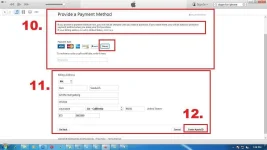
Image # 7
Just click OK

Image # 8
Verify your Apple ID
An email will be sent to you to verify your account…

Image # 9
Verify Now

Image # 10
Sign in to verify your email address..

Image # 11
Email Address verified.

Account is successfully created
Done
Procedure :
1 .Gawa muna tyo ng Accnt
Choose one kung anung accnt ang nais
You do not have permission to view the full content of this post. Log in or register now.
You do not have permission to view the full content of this post. Log in or register now.
You do not have permission to view the full content of this post. Log in or register now.
I choose Hotmail/Outlook accnt. for example
Open itunes
Go to apps store
Search for free apps (ex: SKYPE)
Then click GET
Image # 1
Create Apple ID
Image # 2
Image # 3
Continue
Image # 4
Agree
Image # 5
Sagutan ang mga tanong
Take note : tandaan mabuti ang security question importante ito ..
Image # 6
Choose (USA o United States)
Image # 7
Just click OK
Image # 8
Verify your Apple ID
An email will be sent to you to verify your account…
Image # 9
Verify Now
Image # 10
Sign in to verify your email address..
Image # 11
Email Address verified.
Account is successfully created
Done