 PH
PH Luffy East Blue Cursors
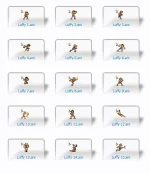
Download Link:
You do not have permission to view the full content of this post. Log in or register now.
Follow these steps :
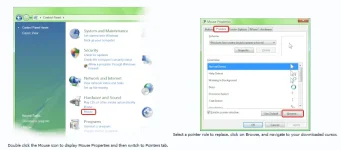
When changing pointers, you can see a preview of the frames of a cursor. Be aware that the preview is not accurate, it dos not respect frame duration and sequence.
Download Link:
You do not have permission to view the full content of this post. Log in or register now.
Changing your active cursor
Follow these steps :
- In Start menu, click on Control Panel.
- In Control Panel, double-click Mouse. Switch to classic view or navigate to Hardware and Devices section if you do not see the Mouse icon.
- Switch to Pointer tab.
- Select a cursor to modify and click on Browse button.
- Navigate to the downloaded cursor.
- Repeat for another cursor role and then click OK.
When changing pointers, you can see a preview of the frames of a cursor. Be aware that the preview is not accurate, it dos not respect frame duration and sequence.