 PH
PHconviction
Forum Guru
photoshop cs6 (try nyo sa higher version kung working)
1. Download Ps action (atn file extension)
You do not have permission to view the full content of this post. Log in or register now.
2. Load PS action
3. Invert foreground to BLACK
4. Select magic_shield
5. Click PLAY
View attachment psaction.mp4
Pag epik peyl?
Manual from start
1. New document (1080 x 1080 72dpi)set nyo na agad sa background color (black)
2. lagyan nyo ng guide horizontal, vertical (new guide verti 50%, new guide hori 50%) or drag at snap
3. new layer (select nyo as current)
4. ellipse tool (shape) fill no color, stroke 6pt (alternate nyo nalan sa stroke size 4pt, 6pt)
5. rectangle tool (shape) fill no color, stroke 6pt (alternate nyo nalan sa stroke size 4pt, 6pt)
-ctrl+j para duplicate sabay rotate (shift + handle)
6. ellipse tool (path) kayo na bahala san nyo ilalagay
7. click text at point nyo sa path
-gawa nalan kayo sa googletranslate copy then paste
-adjust na lan height at spacing sa properties
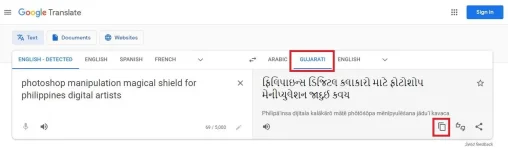
8. select lahat ng layers tas igroup mo sa isang folder (ctrl+g)
9. ctrl+alt+2 para maselect
10. click mo add a mask (layer mask)
11. click filter-pixelate-crystallize-set mo sa lowest 3 cell size-
12. filter-pixelate-crystallize-set sa 15
13. edit-fade-crystallize(adjust nyo sa 50-59 levels)
14. convert mo as smart object
15. done
video
View attachment psaction_manual.mp4
1. Download Ps action (atn file extension)
You do not have permission to view the full content of this post. Log in or register now.
2. Load PS action
3. Invert foreground to BLACK
4. Select magic_shield
5. Click PLAY
View attachment psaction.mp4
Pag epik peyl?
Manual from start
1. New document (1080 x 1080 72dpi)set nyo na agad sa background color (black)
2. lagyan nyo ng guide horizontal, vertical (new guide verti 50%, new guide hori 50%) or drag at snap
3. new layer (select nyo as current)
4. ellipse tool (shape) fill no color, stroke 6pt (alternate nyo nalan sa stroke size 4pt, 6pt)
5. rectangle tool (shape) fill no color, stroke 6pt (alternate nyo nalan sa stroke size 4pt, 6pt)
-ctrl+j para duplicate sabay rotate (shift + handle)
6. ellipse tool (path) kayo na bahala san nyo ilalagay
7. click text at point nyo sa path
-gawa nalan kayo sa googletranslate copy then paste
-adjust na lan height at spacing sa properties
8. select lahat ng layers tas igroup mo sa isang folder (ctrl+g)
9. ctrl+alt+2 para maselect
10. click mo add a mask (layer mask)
11. click filter-pixelate-crystallize-set mo sa lowest 3 cell size-
12. filter-pixelate-crystallize-set sa 15
13. edit-fade-crystallize(adjust nyo sa 50-59 levels)
14. convert mo as smart object
15. done
video
View attachment psaction_manual.mp4