🔒 Closed USB Flashdrive Can't Format

Status
Not open for further replies.

Chicharongbaboy

Forum Veteran
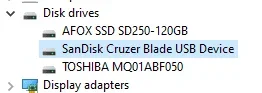
SanDisk Cruzerblade 16GB na hindi maformat format after ko gamitin as Windows 10 Bootable Drive.

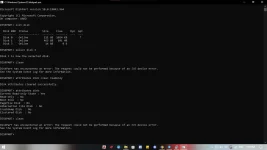
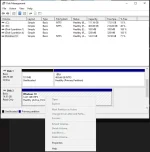
tinry kona sa CMD, Disk Management, format sa file explorer, at partition master pero walang nangyari. baka meron may alam dito kung pan.

tia. :)
1665490261163.webp
1665490264670.webp
 
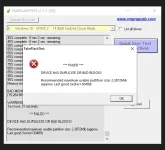
Hhhmmppp this maybe risky pero try mo si FakeFlashTest for format este dumping files on the flashdrive

Code:
https://www.majorgeeks.com/files/details/fakeflashtest.html
 
woah it has bad blocks already, baka naman di genuine yang sandisk cruzer blade, just saying lng po

sakin kase ung Transcend ko binili ko sa mismong Kiosk Booth tas ayun wla naman problema sa Dual Boot, Reformat, at Installers. Bugbog nanga sa kakaformat eh kahit sa Disk Management kolng galawin.
 
woah it has bad blocks already, baka naman di genuine yang sandisk cruzer blade, just saying lng po

sakin kase ung Transcend ko binili ko sa mismong Kiosk Booth tas ayun wla naman problema sa Dual Boot, Reformat, at Installers. Bugbog nanga sa kakaformat eh kahit sa Disk Management kolng galawin.
legit na sandisk paps ilang taon kona ginagamit, nag error lang nito kasi nag install ako ng windows 10 sa asus chromebox 3. GPT hindi MBR tas nung irereformat kona para magamit ulit ganyan na nangyari

1665493446319.webp

ilang beses kona rin nagamit yan bilang bootable ngayon lang talaga nagkaerror, baka dahil GPT yung partition scheme sa rufus ?

di kasi gumagana yung MBR sa pag install ng windows sa chromebox eh kaya ginawa kong GPT. sucess naman pag install ng windows pero sakripisyo naman si flashdrive ahahahhahahaha
 
Na try mo ts sa mac os o linux os base e access yung drive?? Kung kaya pa ma read at write...tapos e format mo yung stick drive kung unknown format o partition
 
d
Na try mo ts sa mac os o linux os base e access yung drive?? Kung kaya pa ma read at write...tapos e format mo yung stick drive kung unknown format o partition
dikopa natry paps, lako mac e tas di ako familiar sa linux

Meron pang paraan yan kaPHC..
pano paps baka naman hehe

try mo ganito lods

diskpart
select disk yong need mong ireformat
clean
create partition primary
tapos format mo sa default pang format ng windows
ayaw maclean sir, I/O device error
 
https://youtu(.)be/S0bFeKnkS6Uito paps try mo kaka ayos ko lang din ng isa kong flashdrive nung nakaraan ito ung naka tulong saakin baka sayo din. (Tangalin mo nalang ung open close parenthesis)
 
Status
Not open for further replies.

About this Thread

  • 42
    Replies
  • 2K
    Views
  • 17
    Participants
Last reply from:
Dragonced09

Trending Topics

Online now

Members online
978
Guests online
743
Total visitors
1,721

Forum statistics

Threads
2,275,574
Posts
28,964,202
Members
1,231,870
Latest member
Dabojax
Back
Top