🔒 Closed Http Injector v2 (moded)

Status
Not open for further replies.

Dezaster

Forum Guru
HTTP Injector 2.2.0g (handler v400)
Modified by: Renz Zy Braza
Credits:
➡Dzebb
➡CyberGhost Developer
➡Kanike Ken

Features:
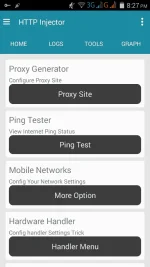
•Settings Helper √
•ping tester √
•proxy site enjector √
•updated Handler √
•Data Usage √
•More Option √

Explore niyo ang app may settings helper sa loob pwede mong kopyahin at ilagay sa handler or use your own working settings.

Security Code:
Renz Zy CyberGhostAdmin
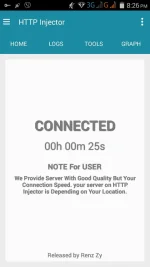
Screenshot_2016-07-05-20-26-14.webp
Screenshot_2016-07-05-20-26-40.webp
Screenshot_2016-07-05-20-27-03.webp
Screenshot_2016-07-05-20-27-31.webp

Download link You do not have permission to view the full content of this post. Log in or register now.

Tested ko lang sa talkntext kayo na bahala sa ibang network.

Ito ang gamit kong settings copy paste niyo nalang medyo mahaba eh :)

Front Query:
CONNECT [host_port] [protocol][crlf]Host: wikipedia.org[crlf]X-Online-Host: wikipedia.org[crlf]Connection: Keep-Alive[crlf][crlf]-188.42.254.88:3128
Middle Query:
CONNECT [host_port] [protocol][crlf]Host: wikipedia.org[crlf]X-Online-Host: wikipedia.org[crlf]Connection: Keep-Alive[crlf][crlf]-188.42.254.88:3128
Back Query:
CONNECT [host_port] [protocol][crlf]Host: wikipedia.org[crlf]X-Online-Host: wikipedia.org[crlf]Connection: Keep-Alive[crlf][crlf]-188.42.254.88:3128
Filter:
CONNECT [host_port] [protocol][crlf]Host: wikipedia.org[crlf]X-Online-Host: wikipedia.org[crlf]Connection: Keep-Alive[crlf][crlf]-188.42.254.88:3128
Add Port to non-Port URL:
443
Remove Port: ✅
Proxy Type:
Dual Real Host
Custom Header: X-Online-Host
Proxy Server:
mobile.smart.com.ph/go.talkntext.ph/m.smartnet.ph/clickhere.ph
Real Proxy Type: Inject
Real Proxy Server:
miami6.blue-vpn.net [J:MIAMI 6]/sg.tcpvpn.com:443/wikipedia.org
Real Proxy Port: 443

Before you connect
➡Go to mobile network
➡Mgc Ip User: ✅
➡TNT SMART SUN ONLY
➡click back and connect


Note: please wag po erepost o ikalat lalo na kung walang proper credits magbigay galang tayo sa gumawa at wag angkinin ang hindi sa atin :)

Feedback po kung working

Enjoy freenet

Thanks! (y)
 
HTTP Injector 2.2.0g (handler v400)
Modified by: Renz Zy Braza
Credits:
➡Dzebb
➡CyberGhost Developer
➡Kanike Ken

Features:
•Settings Helper √
•ping tester √
•proxy site enjector √
•updated Handler √
•Data Usage √
•More Option √

Explore niyo ang app may settings helper sa loob pwede mong kopyahin at ilagay sa handler or use your own working settings.

Security Code:
Renz Zy CyberGhostAdmin
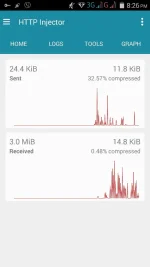
View attachment 57331
View attachment 57332
View attachment 57333
View attachment 57334

Download link You do not have permission to view the full content of this post. Log in or register now.

Tested ko lang sa talkntext kayo na bahala sa ibang network.

Ito ang gamit kong settings copy paste niyo nalang medyo mahaba eh :)

Front Query:
CONNECT [host_port] [protocol][crlf]Host: wikipedia.org[crlf]X-Online-Host: wikipedia.org[crlf]Connection: Keep-Alive[crlf][crlf]-188.42.254.88:3128
Middle Query:
CONNECT [host_port] [protocol][crlf]Host: wikipedia.org[crlf]X-Online-Host: wikipedia.org[crlf]Connection: Keep-Alive[crlf][crlf]-188.42.254.88:3128
Back Query:
CONNECT [host_port] [protocol][crlf]Host: wikipedia.org[crlf]X-Online-Host: wikipedia.org[crlf]Connection: Keep-Alive[crlf][crlf]-188.42.254.88:3128
Filter:
CONNECT [host_port] [protocol][crlf]Host: wikipedia.org[crlf]X-Online-Host: wikipedia.org[crlf]Connection: Keep-Alive[crlf][crlf]-188.42.254.88:3128
Add Port to non-Port URL:
443
Remove Port: ✅
Proxy Type:
Dual Real Host
Custom Header: X-Online-Host
Proxy Server:
mobile.smart.com.ph/go.talkntext.ph/m.smartnet.ph/clickhere.ph
Real Proxy Type: Inject
Real Proxy Server:
miami6.blue-vpn.net [J:MIAMI 6]/sg.tcpvpn.com:443/wikipedia.org
Real Proxy Port: 443

Before you connect
➡Go to mobile network
➡Mgc Ip User: ✅
➡TNT SMART SUN ONLY
➡click back and connect


Note: please wag po erepost o ikalat lalo na kung walang proper credits magbigay galang tayo sa gumawa at wag angkinin ang hindi sa atin :)

Feedback po kung working

Enjoy freenet

Thanks! (y)
Thanks sir. Try ko po.
 
HTTP Injector 2.2.0g (handler v400)
Modified by: Renz Zy Braza
Credits:
➡Dzebb
➡CyberGhost Developer
➡Kanike Ken

Features:
•Settings Helper √
•ping tester √
•proxy site enjector √
•updated Handler √
•Data Usage √
•More Option √

Explore niyo ang app may settings helper sa loob pwede mong kopyahin at ilagay sa handler or use your own working settings.

Security Code:
Renz Zy CyberGhostAdmin
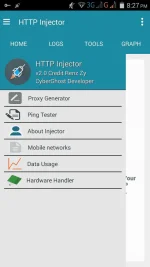
View attachment 57331
View attachment 57332
View attachment 57333
View attachment 57334

Download link You do not have permission to view the full content of this post. Log in or register now.

Tested ko lang sa talkntext kayo na bahala sa ibang network.

Ito ang gamit kong settings copy paste niyo nalang medyo mahaba eh :)

Front Query:
CONNECT [host_port] [protocol][crlf]Host: wikipedia.org[crlf]X-Online-Host: wikipedia.org[crlf]Connection: Keep-Alive[crlf][crlf]-188.42.254.88:3128
Middle Query:
CONNECT [host_port] [protocol][crlf]Host: wikipedia.org[crlf]X-Online-Host: wikipedia.org[crlf]Connection: Keep-Alive[crlf][crlf]-188.42.254.88:3128
Back Query:
CONNECT [host_port] [protocol][crlf]Host: wikipedia.org[crlf]X-Online-Host: wikipedia.org[crlf]Connection: Keep-Alive[crlf][crlf]-188.42.254.88:3128
Filter:
CONNECT [host_port] [protocol][crlf]Host: wikipedia.org[crlf]X-Online-Host: wikipedia.org[crlf]Connection: Keep-Alive[crlf][crlf]-188.42.254.88:3128
Add Port to non-Port URL:
443
Remove Port: ✅
Proxy Type:
Dual Real Host
Custom Header: X-Online-Host
Proxy Server:
mobile.smart.com.ph/go.talkntext.ph/m.smartnet.ph/clickhere.ph
Real Proxy Type: Inject
Real Proxy Server:
miami6.blue-vpn.net [J:MIAMI 6]/sg.tcpvpn.com:443/wikipedia.org
Real Proxy Port: 443

Before you connect
➡Go to mobile network
➡Mgc Ip User: ✅
➡TNT SMART SUN ONLY
➡click back and connect


Note: please wag po erepost o ikalat lalo na kung walang proper credits magbigay galang tayo sa gumawa at wag angkinin ang hindi sa atin :)

Feedback po kung working

Enjoy freenet

Thanks! (y)
Ano yung sec code?
 
Thanks sir. Try ko po.
Sige lang boss :)

Salamat idol sa pagshare :)
No problem boss :)

Thanks for sharing boss :) Feedback later
Go lang boss :)

May security code

Ano yung sec code?
Naku naman talaga basa basa po mga brod kinulayan ko na nga po ng pula para madali niyong makita hahaha :D

thank you tol working.
Your welcome tol and thanks for positive feedback (y)
 

Friendly reminder:
  • Please refrain from making one word/single smiley posts as they can appear to be spam and are too vague to be sufficient feedback.

Please read the following rules:
Forum Rules: https://phcorner.org/rules
Shoutbox Rules:
https://phcorner.org/t/please-read-shoutbox-rules-and-guidelines.48808/
SMS/Jejemon/Allcaps rules:
https://phcorner.org/t/must-read...ps-jejemon-style-posts-must-be-avoided.44707/


Thanks!
***always read and follow all PHC rules***

[sigpic]426249[/sigpic]
 
Ayus dude .. Gumaga .. Thanks d2.
no problem boss and thanks sa positive feedback. enjoy lang (y)

Friendly reminder:
Posting in SMS format / text message / all capital letters / jejemon style posts must be avoided

Please read the following rules:
Forum Rules: https://phcorner.org/rules
Shoutbox Rules:
https://phcorner.org/t/please-read-shoutbox-rules-and-guidelines.48808/
SMS/Jejemon/Allcaps rules:
https://phcorner.org/t/must-read...ps-jejemon-style-posts-must-be-avoided.44707/


Thanks!
***always read and follow all PHC rules***

426249.jpg
 
Status
Not open for further replies.

About this Thread

  • 137
    Replies
  • 19K
    Views
  • 103
    Participants
Last reply from:
SerenityJasmine

Online now

Members online
1,039
Guests online
912
Total visitors
1,951

Forum statistics

Threads
2,274,901
Posts
28,959,245
Members
1,233,482
Latest member
MyNameIsElga
Back
Top