 PH
PHNOTE:Beta test lang
DO IT WITH YOUR OWN RISK!
This method involves the installation of a verified Apple Configuration Profile that triggers an OTAupdate to the beta firmware. As is the wise thing to do before any and all beta build installations, backup your device to iCloud or iTunes before starting. I can’t stress this enough. Make sure you have secured your data in case something goes wrong or you decide to go for a fresh restore later on. Also, you might want to check if your device is compatible with the latest iOS 10 from Apple.
Simply Follow this Guide :
Step 1: On your iOS device, launch Safari, and open this link: iOS 10 Beta Config.
You do not have permission to view the full content of this post. Log in or register now.
Step 2: Download the profile to your device by tapping the Download as free member button.
Step 3: When asked on which device would you like to install this profile? Select iPhone.
Step 4: In the screen that follows, hit Install. After the profile is installed, your device will be rebooted.
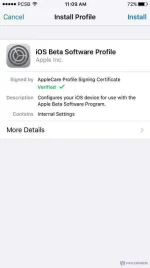
Step 5: Once your device is done rebooting, launch the Settings app, navigate to General > Software Update and you should find the iOS 10 Developer Beta OTA update waiting for you there.
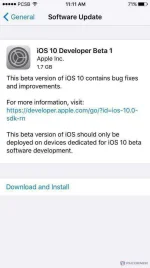
Step 6: Hit Download and Install, sit back and relax.
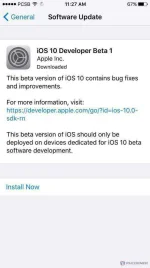
Once your device is done updating, it should reboot into the first beta of iOS 10. Test away!
Goodluck kaPHC
Thanks sa water mark SIR RAVAGE AND SIR DRAFT
DO IT WITH YOUR OWN RISK!
This method involves the installation of a verified Apple Configuration Profile that triggers an OTAupdate to the beta firmware. As is the wise thing to do before any and all beta build installations, backup your device to iCloud or iTunes before starting. I can’t stress this enough. Make sure you have secured your data in case something goes wrong or you decide to go for a fresh restore later on. Also, you might want to check if your device is compatible with the latest iOS 10 from Apple.
Simply Follow this Guide :
Step 1: On your iOS device, launch Safari, and open this link: iOS 10 Beta Config.
You do not have permission to view the full content of this post. Log in or register now.
Step 2: Download the profile to your device by tapping the Download as free member button.
Step 3: When asked on which device would you like to install this profile? Select iPhone.
Step 4: In the screen that follows, hit Install. After the profile is installed, your device will be rebooted.
Step 5: Once your device is done rebooting, launch the Settings app, navigate to General > Software Update and you should find the iOS 10 Developer Beta OTA update waiting for you there.
Step 6: Hit Download and Install, sit back and relax.
Once your device is done updating, it should reboot into the first beta of iOS 10. Test away!
Goodluck kaPHC
Thanks sa water mark SIR RAVAGE AND SIR DRAFT