 PH
PH-
Welcome to PHCorner Forums! Sign up for free to unlock full access and exclusive privileges, including:
- Asking questions about computer and mobile issues
- Discovering internet tips for your mobile network and computer
You are using an out of date browser. It may not display this or other websites correctly.
You should upgrade or use an alternative browser.
You should upgrade or use an alternative browser.
🔒 Closed A network cable is not properly plugged in or maybe broken
- Thread starter nikkiii
- Start date
- Status
- Not open for further replies.
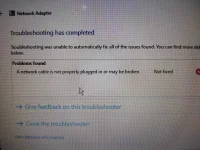
TS, WiFi ayaw din?
Check mo yung internet cable kung naka-saksak ng maayos sa router end at sa laptop end, unplug at re-plug mo. Restart mo yung router, restart mo rin yung laptop tapos try mo kung may connection na.
Kung wala pa rin, check mo sa Device manager yung network adapters kung may yellow exclamation mark. Kung mayroon, i-right click mo yung adapter > click Uninstall > close mo na si Device Manager at restart mo yung laptop.
Update mo na yung drivers ng mga network adapters, punta ka sa support site ng laptop maker at doon ka magdownload ng drivers.
Check mo yung internet cable kung naka-saksak ng maayos sa router end at sa laptop end, unplug at re-plug mo. Restart mo yung router, restart mo rin yung laptop tapos try mo kung may connection na.
Kung wala pa rin, check mo sa Device manager yung network adapters kung may yellow exclamation mark. Kung mayroon, i-right click mo yung adapter > click Uninstall > close mo na si Device Manager at restart mo yung laptop.
Update mo na yung drivers ng mga network adapters, punta ka sa support site ng laptop maker at doon ka magdownload ng drivers.
Di maka sagap wifi lods. Nag try nako update wireless lan driver at nakailang restart ayaw pa dinTS, WiFi ayaw din?
Check mo yung internet cable kung naka-saksak ng maayos sa router end at sa laptop end, unplug at re-plug mo. Restart mo yung router, restart mo rin yung laptop tapos try mo kung may connection na.
Kung wala pa rin, check mo sa Device manager yung network adapters kung may yellow exclamation mark. Kung mayroon, i-right click mo yung adapter > click Uninstall > close mo na si Device Manager at restart mo yung laptop.
Update mo na yung drivers ng mga network adapters, punta ka sa support site ng laptop maker at doon ka magdownload ng drivers.

May signal ba yung router mo? Check mo rin yung cable sa signal input nung router, unplug at replug. Yung cp ba, nakaka-connect sa WiFi?Di maka sagap wifi lods. Nag try nako update wireless lan driver at nakailang restart ayaw pa din
Kung may data ka, ilagay mo sa Hotspot yung cp tapos subok mo yung WiFi ng laptop kung ku-konekta siya. Kapag kumunekta si laptop mo sa hotspot ni cp, may problema sa router mo, pa-check mo sa provider nyo.
Kahit ba tabi lang ng router yung laptop, wala pa ring signal? Check mo yung Airplane Mode, baka naka-enabled. Baka mayroon ding physical WiFi switch yung laptop mo, naka-off.
di ako gumagamit lan cable lods. wifi lang talaga. hindi maka sagap kahit wifi ng kapitbahayBaka loose cable or broken lan cable lang itong issue na ito TS.
check mo kung may ilaw sa router at sa laptop lan port. Pag wala try ng ibang lan cable.
hp 14-cm00724au lodslaptop model po?
and may additional question pa ako
di ko po dinadala lods. need na nakasak sak charger lagi para may powerlage po yan dalhin sa ibang lugar na naka backpack?
PHC_LaCe12
Forum Master
bigla po yan na yari?di ko po dinadala lods. need na nakasak sak charger lagi para may power
uu lods biglaan langbigla po yan na yari?
Man with No Name
Forum Guru
Hardware failure (i.e., built-in wireless adapter), perhaps? See your options below.Di maka sagap wifi lods. Nag try nako update wireless lan driver at nakailang restart ayaw pa din
1. Try using a working cable (to isolate and deternine if the internet problem is only with your wi-fi).di ako gumagamit lan cable lods. wifi lang talaga. hindi maka sagap kahit wifi ng kapitbahay
2. If you are still hesitant on using a cable, then borrow from someone a working external USB wifi-adapter/dongle and test if that will work on your laptop.
baka nga hardware failure lods. ginawa ko nlng for now is nag usb tether muna, wla pa kasi ako nakita extra lan cableHardware failure (i.e., built-in wireless adapter), perhaps? See your options below.
1. Try using a working cable (to isolate and deternine if the internet problem is only with your wi-fi).
2. If you are still hesitant on using a cable, then borrow from someone a working external USB wifi-adapter/dongle and test if that will work on your laptop.
- Status
- Not open for further replies.
About this Thread
-
16Replies
-
865Views
-
7Participants
Last reply from:
Chakie Jan
Chakie Jan
New Topics
-
Dataset or model for ML Rice maturity/disease
- Started by GreAtSage05
- Replies: 1
- ❓ Computer Discussion & Support
-
Ask lang kung magkakano System Unit ko
- Started by ScyberMhaster
- Replies: 2
- ❓ Computer Discussion & Support
-
Nag sisignal loss ang monitor pero buhay pa ang cpu
- Started by HaruKi00005
- Replies: 11
- ❓ Computer Discussion & Support
-
𝐓𝐮𝐫𝐧𝐢𝐭𝐢𝐧 BYPASSED BY CLEVER
- Started by H4nsie234
- Replies: 1
- ❓ Computer Discussion & Support
-
Screen Flickering Issue
- Started by chenez68
- Replies: 5
- ❓ Computer Discussion & Support
-
LF rent po TSM or unlock tool
- Started by Z3N0
- Replies: 0
- ❓ Computer Discussion & Support
-
Suggest laptop 30-33k budget
- Started by PHC_Shion
- Replies: 1
- ❓ Computer Discussion & Support
-
Using Codex CLI for Coding Efficiently
- Started by missterry
- Replies: 2
- ❓ Computer Discussion & Support
-
Pasabit Autocad Invites
- Started by Kryptonite18
- Replies: 0
- ❓ Computer Discussion & Support
-
FB ban and cant create new
- Started by VedfacR
- Replies: 3
- ❓ Computer Discussion & Support
Trending Topics
Online now
- Members online
- 1,173
- Guests online
- 5,338
- Total visitors
- 6,511