 PH
PHWinZip is a tool that helps users to compress or decompress several layers of files and send them everywhere conveniently and quickly. It is also a widely used method on many platforms today, and the application can be compatible with all zip formats for users to interact with them flexibly. In addition, compressing files makes things neater and optimizes their inherent capacity to the fullest.
Simple & Elegant file Manager
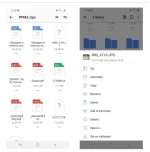
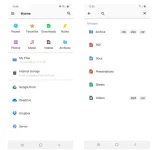
Before users get to the main functionality of WinZip, it introduces a simple, convenient, and elegant file manager for users to freely filter files. This professional file manager automatically organizes the clutter or scattered of multiple file types into categories. It also comes with a built-in search engine with filters so that users can quickly access any content, whether photos, documents, folders, etc.
Quick Archive any File
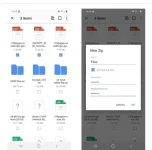
The archive function is to help users pack or contribute multiple files or a single folder into a special compressed format coming from the application. After compression, their content will be significantly reduced in size, making copying, moving, and sharing simpler and faster. Any format or anything can be conveniently compressed, and users can freely interact with any content later.
Extract Archive with Ease
Next, the extractor of WinZip will help users directly retrieve all content or information stored in zip files. Its support is extensive and versatile, so all zip formats, like WinRAR or 7zip, are compatible and have the simplest operation. The decompression process also allows the user to choose the folder or location to store all the information after completing all the progress.
Next, the extractor of WinZip will help users directly retrieve all content or information stored in zip files. Its support is extensive and versatile, so all zip formats, like WinRAR or 7zip, are compatible and have the simplest operation. The decompression process also allows the user to choose the folder or location to store all the information after completing all the progress.
wide range of costumization and set password for your zip files.
Simple & Elegant file Manager
Before users get to the main functionality of WinZip, it introduces a simple, convenient, and elegant file manager for users to freely filter files. This professional file manager automatically organizes the clutter or scattered of multiple file types into categories. It also comes with a built-in search engine with filters so that users can quickly access any content, whether photos, documents, folders, etc.
Quick Archive any File
The archive function is to help users pack or contribute multiple files or a single folder into a special compressed format coming from the application. After compression, their content will be significantly reduced in size, making copying, moving, and sharing simpler and faster. Any format or anything can be conveniently compressed, and users can freely interact with any content later.
Extract Archive with Ease
Next, the extractor of WinZip will help users directly retrieve all content or information stored in zip files. Its support is extensive and versatile, so all zip formats, like WinRAR or 7zip, are compatible and have the simplest operation. The decompression process also allows the user to choose the folder or location to store all the information after completing all the progress.
Next, the extractor of WinZip will help users directly retrieve all content or information stored in zip files. Its support is extensive and versatile, so all zip formats, like WinRAR or 7zip, are compatible and have the simplest operation. The decompression process also allows the user to choose the folder or location to store all the information after completing all the progress.
wide range of costumization and set password for your zip files.