 PH
PHIn Depths of Silence
Forum Expert
Update:
Wag na magtiyaga dito kasi di na gumagana.
May bagong thread na.
https://phcorner.org/threads/klnemaster-7-2-7-latest-mod.1909001/#post-27491319
Otherwise,
Just sharing. Gamit ko rin kasi si kine pag hindi ko dala laptop ko for on-the-go SDEs ko (non professionally).
For Android 12 only. Di ko sure sa 11 below kung same issue.
Sa mga nakakaranas ng auto close bug sa kahit anong mod version ng Kínémás†ér sa Android 12, heto na yung simpleng trick.
1st download this
This version is 5.0.9.22000
Pwede na to kaysa sa wala
https://www. mediafire.com/download_repair.php?flag=4&dkey=ygly4zlbr4m&qkey=4g5ojkltl48q754&ip=178.128.23.100&ref=https://www.youtube.com/
Remove emojis
2nd - Uninstall Kínémás†ér kung meron.
3rd - Open Kínémás†ér for the 1st time.
Tapos ganito ang lalabas panigurado
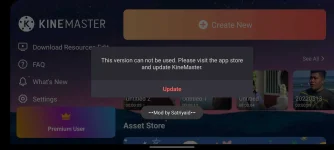
4th - Close Kínémás†ér then go to
Settings > Date and Time > Disable niyo Auto update Date and Time.
5th - Set the date to May 13 2022 or set the year to 2021 or earlier siguro.
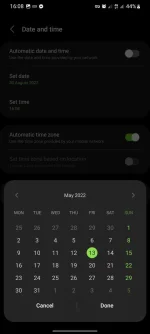
6th - Open Kínémás†ér then ok na. Try to edit and export
Edit 9/9/22
Video proof 4K export
View attachment Screen_Recording_20220830-163459_Gallery_1.mov.mov
I hope this helps.
Wag na magtiyaga dito kasi di na gumagana.
May bagong thread na.
https://phcorner.org/threads/klnemaster-7-2-7-latest-mod.1909001/#post-27491319
Otherwise,
Just sharing. Gamit ko rin kasi si kine pag hindi ko dala laptop ko for on-the-go SDEs ko (non professionally).
For Android 12 only. Di ko sure sa 11 below kung same issue.
Sa mga nakakaranas ng auto close bug sa kahit anong mod version ng Kínémás†ér sa Android 12, heto na yung simpleng trick.
1st download this
This version is 5.0.9.22000
Pwede na to kaysa sa wala
https://www.
mediafire.com/download_repair.php?flag=4&dkey=ygly4zlbr4m&qkey=4g5ojkltl48q754&ip=178.128.23.100&ref=https://www.youtube.com/Remove emojis
2nd - Uninstall Kínémás†ér kung meron.
3rd - Open Kínémás†ér for the 1st time.
Tapos ganito ang lalabas panigurado
4th - Close Kínémás†ér then go to
Settings > Date and Time > Disable niyo Auto update Date and Time.
5th - Set the date to May 13 2022 or set the year to 2021 or earlier siguro.
6th - Open Kínémás†ér then ok na. Try to edit and export
Edit 9/9/22
Video proof 4K export
View attachment Screen_Recording_20220830-163459_Gallery_1.mov.mov
I hope this helps.
 d nag oopen