 PH
PHpaulenekulet
Fanatic
You do not have permission to view the full content of this post.
Log in or register now.
Tama po ba yan?
Tama po ba yan?
Yan lagi lumalabas sa akin ehYou do not have permission to view the full content of this post. Log in or register now.
Ginaya ko naman yung setting pero yan lagi lumalabas....
You do not have permission to view the full content of this post. Log in or register now.
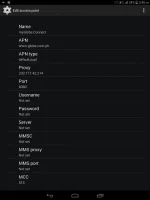
panu po ma e connect sa globe pocket wifi?nagawa ko na po settings sa handler.ng run lng pero hindi mka connect...Gawa po kayo ng apn mgc sa globe pocket wifi ninyo at proxy plus port nasa 1st po ang proxy at port


gagongsniper1 our vpn is an apk file.android units lang po tayo.meron po ba sa pc nito?
paulenekulet You have not followed any of our advices yet, you have incorrect and missing entries that is why you find it hard to connect ma'am.You do not have permission to view the full content of this post. Log in or register now.
Ginaya ko naman yung setting pero yan lagi lumalabas....
You do not have permission to view the full content of this post. Log in or register now.
Yan lagi lumalabas sa akin eh
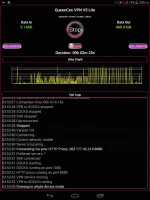
noblesse You are most welcome ma'am and thank you for the positive feedback on your successful connections to tnt and smart sim networks.working po sya sa tnt at smart sim ko madam queencee
maraming salamat sa pag share nyo po nito.. idol.
mangkong96 You are most welcome sir.maraming thank you po dito, more power
boknoyz you are most welcome sir, yes, your ts is a tnt user also.thanks queenzz tnt user????
noblesse you are most welcome ma'am and goodluck.working po sya sa tnt at smart sim ko madam queencee
maraming salamat sa pag share nyo po nito.. idol.
roifz_09 You are most welcome sir.Tnx po ts....
panu po ma e connect sa globe pocket wifi?nagawa ko na po settings sa handler.ng run lng pero hindi mka connect...
 Sa vpn v5 ni sistah under vpn options i √ check ang
Mga boss pascreenshot naman ng handler setting nyo...sorry sobrang kulit ko...nd ako titigil hanggang nd ako makaconnect dito...
Me mga screenshot napong nilabas si t.s at iba pa po pwede ka pong mag back read or change your sim to tnt kung ayaw po talagang gumana sayo globepaulenekulet The handler settings for globe is on page 1. All you need to do is follow it.If you cannot connect right then and then , it means you need to adjust.Provided that you have followed the set up of the apn mgc and the you have made the inputs for the vpn options correctly, you will connect if you patiently do this :Mga boss pascreenshot naman ng handler setting nyo...sorry sobrang kulit ko...nd ako titigil hanggang nd ako makaconnect dito...
_TURBO_
Connect through an http proxy
√ check use the following setting
Host address: 203.177.42.214
Port : 8080
Sa pocket wifi gawin apn ang You do not have permission to view the full content of this post. Log in or register now.
Good luck po
yhanix123 you are most welcome.thanks po