 PH
PH-
Welcome to PHCorner Forums! Sign up for free to unlock full access and exclusive privileges, including:
- Asking questions about computer and mobile issues
- Discovering internet tips for your mobile network and computer
You are using an out of date browser. It may not display this or other websites correctly.
You should upgrade or use an alternative browser.
You should upgrade or use an alternative browser.
🔒 Closed QueenCee VPN V5 Lite ( All Networks )
- Thread starter queencee
- Start date
- Status
- Not open for further replies.
arcilicious08baket hindi po gumagana saken? smart po ako quezon city =(
Have you tried doing this on your smart sim?
For a "No Promo Registration" or
for a better connection you can register to :
FREEWIKI to 5555
(It still works for Smart ; it just needs a balance of 1 Peso)
And try this too :
On the first page there is a list of Proxy Servers and Real Proxy Servers. Mix match them until you get a good connection. There will be a right combination for your location.Patience is required.Goodluck.
fangetsakin din
smart user ko
di rin gumagana
help po pls
Have you tried doing this on your smart sim?
For a "No Promo Registration" or
for a better connection you can register to :
FREEWIKI to 5555
(It still works for Smart ; it just needs a balance of 1 Peso)
And try this too :
On the first page there is a list of Proxy Servers and Real Proxy Servers. Mix match them until you get a goodconnection. There will be a right combination for yourlocation.Patience is required.Goodluck.
arcilicious08
Grasshopper
arcilicious08
Have you tried doing this on your smart sim?
For a "No Promo Registration" or
for a better connection you can register to :
FREEWIKI to 5555
(It still works for Smart ; it just needs a balance of 1 Peso)
And try this too :
On the first page there is a list of Proxy Servers and Real Proxy Servers. Mix match them until you get a good connection. There will be a right combination for your location.Patience is required.Goodluck.
Thankyou mam for your responce =)
Spiural You may have a storage issue on you cp.Try uninstalling apps you never use. Click on Settings-Apps and then proceed to uninstalling unused apps for you to have enough space on your cp and to be able to enjoy any apps functionality.force closed saken :'(
OR
You can do this.
1.Go to Settings and choose Apps.
2.Locate QueenCee VPN V5. Hit Clear Data.
3.Relaunch QueenCee VPN and input the correct Handler Settings for the sim in use.Hit Save
4.Turn Data Connection On
5.As soon as clicking save, a choice between Browser Only and Tunnel Whole Device will appear. Please click Tunnel Whole Device.
home_2164 You are most welcome sir.ty d2 madam QueenCee
pwede rin po ba ito sa 4g modem?

Let us have a look inside QueenCee VPN V5 Lite
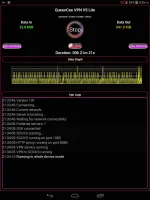
A peek at the stylish handler perhaps?

And now for the Settings and Proceedures...
QueenCee VPN V5
Handler Settings For Talk n' Text
Use Default APN
Remove Port : Check
Proxy Type : Real Host
Proxy Server : Choose one below
click.ph
carmudi.com.ph
clubzed.ph
m.talkntext.com.ph
go.talkntext.com.ph
clickhere.ph
vshop.mdc.gameloft.com
203.174.14.199
Real Proxy Type : Default
Real Proxy Server : Choose one below
115.85.26.8
110.3.114.243
220.83.91.45
183.111.169.202
221.131.112.123
10.102.61.46
14.3.167.193
127.69.79.119
210.165.245.132
104.131.28.28
Real Proxy Port : 80/8080
QueenCee VPN V5
Handler Settings For Smart
[For a "No Promo Registration" or
for a better connection you can register to :
FREEWIKI to 5555
(It still works for Smart ; it just needs a balance of 1 Peso)]
Use Default APN
Front Query: www1.smart.com.ph
MiddleQuery: Leave blank
BackQuery: v.smartads.com.ph
Filter: safezone.ph
Add Port to non-port URL: 1080/8555
Remove Port: Check
Proxy Type: Real Host/Host
Custom Header: X-Online-Host
Proxy Server: Choose one below
click.ph
clubzed.ph
carmudi.com.ph
m.wikipedia.org
en.wikipedia.org
smart.ph
smartlife.ph
smsarena.com
smart.portals.8elements.mobi
ph.m.yahoo.com
wap.zed.com
wap.amob.com
wapx.amob.com
Real Proxy Type: Default/Http/Socks
Real Proxy Server: Choose one below
127.0.0.1
127.8.8.1
10.24.56.10
43.255.114.140
203.93.97.24
210.165.245.132
Real Proxy Port: 80/8080
SAVE
QueenCee VPN V5Use Default APN
Handler Settings For Sun
Remove Port : Check
Proxy Type : Real Host
Proxy Server : Choose one
You do not have permission to view the full content of this post. Log in or register now.
You do not have permission to view the full content of this post. Log in or register now.
You do not have permission to view the full content of this post. Log in or register now.
You do not have permission to view the full content of this post. Log in or register now.
You do not have permission to view the full content of this post. Log in or register now.
click.ph
Real Proxy Type : Default
Real Proxy Server : Choose one below
110.3.114.243
220.83.91.45
183.111.169.202
221.131.112.123
10.102.61.46
14.3.167.193
127.69.79.119
210.165.245.132
104.131.28.28
Real Proxy Port : 80/8080
SAVE
QueenCee VPN V5
Handler Settings For Globe / TM
MGC APN Phone Setting
Create APN MGC on your phone.
To those who have no idea on how to do it
on an Android phone, you may follow these steps...
1. Settings2. More
3. Mobile Network
4. Access Point Name
5. Choose Globe Telecom
6. Choose myGlobe Connect
7. Name: my Globe connect
8. APN: You do not have permission to view the full content of this post. Log in or register now.
9. PROXY: 203.177.42.214 or 108.67.222.222
10. PORT 8080
Handler Settings For Globe / TM
Add Port to non Port URL: 1080
Remove port: Check
Proxy Type: Host
Custom Header: X-Online-Host
Proxy Server : Choose one below
libre.ph
m.globe.com.ph
dloadstation.com
tm.dloadstation.com
t.globe.com.ph
wapshop.gameloft.com
You do not have permission to view the full content of this post. Log in or register now.
125.5.112.173
203.177.154.220
209.170.97.175
203.177.57.231
Real Proxy Type: Default/Inject/Socks
Real Proxy Server: Choose one below
127.0.0.1
127.8.8.1
126.150.113.196
Real Proxy Port: 1080/1614
SAVE
More Options
Connect trough an HTTP proxy: Check
Use the Following settings: Check
Host Address: 203.177.42.214
Port: 8080
Here is a bonus for Phcorner Established Members...
And now for the DOWNLOAD links...
You do not have permission to view the full content of this post. Log in or register now.
You do not have permission to view the full content of this post. Log in or register now.
Kazura00 You are most welcome sir.Thanks for sharing po..
Keep sharing and sharing
Tolskie You are most welcome sir.Thankyou madam!
Elow po pwde malaman ung setting ng v5?kc po ung lumabas po ay browsing only mode ano po gagawen ko. Tnx..
Hello po
Elow po
Elow po madam queencee
Elow sir
Hello po
Elow po
Elow po madam queencee
Elow sir
Harlai15 , dito ka mag inquire, click mo lang yung reply nasa ibaba..
sakin din
smart user ko
di rin gumagana
help po pls
rapandreifontaron
Enthusiast
working po sa globe sana po mabilis nag connect na po , kaso ndi pa na tatry yung speed
jan myni
How To Re-launch QueenCee VPN
You can do this.
1.Go to Settings and choose Apps.
2.Locate QueenCee VPN. Hit Clear Data.
3.Relaunch or open a new QueenCee VPN and input the correct Handler Settings for the sim in use.Hit Save
4.Turn Data Connection On
5.As soon as clicking save, a choice between Browser Only and Tunnel Whole Device will appear. Please click Tunnel Whole Device.
How To Re-launch QueenCee VPN
You can do this.
1.Go to Settings and choose Apps.
2.Locate QueenCee VPN. Hit Clear Data.
3.Relaunch or open a new QueenCee VPN and input the correct Handler Settings for the sim in use.Hit Save
4.Turn Data Connection On
5.As soon as clicking save, a choice between Browser Only and Tunnel Whole Device will appear. Please click Tunnel Whole Device.
rapandreifontaron You are most welcome sir.working po sa globe sana po mabilis nag connect na po , kaso ndi pa na tatry yung speed
- Status
- Not open for further replies.
About this Thread
-
2KReplies
-
221KViews
-
802Participants
Last reply from:
blank1134
blank1134
New Topics
-
LOOKING FOR WIREGUARD SETUP IN MIKROTIK (WILLING TO PAY )
- Started by moreinformation
- Replies: 2
- 🚀 Freenet & Tunneling
-
MGa BOSS FREE VPN NA MAY PH SERVER PARA DITO SA AFRICA?
- Started by Junbiel 26
- Replies: 0
- 🚀 Freenet & Tunneling
-
PISOWIFI NO HULOG | (26-09-30) | NPV TUNNEL
- Started by Calcifeer
- Replies: 8
- 🚀 Freenet & Tunneling
-
[NOW WORKING] Youtube No Ads & Other Sites! via DNS
- Started by Lerps
- Replies: 31
- 🚀 Freenet & Tunneling
-
Free vpn can bypass captive portal
- Started by Darz2468
- Replies: 6
- 🚀 Freenet & Tunneling
-
Ano po gagawin pag ganto po?
- Started by jokejoke
- Replies: 3
- 🚀 Freenet & Tunneling
-
C pasabit pls need lang po sa edting
- Started by racetrack21
- Replies: 0
- 🚀 Freenet & Tunneling
Trending Topics
-
-
-
WIFI häçk using NodeMCU V3 ESP8266 Deauther + Evil Twin Attack (low badget 200 pesos)
- PHC H3XGAMING
Replies: 575 -
-
Multi-hop VLESS + Cloudflare WARP config (XHTTP + REALITY + TLS), privacy-focused
- Noahclanman
Replies: 4 -
-
Online now
- Members online
- 1,121
- Guests online
- 6,055
- Total visitors
- 7,176