PH
PHYelllh Hllley
Honorary Poster
Para ganito mging speed moPara saan po yung termux at tweker boss?
Para ganito mging speed moPara saan po yung termux at tweker boss?
Saan po madodownload?Para ganito mging speed mo
Nasa pg 1 po yung link.Maam san ko po ba ito pweding ma download ...sala kasi sa play store ...pwede hinge nang link...thank you madam...
You do not have permission to view the full content of this post. Log in or register now.Maam san ko po ba ito pweding ma download ...sala kasi sa play store ...pwede hinge nang link...thank you madam...
J-9Thank you for sharing maam..
Na e download ko na po bakit mag error pag e intall ko na..ano po ba dapat gawin ...
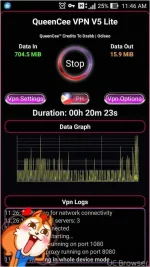
Madam hindi namin makita, dakilang leecher lang ako sana naman may magpm sakin nunGreetings QueenCee VPN V5 Lite users,
Boost for tnt handler settings has been updated.
See it on page 1.
maam san po pweding madownload ang qeencee v5
 Nasa unang pahina po ang link
Para ganito mging speed mo
Madam, makakaconnect ba to sa Pocket Wifi na walang load? Paturo naman po kung pwede. Salamat
 No load tnt sim pocket wifi po gamit ko konek lang ninyo at gamitin v5 ayun na
 Paano po? globe po pocket wifi ko. May capping pa ba o diritso connect na?
Gabriel ernGud eve po mam.mam kc HND n ngana skin ung mga server ng tnt.my bago po b kau tnx..
Tnx po s info.try q poGabriel ern
there is no problem with the app or the settings sir, you just need to make adjustments...
you may do this :
on the first page there is a list of proxy servers and real proxy servers. mixmatch them until you get a good connection. there will be a right combination for your location. patience is required.
Then proceed to the regions/server button.
Start by connecting to the best performance or in my vpn as the philippines flag, when you notice buffering or you get dc too often, that is the time to :
jump to regions/servers for a fresh set.
Change from one country to another. Good luck