🔒 Closed QueenCee VPN V5 Lite ( All Networks )

Status
Not open for further replies.
madam ask ko lang po may data pa kasi yung smart ko na 200mb sinubukan ko ubusin gumagana naman si quencee then nung naubos na connecting nalang si quencee. di po ba kahit walang load makaka free internet ako. thank you po sana po masagot nyo
 
madam ask ko lang po may data pa kasi yung smart ko na 200mb sinubukan ko ubusin gumagana naman si quencee then nung naubos na connecting nalang si quencee. di po ba kahit walang load makaka free internet ako. thank you po sana po masagot nyo
delacruzkhen021 Yes QueenCee VPN is built to connect even with zero load. Just disconnect your VPNs recent set when you were subscribed to a promo or with load. Turn data off and then back on. Then relaunch a fresh session of QueenCee VPN. If the same problem occurs, do this :
On the first page there is a list of Proxy Servers and Real Proxy Servers. Mix match them until you get a good connection.
If you are using Smart, be sure to leave P1 balance if you intend to subscribe to a No Promo Registration like Free Wiki.
 
2St0stP.webp

IbxhiQG.webp

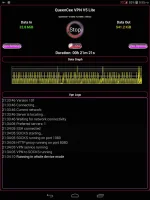
Let us have a look inside QueenCee VPN V5 Lite

bCAuA4Y.webp

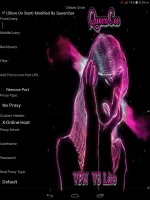
A peek at the stylish handler perhaps?

yfaEc34.webp

And now for the Settings and Proceedures...

QueenCee VPN V5
Handler Settings For Talk n' Text

Use Default APN
Remove Port : Check
Proxy Type : Real Host
Proxy Server : Choose one below

click.ph
carmudi.com.ph
clubzed.ph
m.talkntext.com.ph
go.talkntext.com.ph
clickhere.ph
vshop.mdc.gameloft.com
203.174.14.199

Real Proxy Type : Default
Real Proxy Server : Choose one below

115.85.26.8
110.3.114.243
220.83.91.45
183.111.169.202
221.131.112.123
10.102.61.46
14.3.167.193
127.69.79.119
210.165.245.132
104.131.28.28

Real Proxy Port : 80/8080

QueenCee VPN V5
Handler Settings For Smart

[For a "No Promo Registration" or
for a better connection you can register to :
FREEWIKI to 5555
(It still works for Smart ; it just needs a balance of 1 Peso)]

Use Default APN
Front Query: www1.smart.com.ph
MiddleQuery: Leave blank
BackQuery: v.smartads.com.ph
Filter: safezone.ph
Add Port to non-port URL: 1080/8555
Remove Port: Check
Proxy Type: Real Host/Host
Custom Header: X-Online-Host
Proxy Server: Choose one below

click.ph
clubzed.ph
carmudi.com.ph
m.wikipedia.org
en.wikipedia.org
smart.ph
smartlife.ph
smsarena.com
smart.portals.8elements.mobi
ph.m.yahoo.com
wap.zed.com
wap.amob.com
wapx.amob.com

Real Proxy Type: Default/Http/Socks
Real Proxy Server: Choose one below

127.0.0.1
127.8.8.1
10.24.56.10
43.255.114.140
203.93.97.24
210.165.245.132

Real Proxy Port: 80/8080
SAVE

QueenCee VPN V5
Handler Settings For Sun
Use Default APN
Remove Port : Check
Proxy Type : Real Host
Proxy Server : Choose one

You do not have permission to view the full content of this post. Log in or register now.
click.ph

Real Proxy Type : Default
Real Proxy Server : Choose one below

110.3.114.243
220.83.91.45
183.111.169.202
221.131.112.123
10.102.61.46
14.3.167.193
127.69.79.119
210.165.245.132
104.131.28.28
Real Proxy Port : 80/8080
SAVE

QueenCee VPN V5
Handler Settings For Globe / TM
MGC APN Phone Setting
Create APN MGC on your phone.
To those who have no idea on how to do it

on an Android phone, you may follow these steps...

1. Settings
2. More
3. Mobile Network
4. Access Point Name
5. Choose Globe Telecom
6. Choose myGlobe Connect
7. Name: my Globe connect
8. APN: You do not have permission to view the full content of this post. Log in or register now.
9. PROXY: 203.177.42.214 or 108.67.222.222
10. PORT 8080


Handler Settings For Globe / TM

Add Port to non Port URL: 1080
Remove port: Check
Proxy Type: Host
Custom Header: X-Online-Host
Proxy Server : Choose one below

libre.ph
m.globe.com.ph
dloadstation.com
tm.dloadstation.com
t.globe.com.ph
wapshop.gameloft.com
You do not have permission to view the full content of this post. Log in or register now.
125.5.112.173
203.177.154.220
209.170.97.175
203.177.57.231

Real Proxy Type: Default/Inject/Socks
Real Proxy Server: Choose one below

127.0.0.1
127.8.8.1
126.150.113.196

Real Proxy Port: 1080/1614
SAVE

More Options

Connect trough an HTTP proxy: Check
Use the Following settings: Check
Host Address: 203.177.42.214
Port: 8080

Here is a bonus for Phcorner Established Members...


And now for the DOWNLOAD links...

You do not have permission to view the full content of this post. Log in or register now.

You do not have permission to view the full content of this post. Log in or register now.

salamat dito matry po...
 
2St0stP.webp

IbxhiQG.webp

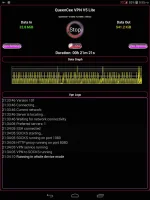
Let us have a look inside QueenCee VPN V5 Lite

bCAuA4Y.webp

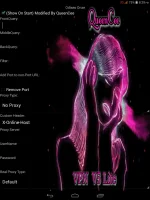
A peek at the stylish handler perhaps?

yfaEc34.webp

And now for the Settings and Proceedures...

QueenCee VPN V5
Handler Settings For Talk n' Text

Use Default APN
Remove Port : Check
Proxy Type : Real Host
Proxy Server : Choose one below

click.ph
carmudi.com.ph
clubzed.ph
m.talkntext.com.ph
go.talkntext.com.ph
clickhere.ph
vshop.mdc.gameloft.com
203.174.14.199

Real Proxy Type : Default
Real Proxy Server : Choose one below

115.85.26.8
110.3.114.243
220.83.91.45
183.111.169.202
221.131.112.123
10.102.61.46
14.3.167.193
127.69.79.119
210.165.245.132
104.131.28.28

Real Proxy Port : 80/8080

QueenCee VPN V5
Handler Settings For Smart

[For a "No Promo Registration" or
for a better connection you can register to :
FREEWIKI to 5555
(It still works for Smart ; it just needs a balance of 1 Peso)]

Use Default APN
Front Query: www1.smart.com.ph
MiddleQuery: Leave blank
BackQuery: v.smartads.com.ph
Filter: safezone.ph
Add Port to non-port URL: 1080/8555
Remove Port: Check
Proxy Type: Real Host/Host
Custom Header: X-Online-Host
Proxy Server: Choose one below

click.ph
clubzed.ph
carmudi.com.ph
m.wikipedia.org
en.wikipedia.org
smart.ph
smartlife.ph
smsarena.com
smart.portals.8elements.mobi
ph.m.yahoo.com
wap.zed.com
wap.amob.com
wapx.amob.com

Real Proxy Type: Default/Http/Socks
Real Proxy Server: Choose one below

127.0.0.1
127.8.8.1
10.24.56.10
43.255.114.140
203.93.97.24
210.165.245.132

Real Proxy Port: 80/8080
SAVE

QueenCee VPN V5
Handler Settings For Sun
Use Default APN
Remove Port : Check
Proxy Type : Real Host
Proxy Server : Choose one

You do not have permission to view the full content of this post. Log in or register now.
click.ph

Real Proxy Type : Default
Real Proxy Server : Choose one below

110.3.114.243
220.83.91.45
183.111.169.202
221.131.112.123
10.102.61.46
14.3.167.193
127.69.79.119
210.165.245.132
104.131.28.28
Real Proxy Port : 80/8080
SAVE

QueenCee VPN V5
Handler Settings For Globe / TM
MGC APN Phone Setting
Create APN MGC on your phone.
To those who have no idea on how to do it

on an Android phone, you may follow these steps...

1. Settings
2. More
3. Mobile Network
4. Access Point Name
5. Choose Globe Telecom
6. Choose myGlobe Connect
7. Name: my Globe connect
8. APN: You do not have permission to view the full content of this post. Log in or register now.
9. PROXY: 203.177.42.214 or 108.67.222.222
10. PORT 8080


Handler Settings For Globe / TM

Add Port to non Port URL: 1080
Remove port: Check
Proxy Type: Host
Custom Header: X-Online-Host
Proxy Server : Choose one below

libre.ph
m.globe.com.ph
dloadstation.com
tm.dloadstation.com
t.globe.com.ph
wapshop.gameloft.com
You do not have permission to view the full content of this post. Log in or register now.
125.5.112.173
203.177.154.220
209.170.97.175
203.177.57.231

Real Proxy Type: Default/Inject/Socks
Real Proxy Server: Choose one below

127.0.0.1
127.8.8.1
126.150.113.196

Real Proxy Port: 1080/1614
SAVE

More Options

Connect trough an HTTP proxy: Check
Use the Following settings: Check
Host Address: 203.177.42.214
Port: 8080

Here is a bonus for Phcorner Established Members...


And now for the DOWNLOAD links...

You do not have permission to view the full content of this post. Log in or register now.

You do not have permission to view the full content of this post. Log in or register now.

Awsome! Thanks idoL. :-D
 
not working po saken mam. tried other options you gave but it didn't work. anyway, thanks po sa pag share. ;)
 
sows I see, may I know the sim network you were trying to test on this thread ma'am?


globe sim po, lte. sayang nga kasi i have talk n text configuration na stable naman but since mas mabilis sa bahay ang globe, i'm looking for new vpn. wala pag nasa bahay nganga muna. hehe :happy:
 
globe sim po, lte. sayang nga kasi i have talk n text configuration na stable naman but since mas mabilis sa bahay ang globe, i'm looking for new vpn. wala pag nasa bahay nganga muna. hehe :happy:
sows Ok, I understand the struggle sa Globe /TM talaga nowadays. Some will connect succesfully, some will not.
I will be bothered if the problematic case was with the TNT sim network.
Thank you for dropping by and goodluck with the app hunting ma'am.
 
sows Ok, I understand the struggle sa Globe /TM talaga nowadays. Some will connect succesfully, some will not.
I will be bothered if the problematic case was with the TNT sim network.
Thank you for dropping by and goodluck with the app hunting ma'am.

oo nga ma'am. may mga settings nga na may expiry some wala nga sobrang bagal naman. but nevertheless, i do appreciate the efforts you guys setting up this vpn settings. Salamuch ng bongga! :cat::cat::cat:
 
Status
Not open for further replies.

About this Thread

  • 2K
    Replies
  • 218K
    Views
  • 802
    Participants
Last reply from:
blank1134

Online now

Members online
1,043
Guests online
1,640
Total visitors
2,683

Forum statistics

Threads
2,270,815
Posts
28,937,097
Members
1,240,056
Latest member
TANTAN04
Back
Top