 PH
PHarsenal1205
Rarely opens PHC
I made this thread dahil medyo bored ako hehe at least may bagong kaalaman ako at kayo rin! Ishare ko sa inyo kung paanong mag install ng NGINX sa windows pc or laptop, (puede rin sa VPS na Windows Server) ninyo.
ABOUT NGINX. Ano ang NGINX? Intro muna tayo... Engine X pala ang pronounciation ng NGINX.
Anong gamit kong pang testing ng NGINX?
Lenovo Think PAD T420
Windows 10 PRO X64
Installation na tayo:
Step 1: Download NGINX sa You do not have permission to view the full content of this post. Log in or register now. Dapat STABLE VERSION kung ayaw nyo mag ka bugs.
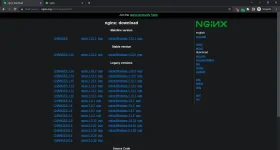
Step 2: Pag ka download ng NGINX extract nyo sa folder or drive na gusto ninyo. Itong sa akin sa drive D ko nilagay.
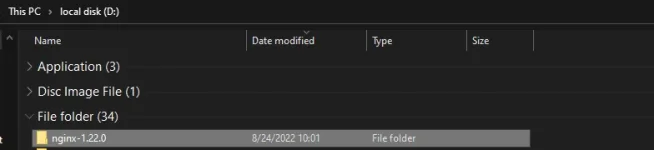
Step 3: Buksan ang command prompt o CMD [KAHIT HINDI RUN AS ADMINISTRATOR YUNG CMD PUEDE.] at itype ang mga commands na ito:
(Drive letter kung saan nakalagay ang NGINX) yung saakin D.
ACTUAL SCREENSHOT:
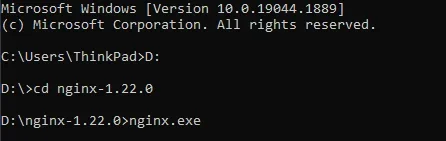
then press enter para mag install na ng NGINX.
Tapos mag popup yung Windows Security Alert na ito
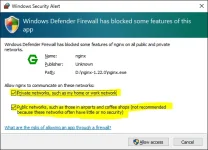
DAPAT NAKA CHECK YUNG DALAWANG IYAN NA NAKA HIGHLIGHT. Tapos click Allow access.
Step 4: Mag bukas ng browser na paborito ninyong gamitin, at itype ang localhost sa URL/search bar.
Test sa EDGE:
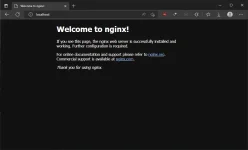
Test sa CHROME:
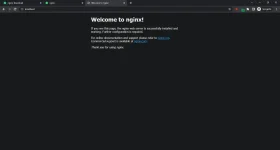
Ready to use na ang NGINX sa system ninyo.
Step 5: Palitan ninyo yung page ng Welcome to nginx! website sa root folder.
Dito kung paano ninyo lalagyan ng webpage ninyo sa NGINX.
Mag bukas ulit ng command prompt. Again hindi na kailangan ng admin privileges nito. Tapos i type ang mga commands na ito:
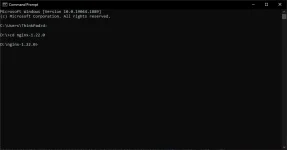
WAG MUNANG PRESS ENTER!
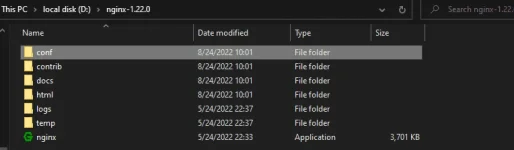
Puntahan ninyo yung root directory ng NGINX:
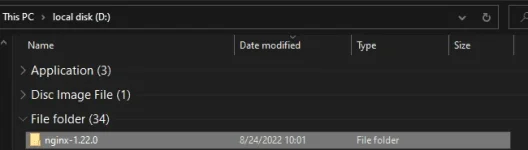
Tapos puntahan ang conf folder
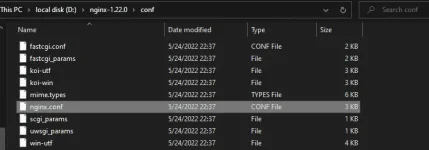
Iedit ang nginx.conf gamit ang paborito ninyong notepad app tulad ng notepad++ o sublime text.
Gamit ko sublime text. Hanapin ang root sa loob ng nginx.conf.
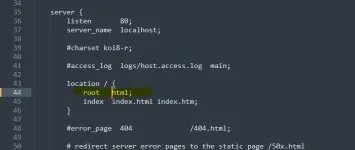
ito ang ilalagay ninyo sa line 44 html; palitan ninyo ng folder directory yung html kung saan nakalagay yung webpage na ginawa ninyo.
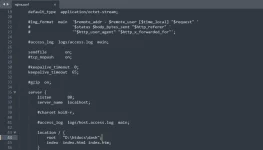
pagkatapos mag i edit. I save ang config file.
Step 6: Balikan ang CMD natin kanina.
May itytype ulit na command para i reload yung NGINX natin.
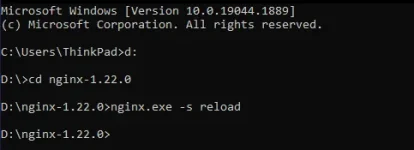
press enter.
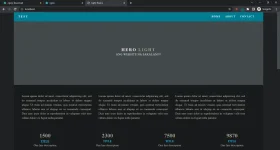
Mag bukas ulit ng browser at itype ang localhost.
Iba na ang lalabas.
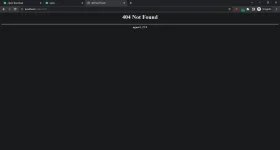
Testing 404 page:
At diyan nag tatapos ang tutorial kung paanong mag install ng NGINX sa windows ninyo.
ABOUT NGINX. Ano ang NGINX? Intro muna tayo... Engine X pala ang pronounciation ng NGINX.
nginx [engine x] is an HTTP and reverse proxy server, a mail proxy server, and a generic TCP/UDP proxy server, originally written by You do not have permission to view the full content of this post. Log in or register now.. For a long time, it has been running on many heavily loaded Russian sites including You do not have permission to view the full content of this post. Log in or register now., You do not have permission to view the full content of this post. Log in or register now., You do not have permission to view the full content of this post. Log in or register now., and You do not have permission to view the full content of this post. Log in or register now.. According to Netcraft, nginx served or proxied You do not have permission to view the full content of this post. Log in or register now.. Here are some of the success stories: You do not have permission to view the full content of this post. Log in or register now., Netflix, You do not have permission to view the full content of this post. Log in or register now., You do not have permission to view the full content of this post. Log in or register now..
The sources and documentation are distributed under the You do not have permission to view the full content of this post. Log in or register now..
Commercial support is available from You do not have permission to view the full content of this post. Log in or register now.
Basic HTTP server features
- Serving static and You do not have permission to view the full content of this post. Log in or register now. files, You do not have permission to view the full content of this post. Log in or register now.; You do not have permission to view the full content of this post. Log in or register now.;
- You do not have permission to view the full content of this post. Log in or register now.; You do not have permission to view the full content of this post. Log in or register now.;
- Accelerated support with caching of You do not have permission to view the full content of this post. Log in or register now., You do not have permission to view the full content of this post. Log in or register now., You do not have permission to view the full content of this post. Log in or register now., and You do not have permission to view the full content of this post. Log in or register now. servers; You do not have permission to view the full content of this post. Log in or register now.;
- Modular architecture. Filters include You do not have permission to view the full content of this post. Log in or register now., byte ranges, chunked responses, You do not have permission to view the full content of this post. Log in or register now., You do not have permission to view the full content of this post. Log in or register now., and You do not have permission to view the full content of this post. Log in or register now. filter. Multiple SSI inclusions within a single page can be processed in parallel if they are handled by proxied or FastCGI/uwsgi/SCGI servers;
- You do not have permission to view the full content of this post. Log in or register now.;
- Support for You do not have permission to view the full content of this post. Log in or register now. with weighted and dependency-based prioritization.
Other HTTP server features
- Name-based and IP-based You do not have permission to view the full content of this post. Log in or register now.;
- You do not have permission to view the full content of this post. Log in or register now. and pipelined connections support;
- You do not have permission to view the full content of this post. Log in or register now., You do not have permission to view the full content of this post. Log in or register now., You do not have permission to view the full content of this post. Log in or register now., and You do not have permission to view the full content of this post. Log in or register now.;
- 3xx-5xx error codes You do not have permission to view the full content of this post. Log in or register now.;
- The rewrite module: You do not have permission to view the full content of this post. Log in or register now.;
- You do not have permission to view the full content of this post. Log in or register now. depending on the You do not have permission to view the full content of this post. Log in or register now.;
- Access control based on You do not have permission to view the full content of this post. Log in or register now., You do not have permission to view the full content of this post. Log in or register now. and by the You do not have permission to view the full content of this post. Log in or register now.;
- Validation of You do not have permission to view the full content of this post. Log in or register now.;
- The You do not have permission to view the full content of this post. Log in or register now. methods;
- You do not have permission to view the full content of this post. Log in or register now. and You do not have permission to view the full content of this post. Log in or register now. streaming;
- You do not have permission to view the full content of this post. Log in or register now.;
- Limiting the number of simultaneous You do not have permission to view the full content of this post. Log in or register now. or You do not have permission to view the full content of this post. Log in or register now. coming from one address;
- You do not have permission to view the full content of this post. Log in or register now.;
- You do not have permission to view the full content of this post. Log in or register now.;
- You do not have permission to view the full content of this post. Log in or register now.;
- Embedded You do not have permission to view the full content of this post. Log in or register now.;
- You do not have permission to view the full content of this post. Log in or register now. scripting language.
Mail proxy server features
- User redirection to You do not have permission to view the full content of this post. Log in or register now. or You do not have permission to view the full content of this post. Log in or register now. server using an external HTTP You do not have permission to view the full content of this post. Log in or register now. server;
- User authentication using an external HTTP You do not have permission to view the full content of this post. Log in or register now. server and connection redirection to an internal You do not have permission to view the full content of this post. Log in or register now. server;
- Authentication methods:
- You do not have permission to view the full content of this post. Log in or register now.: USER/PASS, APOP, AUTH LOGIN/PLAIN/CRAM-MD5;
- You do not have permission to view the full content of this post. Log in or register now.: LOGIN, AUTH LOGIN/PLAIN/CRAM-MD5;
- You do not have permission to view the full content of this post. Log in or register now.: AUTH LOGIN/PLAIN/CRAM-MD5;
- You do not have permission to view the full content of this post. Log in or register now. support;
- You do not have permission to view the full content of this post. Log in or register now. support.
TCP/UDP proxy server features
- You do not have permission to view the full content of this post. Log in or register now. of TCP and UDP;
- You do not have permission to view the full content of this post. Log in or register now. and TLS You do not have permission to view the full content of this post. Log in or register now. support for TCP;
- You do not have permission to view the full content of this post. Log in or register now.;
- Access control based on You do not have permission to view the full content of this post. Log in or register now.;
- Executing different functions depending on the You do not have permission to view the full content of this post. Log in or register now.;
- Limiting the number of simultaneous You do not have permission to view the full content of this post. Log in or register now. coming from one address;
- You do not have permission to view the full content of this post. Log in or register now., You do not have permission to view the full content of this post. Log in or register now., You do not have permission to view the full content of this post. Log in or register now., and You do not have permission to view the full content of this post. Log in or register now.;
- You do not have permission to view the full content of this post. Log in or register now.;
- You do not have permission to view the full content of this post. Log in or register now.;
- You do not have permission to view the full content of this post. Log in or register now. scripting language.
Architecture and scalability
- One master and several worker processes; worker processes run under an unprivileged user;
- You do not have permission to view the full content of this post. Log in or register now.;
- You do not have permission to view the full content of this post. Log in or register now. and You do not have permission to view the full content of this post. Log in or register now. without interruption of the client servicing;
- You do not have permission to view the full content of this post. Log in or register now. for kqueue (FreeBSD 4.1+), epoll (Linux 2.6+), /dev/poll (Solaris 7 11/99+), event ports (Solaris 10), select, and poll;
- The support of the various kqueue features including EV_CLEAR, EV_DISABLE (to temporarily disable events), NOTE_LOWAT, EV_EOF, number of available data, error codes;
- The support of various epoll features including EPOLLRDHUP (Linux 2.6.17+, glibc 2.8+) and EPOLLEXCLUSIVE (Linux 4.5+, glibc 2.24+);
- sendfile (FreeBSD 3.1+, Linux 2.2+, macOS 10.5+), sendfile64 (Linux 2.4.21+), and sendfilev (Solaris 8 7/01+) support;
- You do not have permission to view the full content of this post. Log in or register now. (FreeBSD 4.3+, Linux 2.6.22+);
- You do not have permission to view the full content of this post. Log in or register now. (FreeBSD 4.4+, Linux 2.4+, Solaris 2.6+, macOS);
- Accept-filters (FreeBSD 4.1+, NetBSD 5.0+) and TCP_DEFER_ACCEPT (Linux 2.4+) You do not have permission to view the full content of this post. Log in or register now.;
- 10,000 inactive HTTP keep-alive connections take about 2.5M memory;
- Data copy operations are kept to a minimum.
Tested OS and platforms
- FreeBSD 3 — 12 / i386; FreeBSD 5 — 12 / amd64; FreeBSD 11 / ppc; FreeBSD 12 / ppc64;
- Linux 2.2 — 4 / i386; Linux 2.6 — 5 / amd64; Linux 3 — 4 / armv6l, armv7l, aarch64, ppc64le; Linux 4 — 5 / s390x;
- Solaris 9 / i386, sun4u; Solaris 10 / i386, amd64, sun4v; Solaris 11 / x86;
- AIX 7.1 / powerpc;
- HP-UX 11.31 / ia64;
- macOS / ppc, i386, x86_64;
- Windows XP, Windows Server 2003, Windows 7, Windows 10. (SA 11 GAGANA DIN YAN!)
Anong gamit kong pang testing ng NGINX?
Lenovo Think PAD T420
Windows 10 PRO X64
Installation na tayo:
Step 1: Download NGINX sa You do not have permission to view the full content of this post. Log in or register now. Dapat STABLE VERSION kung ayaw nyo mag ka bugs.
Step 2: Pag ka download ng NGINX extract nyo sa folder or drive na gusto ninyo. Itong sa akin sa drive D ko nilagay.
Step 3: Buksan ang command prompt o CMD [KAHIT HINDI RUN AS ADMINISTRATOR YUNG CMD PUEDE.] at itype ang mga commands na ito:
(Drive letter kung saan nakalagay ang NGINX) yung saakin D.
Code:
C:\Users\user name ninyo>D:

D:\>cd nginx-1.22.0

D:\nginx-1.22.0>nginx.exethen press enter para mag install na ng NGINX.
Tapos mag popup yung Windows Security Alert na ito
DAPAT NAKA CHECK YUNG DALAWANG IYAN NA NAKA HIGHLIGHT. Tapos click Allow access.
Step 4: Mag bukas ng browser na paborito ninyong gamitin, at itype ang localhost sa URL/search bar.
Test sa EDGE:
Test sa CHROME:
Ready to use na ang NGINX sa system ninyo.
Step 5: Palitan ninyo yung page ng Welcome to nginx! website sa root folder.
Dito kung paano ninyo lalagyan ng webpage ninyo sa NGINX.
Mag bukas ulit ng command prompt. Again hindi na kailangan ng admin privileges nito. Tapos i type ang mga commands na ito:
Code:
C:\Users\user name ninyo>D:

D:\>cd nginx-1.22.0

D:\nginx-1.22.0
WAG MUNANG PRESS ENTER!
Puntahan ninyo yung root directory ng NGINX:
Tapos puntahan ang conf folder
Iedit ang nginx.conf gamit ang paborito ninyong notepad app tulad ng notepad++ o sublime text.
Gamit ko sublime text. Hanapin ang root sa loob ng nginx.conf.
ito ang ilalagay ninyo sa line 44 html; palitan ninyo ng folder directory yung html kung saan nakalagay yung webpage na ginawa ninyo.
pagkatapos mag i edit. I save ang config file.
Step 6: Balikan ang CMD natin kanina.
May itytype ulit na command para i reload yung NGINX natin.
Code:
C:\Users\user name ninyo>D:

D:\>cd nginx-1.22.0

D:\nginx-1.22.0>nginx.exe -s reload
press enter.
Mag bukas ulit ng browser at itype ang localhost.
Iba na ang lalabas.
Testing 404 page:
At diyan nag tatapos ang tutorial kung paanong mag install ng NGINX sa windows ninyo.


