PH
PHKita kolang mga paps Sana Maka tulong sa mga di maka duo tropa or jowa Nila dahil sa beta version
Leave a beta program
Important: When you leave and uninstall a beta app, you may lose your progress and any customizations you made to the app.
Open the Play Store Google Play.
At the top right, tap the profile icon.
Tap Manage apps & devices and then Beta.
Find the app you want to leave.
Tap the app to open its detail page.
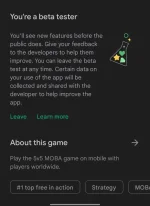
Under “You’re a beta tester," tap Leave and then Leave.
Tip: If you leave an early access or beta program, your space opens up and someone else may take it. You’re not guaranteed to get your space in the beta program back later.
You do not have permission to view the full content of this post. Log in or register now.
Leave a beta program
Important: When you leave and uninstall a beta app, you may lose your progress and any customizations you made to the app.
Open the Play Store Google Play.
At the top right, tap the profile icon.
Tap Manage apps & devices and then Beta.
Find the app you want to leave.
Tap the app to open its detail page.
Under “You’re a beta tester," tap Leave and then Leave.
Tip: If you leave an early access or beta program, your space opens up and someone else may take it. You’re not guaranteed to get your space in the beta program back later.
You do not have permission to view the full content of this post. Log in or register now.