 PH
PHSophia Marie
Eternal Poster
Increase VIDEO RAM for Intel Internal GPU
Go to Regedit
Navigate:
HKeyLocalMachine
Softwares
Intel
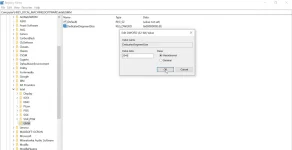
Right click Intel folder, Create key
Name the key/folder ''GMM''
right click at the right side and Select Dword 32 Bit
Type ''DedicatedSegmentSize''
and then again right click or double click the DedicatedSegmentSize
and give value according to the RAM you have
or just multiply by 128 with the ram you have.
Recommended:
RAM Value
2 GB 256
4 GB 512
8 GB 1024
16 GB 2048
Hope it works
if not There is another way to increase Video ram by accessing the BIOS
Go to Regedit
Navigate:
HKeyLocalMachine
Softwares
Intel
Right click Intel folder, Create key
Name the key/folder ''GMM''
right click at the right side and Select Dword 32 Bit
Type ''DedicatedSegmentSize''
and then again right click or double click the DedicatedSegmentSize
and give value according to the RAM you have
or just multiply by 128 with the ram you have.
Recommended:
RAM Value
2 GB 256
4 GB 512
8 GB 1024
16 GB 2048
Hope it works
if not There is another way to increase Video ram by accessing the BIOS