 PH
PHconviction
Forum Guru
PC STEPS:
(botzip, .NET, edit accounts and config, run bot exe)
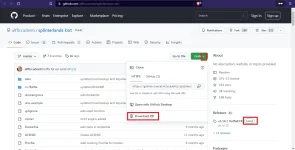
1. Download latest ZIP sa githab kay Pappy JONES
You do not have permission to view the full content of this post. Log in or register now.
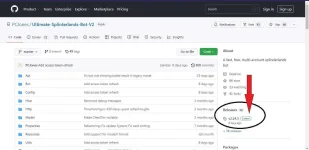
windows-zip sample
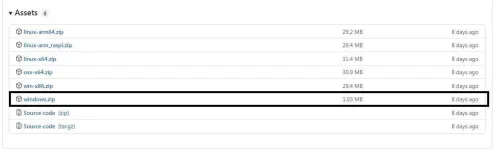
2. Extract zip file
 open config folderrename accounts-example.txt to accounts.txtrename config-example.txt to config.txt
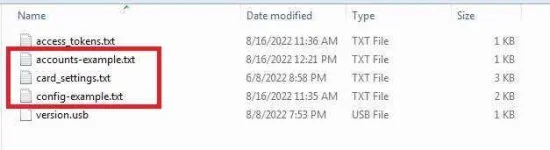 open sa notepad yung dalawa
a. palitan laman sa accounts.txt
- ipalit nyo username + pk
username: postingkey
sample:
olatsboy:5kjaboehjbzabsbdhdncjckddmdkdkdijejPKSDJ
then save
b. palitan laman sa config.txt
- edit nyo sa gusto nyo na values
- sample in red yung pinalitan ko
- explore nalan iba na papalitan
##################General Settings##################
PRIORITIZE_QUEST=false
SLEEP_BETWEEN_BATTLES=1
START_BATTLE_ABOVE_ECR=0
STOP_BATTLE_BELOW_ECR=45
MINIMUM_BATTLE_POWER=0
CLAIM_SEASON_REWARD=false
CLAIM_QUEST_REWARD=false
#Pick between wild or modern
RANKED_FORMAT=modern
## If enabled it will click on the advance to next league button
ADVANCE_LEAGUE=true
# The maximum league the bot will advance to. 0=bronze, 1=silver, 2=gold, 3=diamond, 4=champion
MAX_LEAGUE_TIER=4
## seperate by comma like this: earth,life - it will request new quest on earth and life quest
## Remove the # at the beginning of the next line to activate
#REQUEST_NEW_QUEST=fire
##################General Settings##################
##################Technical Settings##################
## Threads = number of parallel accoounts.
THREADS=1
## Disable this if you want a cleaner log or you have problems with too many
## requests to the splinterlands API. Disabling will also make battles 10-25 seconds faster.
SHOW_BATTLE_RESULTS=true
##################Lightning Mode Settings##################
#######################API Settings########################
USE_API=false
API_URL=
## PRIVATE API Settings - ignore if you don't have it
USE_PRIVATE_API=false
PRIVATE_API_URL=
PRIVATE_API_SHOP=
POWER_TRANSFER_BOT=false
#######################API Settings########################
#####################Advanced Settings#####################
AUTO_UPDATE=false
SHOW_API_RESPONSE=true
DEBUG=false
WRITE_LOG_TO_FILE=false
## Enable this if you get weird characters in your console that makes it hard to read
DISABLE_CONSOLE_COLORS=false
## Advanced bot logic
#nothing here at the moment
then save
c. kayo na dumiskarte sa card_settings.txt
3. Download nyo latest na .NET install
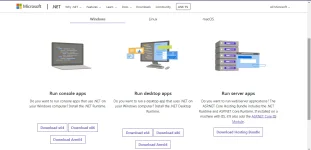
4. Run nyo na bot exe kung nagawa nyo lahat sa taas
close window to stopor type nyo stop sa cmd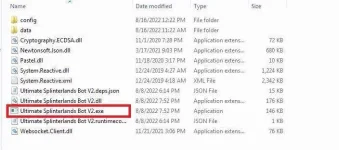
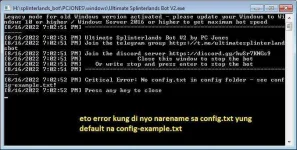
sample overview:
View attachment splinterland bot pc.mp4
Alternative nyo din kay Pappy Alfredo sa GH
(botzip, install nodejs, edit .env-example)
-google is your friend

goodluck!
MOBILE VERSION STEPS:
(botzip link, edit accounts and config, userland, paste code)
1. right click copy link address save sa notepad yung linux-arm64 zip
- same link sa githab sa taas
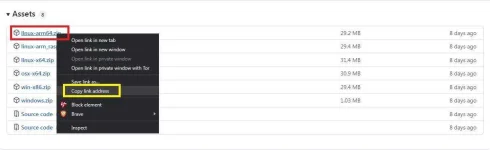
2. kung may bagong update si PappyJones?
ipalit nyo lang sa highlighted na BLUE colorcode 01 (copy code and paste sa terminal) kung yung v2.14 na bot use nyo
credits sa code kay pappy jackfrozensudo apt update && sudo apt install nano unzip libicu-dev -y ; wget You do not have permission to view the full content of this post. Log in or register now.; unzip linux-arm64 ; cd linux-arm64 ; nano config/accounts-example.txt ; nano config/config-example.txt ; chmod +x ./Ultimate\ Splinterlands\ Bot\ V2 ; ./Ultimate\ Splinterlands\ Bot\ V2
code 02 (copy code and paste sa terminal) kung yung v2.15 (latest as of August 20,22)
- added nano config/card_settings-example.txt para pop up at edit niyo to true (use this card settings)
sudo apt update && sudo apt install nano unzip libicu-dev -y ; wget You do not have permission to view the full content of this post. Log in or register now.; unzip linux-arm64 ; cd linux-arm64 ; nano config/accounts-example.txt ; nano config/config-example.txt ; nano config/card_settings-example.txt ; chmod +x ./Ultimate\ Splinterlands\ Bot\ V2 ; ./Ultimate\ Splinterlands\ Bot\ V2
3. Punta sa PS download si USERLAND
4. Open and select nyo si Kaylee para mainstall
5. pag nagopen na yung terminal? paste nyo yung code01
6. mag pop up yung accounts-example.txt
lagay nyo ign or username + posting keyexample:
olatsboy:5kjaboehjbzabsbdhdncjckddmdkdkdijejPKSDJ
para masave
press CTRL, press X then enter, click Y then rename nyo to accounts.txt
press enter, press Y
7. mag pop up yung config-example.txt
- gayahin nalan sa sample 2b sa taas via PC (red values)
press CTRL, press X then enter, click Y then rename nyo to config.txt
press enter, press Y
8a. auto start na yung game (kung yung version v2.14 gamit nyo=code01)
8b. magpop up yung card_settings-example.txt (kung yung v2.15 gamit niyo=code02)
- use this card settings set niyo sa "true"
- then diskartehan niyo na ibang settings
- save niyo as card_settings.txt (alisin niyo yung example na word)
9. type STOP kung ayaw nyo na magrun or CTRL + C, taposs CTRL+D para exit
10. exit and balik sa session tab (long press, end session)
KUNG gusto ulit irun?
Open Userland, select Kayleepaste nyo code sa terminalstart new battle:
code:
cd linux-arm64;./Ultimate\ Splinterlands\ Bot\ V2
kung gusto edit username at postingkey:
code:
cd linux-arm64;nano config/accounts.txt
kung gusto edit config settings:
code:
cd linux-arm64;nano config/config.txt
kung gusto edit card settings:
code:
cd linux-arm64;nano config/card_settings.txt
goodluck!
sample video mobile setup
View attachment p h c e t h o s.mp4
Bato nyo nalan sa staking or pools maipon na DEC at SPS 
tutorial thread (HERE)FINAL VERDICT SA BOT (PC JONES)
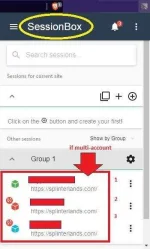
 kayang dalhin sa SILVER III (diko na sinubukan sa Silver II at masyado mataas need na power at season points para makakuha ng season chests) sa modern nyo iset para less power needed vs sa wild sa mobile nyo irun para sulit at 24/7 depende nalang kung may update sa splinter para magstop yung bot (yun kung naka unli data or wifi kayo) set nyo 10mins per battle and above para di ubos yung ECR, stop pag below 70 or 50 sa config_settings.txt (pero diskarte nyo kung gusto nyo every 3-5mins per battle stop at 70 ECR) pag PC gamitan nyo ng session box extension para macheck nyo sabay sabay mga ccounts (tapos sa mobile nakarun yung bot or PC kung trip nyo)
session box sample
 season rewards ito lang habol ko na makuha bonus nalan sa chest sa focuskung anung league ka last season, un din basehan sa makukuha mo sa chests
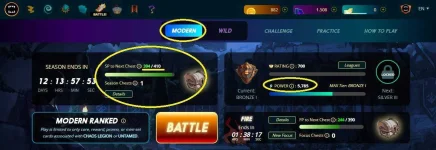 focus chests kung anung league ka last season, un din basehan sa makukuha mo sa chests kung last season Silver League, at ngayon Bronze lang, ung rewards mo sa chest pang Silver padin
sample rewards Bronze league after end of season
kahit papaano nakakasungkit padin ng cards kahit Bronze lang natapos kada season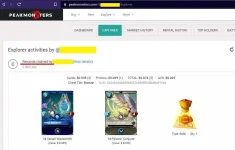
sample rating pag naka bot
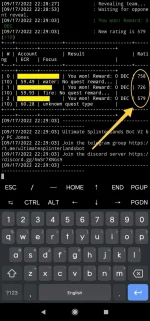
Dahil nagbago ng update si splinter
mas ok kung may sarili kang cards or rented (gamit credits) para mas mataas makuha mo sa points (SP at FP) Season Points at Focus Points para makakolek ng chests (pero dapat din mataas ECR above 50) mga new players may 3k credits ata pag bumili sa spellbook (check nyo nalang) para magamit pang rent ng cards, unlike sa mga nauna walang free credits DEC dati rewards sa battle, ngayon SPS yung pinalit nila, diko na sure sa upper leaguesa cards explore nyo nalan at review sa battles, kadalasan nakikita ko gamit tong water card na to

ipon nyo lang mapanalunang cards pag tumaas value, benta nyo kung gusto nyo sa market
Gamit ko padin old bot 2.15 version (check nyo nalan new vesrion kung gusto nyo)
-so far happy nako sa results kada season
Spoiler contents are visible only to Established Members.
 salamat po