 PH
PH
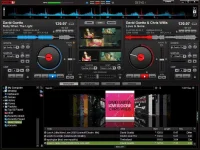
VirtualDJ is the hottest AUDIO and VIDEO mixing software, targeting DJs from the bedroom, mobile, and professional superstars like Carl Cox.
With VirtualDJ's breakthrough BeatLock engine, songs will always stay in beat, and the DJ works their mixes incredibly faster than they ever could.
The automatic seamless loop engine and synchronized sampler let the DJ perform astounding remixes live, with no preparation at all. The visual representation and the cues allow a DJ to clearly see the song structure and never be surprised by a break. The vinyl controls will let you scratch like on a real turntable, except that with the beat lock engine your scratches will never end out of the beat.
Add to that the infinite number of cue points a DJ can save for each song and a large collection of wonderful automatically beat-synchronized effects.
And with VirtualDJ's large collection of skin interfaces to suit everybody from the beginner to the professional DJ, the possibility to record the DJ's mix to then burn to CDs, to broadcasting on the Internet and/or the DJ's own radio station, to use headphones to preview the song, or use an external mixer to perform in a club; VirtualDJ is a DJ's ULTIMATE mix software.
Lastly, enter the new era of DJs mixing video-enhanced songs (DVD, DivX, MPEG...) which can be sent to monitors, TVs, or a projector for display on a giant screen.
VirtualDJ brings all that and more to the DJ in the most easy-to-use way and at the most affordable price for the ULTIMATE DJ MIX EXPERIENCE.
MINIMUM system requirements:
Intel® Pentium® 4 or AMD Athlon™ XP
1024x768 resolution
DirectX compatible soundcard
512MB RAM
50MB free on the hard drive
RECOMMENDED system requirements:
Intel® Core™ 2 or AMD Athlon™ X2
Microsoft® Windows 7 Professional (or newer)
1280x1024 resolution (or higher)
Multi-channel DirectX compatible soundcard
1024MB RAM
200MB free on the hard drive
Additional requirements for Video mixing:
2048MB (2GB) RAM
ATI™ or NVIDIA® video card w/256MB of Dedicated DDR3 RAM
The video card must support dual-screen output
Supported Operating System:
MINIMUM: Microsoft® Windows XP SP3 or newer
RECOMMENDED: Microsoft® Windows 7 Professional 32-bit
You do not have permission to view the full content of this post. Log in or register now.
