PH
PHRen Percivi
Eternal Poster
SHARE LIVE
HOW TO JOIN SHARE LIVE
Click the link below
You do not have permission to view the full content of this post. Log in or register now.
Steps:
1. Put your mobile number excluding "0"
Example: 9123456789
09123456789
2. Click "Get" to obtain verification code
3. Enter the verification code
4. Create a password CAREFULLY and DO NOT FORGET the PASSWORD!
5.Click "Registretion"
Congratulations you've created an Account

6. Download the app and install
You do not have permission to view the full content of this post. Log in or register now.
7. Open the app and Log in your account
8. Input your nickname you want
9. Click the cat logo above and choose and pick your desired photo to display then click "completed"
10. Click "Start Share Live"
11. "Received 1000 diamonds" will appear, CLICK "OK"
12. "New Comer Welfare" will appear, CLICK "Get it right now"
13. You will be directed to "Activate Shared"
14. Below, CLICK "Experience revenue 6 days" for FREE
15. "Confirm activation Lv C Shared" will appear, CLICK " Confirm"
16. "Activated SucceedLv CShared!" will appear, CLICK "Confirm"
HOORAY YOUR ACCOUNT IS NOW EARNING WITHIN 6 DAYS REVENUE TRIAL FOR FREE 
FOR FREE TRIAL CAN EARN 999 = 9.9 pesos PER DAY.
MINIMUM WITHDRAWAL 6000 = 60 pesos
HOW TO BIND MY GCASH
1. CLICK "My" below right
2. CLICK "Withdraw" above right
3. CLICK " + Bind bank card"
4. CLICK " U.S.A"
5. Find " Philippines" then CLICK "confirm"
7. CLICK "Please select a bank"
8. SCROLL UP to reach the Bottom part
9. CLICK "Globe Gcash" then CLICK "Confirm"
10. In "Actual Name" indicated, input your Gcash Name
11. In "Receiving bank card number" input your Gcash number EXCLUDING "0"
Example: 9123456789
09123456789
12. In "Telephone" indicated, just input your Gcash number EXCLUDING "0"
Example: 9123456789
09123456789
13. CLICK "Bind now"
CONGRATULATIONS
YOU'VE SUCCESSFULLY BINDED YOUR GCASH
HOW TO GET MY INVITATIONAL LINK
1.Open SHARE LIVE , then CLICK "Shared" below middle
2. CLICK "Agent" above
3. CLICK "Promotional Material" below
4. Just choose what you desired to copy "copy link" or "Scan QR code"
CONGRATULATIONS YOU HAVE SUCCESSFULLY OBTAIN YOUR INVITATIONAL LINK 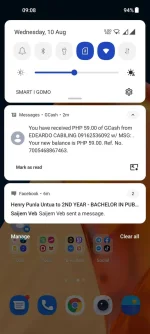
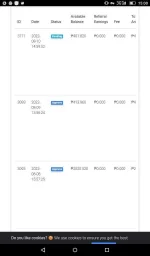
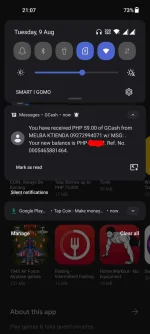 PROOF OF WITHDRAWAL
HOW TO JOIN SHARE LIVE
Click the link below
You do not have permission to view the full content of this post. Log in or register now.
Steps:
1. Put your mobile number excluding "0"
Example: 9123456789
09123456789
2. Click "Get" to obtain verification code
3. Enter the verification code
4. Create a password CAREFULLY and DO NOT FORGET the PASSWORD!
5.Click "Registretion"
Congratulations you've created an Account
6. Download the app and install
You do not have permission to view the full content of this post. Log in or register now.
7. Open the app and Log in your account
8. Input your nickname you want
9. Click the cat logo above and choose and pick your desired photo to display then click "completed"
10. Click "Start Share Live"
11. "Received 1000 diamonds" will appear, CLICK "OK"
12. "New Comer Welfare" will appear, CLICK "Get it right now"
13. You will be directed to "Activate Shared"
14. Below, CLICK "Experience revenue 6 days" for FREE
15. "Confirm activation Lv C Shared" will appear, CLICK " Confirm"
16. "Activated SucceedLv CShared!" will appear, CLICK "Confirm"
HOORAY
YOUR ACCOUNT IS NOW EARNING WITHIN 6 DAYS REVENUE TRIAL FOR FREE FOR FREE TRIAL CAN EARN 999
= 9.9 pesos PER DAY.MINIMUM WITHDRAWAL 6000
= 60 pesosHOW TO BIND MY GCASH
1. CLICK "My" below right
2. CLICK "Withdraw" above right
3. CLICK " + Bind bank card"
4. CLICK "
U.S.A"5. Find "
Philippines" then CLICK "confirm"7. CLICK "Please select a bank"
8. SCROLL UP to reach the Bottom part
9. CLICK "Globe Gcash" then CLICK "Confirm"
10. In "Actual Name" indicated, input your Gcash Name
11. In "Receiving bank card number" input your Gcash number EXCLUDING "0"
Example: 9123456789
09123456789
12. In "Telephone" indicated, just input your Gcash number EXCLUDING "0"
Example: 9123456789
09123456789
13. CLICK "Bind now"
CONGRATULATIONS
YOU'VE SUCCESSFULLY BINDED YOUR GCASH
HOW TO GET MY INVITATIONAL LINK
1.Open SHARE LIVE , then CLICK "Shared" below middle
2. CLICK "Agent" above
3. CLICK "Promotional Material" below
4. Just choose what you desired to copy "copy link" or "Scan QR code"
CONGRATULATIONS
YOU HAVE SUCCESSFULLY OBTAIN YOUR INVITATIONAL LINK PROOF OF WITHDRAWAL