PH
PHLIGHTGreenPH
Forum Veteran
It's already been forever since I last posted here. And since sa tingin ko makakatulong 'tong thread na 'to sa iba, share ko na rin since nagwork siya sa akin.
Kapag magveverify sa gcash using national id, usually nakakaencounter ng "blurry photo" na bug kapag iccapture na 'yung back side nung id, and at first I thought na wala nang pag-asa kasi I already tried it several times, for several days. Pero upon doing 'yung ginawa ni noturbru (nakita ko comment niya sa isang thread dito and upon trying what he did, nagwork siya sa akin kaya thanks bro!).
So, heto na nga 'yung step-by-step:
1. Just do the normal steps in verifying your gcash hanggang mapunta na kayo doon sa pagcapture ng id.
2. Capture the front side nung id hanggang sa magsuccess.
3. Iposition niyo 'yung pagcapture niyo sa backside ng national id niyo like sa mga pictures na nasa baba (second photo owned by noturbru):
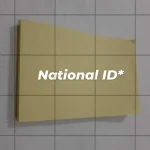
Bale sa unang pic, nakatagilid 'yung pagcapture ko. As in nakalandscape na siya and talagang gilid na gilid. Make sure lang na sundin pa rin itong guide ni gcash:
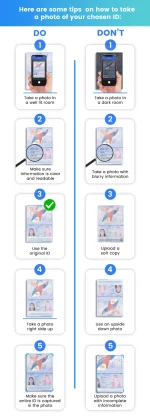
Usually, mas gumagana kapag nakalandscape ang phone sa pagcapture (and nakalandscape din ang position ng id, at sa left side ng id umpisa ng pagcapture). Make sure lang din na nadedetect fully yung id and nasa loob siya nung frame.
Tip: Stabilize niyo ang paghawak sa phone habang nagcacapture para mascan talaga ng maayos ang details ng id. Make sure din mga paps na hindi nagalaw-galaw (or malikot) 'yung frame kapag icacapture niyo na id kasi ibig sabihin nun nahihirapan 'yung AI ni GCash na madetect 'yung sides ng ID.
Di nagwork sa akin 'yung angle tulad nitong nasa baba pero try niyo na lang din mga paps baka magwork sa inyo.
4. Itry niyo lang iba't ibang angle hanggang magsuccess siya.
After doing the steps above, nafully verify ko naman 'yung account ko. Pero, meron lang akong napansin. When I went to User Profile > Personal Info > Edit My Profile, nakalagay doon is "Upgrade in Process" pa rin.
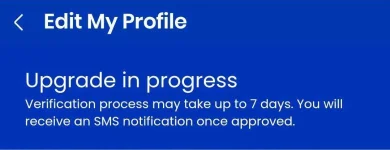
And, sa text na nareceive ko, 'eto ang nakalagay:
"As part of our regular account review, your GCash account has been reverted to a Basic User Profile. To continue using all GCash services like Send Money, Bank Transfer and Save Money, simply log in to GCash App, tap "Edit My Profile" and complete the verification process. Thank you."
"Thank you for going through the KYC process Ref No. ####. Please ensure that your registration details are true and complete to avoid deactivation of your account."
Sa unang quotation, napansin ko lang 'yung part na "your account has been reverted to a Basic User Profile. Normal lang ba 'yun para sa mga Verified User?
Sa second quotation naman, parang pinapahiwatig na success 'yung KYC aka verification?
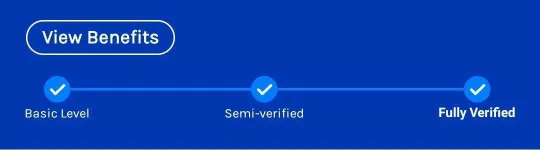
Bottomline, naverify 'yung gcash account ko since nakapagsend akong balance sa other gcash account, etc. ang hindi ko lang sure is kung marerevert pa ba 'yung account ko into Basic User since medyo di normal 'yung angle ng pagcapture ko sa back side nung id ko (which by the way is the only way I know to make the verification using national id a success).
Ano sa tingin niyo mga paps? Any opinion is welcome po para maclear din 'tong issue na ito hehe
Kapag magveverify sa gcash using national id, usually nakakaencounter ng "blurry photo" na bug kapag iccapture na 'yung back side nung id, and at first I thought na wala nang pag-asa kasi I already tried it several times, for several days. Pero upon doing 'yung ginawa ni noturbru (nakita ko comment niya sa isang thread dito and upon trying what he did, nagwork siya sa akin kaya thanks bro!).
So, heto na nga 'yung step-by-step:
1. Just do the normal steps in verifying your gcash hanggang mapunta na kayo doon sa pagcapture ng id.
2. Capture the front side nung id hanggang sa magsuccess.
3. Iposition niyo 'yung pagcapture niyo sa backside ng national id niyo like sa mga pictures na nasa baba (second photo owned by noturbru):
Bale sa unang pic, nakatagilid 'yung pagcapture ko. As in nakalandscape na siya and talagang gilid na gilid. Make sure lang na sundin pa rin itong guide ni gcash:
Usually, mas gumagana kapag nakalandscape ang phone sa pagcapture (and nakalandscape din ang position ng id, at sa left side ng id umpisa ng pagcapture). Make sure lang din na nadedetect fully yung id and nasa loob siya nung frame.
Tip: Stabilize niyo ang paghawak sa phone habang nagcacapture para mascan talaga ng maayos ang details ng id. Make sure din mga paps na hindi nagalaw-galaw (or malikot) 'yung frame kapag icacapture niyo na id kasi ibig sabihin nun nahihirapan 'yung AI ni GCash na madetect 'yung sides ng ID.
Di nagwork sa akin 'yung angle tulad nitong nasa baba pero try niyo na lang din mga paps baka magwork sa inyo.
4. Itry niyo lang iba't ibang angle hanggang magsuccess siya.
After doing the steps above, nafully verify ko naman 'yung account ko. Pero, meron lang akong napansin. When I went to User Profile > Personal Info > Edit My Profile, nakalagay doon is "Upgrade in Process" pa rin.
And, sa text na nareceive ko, 'eto ang nakalagay:
"As part of our regular account review, your GCash account has been reverted to a Basic User Profile. To continue using all GCash services like Send Money, Bank Transfer and Save Money, simply log in to GCash App, tap "Edit My Profile" and complete the verification process. Thank you."
"Thank you for going through the KYC process Ref No. ####. Please ensure that your registration details are true and complete to avoid deactivation of your account."
Sa unang quotation, napansin ko lang 'yung part na "your account has been reverted to a Basic User Profile. Normal lang ba 'yun para sa mga Verified User?
Sa second quotation naman, parang pinapahiwatig na success 'yung KYC aka verification?
Bottomline, naverify 'yung gcash account ko since nakapagsend akong balance sa other gcash account, etc. ang hindi ko lang sure is kung marerevert pa ba 'yung account ko into Basic User since medyo di normal 'yung angle ng pagcapture ko sa back side nung id ko (which by the way is the only way I know to make the verification using national id a success).
Ano sa tingin niyo mga paps? Any opinion is welcome po para maclear din 'tong issue na ito hehe
FEEDBACKS:
boss salamat..gumana nga


Ang ginawa ko tinagilid ko ng konti ung ID ko, after 3 tries nadale din
Salamat dito boss...tagal ko na to problema....kahit anong subok ko mag verify gamit ang philsys/National ID ayaw padin.....buti may mga naka hanap ng paraan kagaya nito
nakapag proceed ako hanggang last step. ive been trying for more than a month so thank you very much! currently waiting for confirmation if verified na ba talaga