 PH
PHComplete guide paano iwasan ang thermal throttling/overheating (for Windows only)
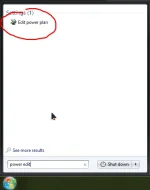
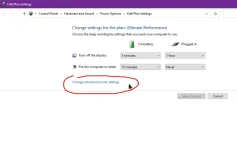
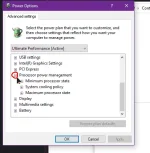
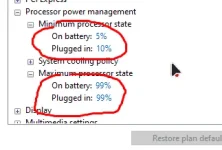
CLICK APPLY AND OK AFTER NITO
QUESTION: Bakit nga ba 99%?
Answer: 99% Para di mag reach to the max ang CPU usage, note na ma disable rin dito yung turbo boost niya kung merong turbo boost ang CPU mo.
Pros and Cons based on my experience.
PROS:
-Makakapalow ng temperatures
-No need to worry na sa long game runs kung mag ge-games ka.
CONS:
-Ma di-disable ang turbo boost niya.. so para sa mga video editors jan or photo editors or mag fa-file transfer, i suggest na e set lang to 100% para madali ma execute tasks niyo.
Hope this helps.
CLICK APPLY AND OK AFTER NITO
QUESTION: Bakit nga ba 99%?
Answer: 99% Para di mag reach to the max ang CPU usage, note na ma disable rin dito yung turbo boost niya kung merong turbo boost ang CPU mo.
Pros and Cons based on my experience.
PROS:
-Makakapalow ng temperatures
-No need to worry na sa long game runs kung mag ge-games ka.
CONS:
-Ma di-disable ang turbo boost niya.. so para sa mga video editors jan or photo editors or mag fa-file transfer, i suggest na e set lang to 100% para madali ma execute tasks niyo.
Hope this helps.