 PH
PHDownload the app needed and the m3u file. Then install IPTV Smarter ρrø apk.
IPTV Smarter ρrø
You do not have permission to view the full content of this post. Log in or register now.
M3u file
You do not have permission to view the full content of this post. Log in or register now.
Then save the m3u file to internal storage. Remember the folder which the file is downloaded. I recommend saving it to Internal Storage's Download folder.
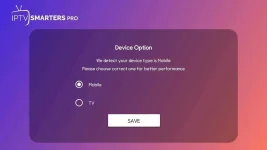
Once the app is installed. It will ask you for your type of device. Click based on your preferences.
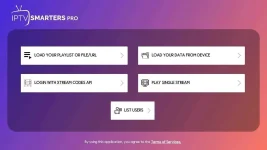
Now it's time to load your m3u file. Click on the LOAD YOUR PLAYLIST OR FILE/URL
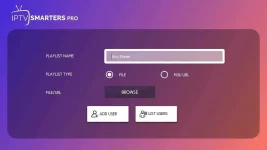
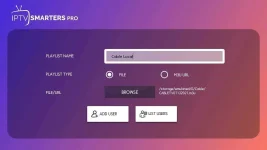
Then it will ask you for a playlist name. Enter your preffered name and click browse.
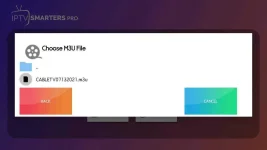
Locate the file you have downloaded. Go to the folder which contains the m3u file you downloaded. The file name is CABLETV061922.m3u
Make sure it shows the imported m3u file. Then click ADD USER.
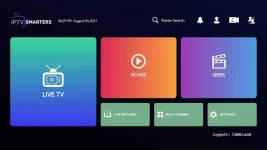
Now it will show the Home Interface. Click on LIVE TV
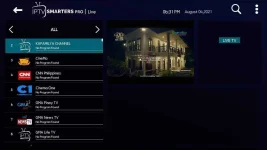
There you can select your preferred channel you want to watch.

Thank you and have a good day!
IPTV Smarter ρrø
You do not have permission to view the full content of this post. Log in or register now.
M3u file
You do not have permission to view the full content of this post. Log in or register now.
Then save the m3u file to internal storage. Remember the folder which the file is downloaded. I recommend saving it to Internal Storage's Download folder.
Once the app is installed. It will ask you for your type of device. Click based on your preferences.
Now it's time to load your m3u file. Click on the LOAD YOUR PLAYLIST OR FILE/URL
Then it will ask you for a playlist name. Enter your preffered name and click browse.
Locate the file you have downloaded. Go to the folder which contains the m3u file you downloaded. The file name is CABLETV061922.m3u
Make sure it shows the imported m3u file. Then click ADD USER.
Now it will show the Home Interface. Click on LIVE TV
There you can select your preferred channel you want to watch.
Thank you and have a good day!