 PH
PHOTT Player po hindi po navigator. Iba po yun. Kung naka android ka at gumagamit na ng OTT Navigator, you should be fine.sir you mean to say may mga channel na not working dahil sa ott navigator? ano pa ba alternative? using mi stick tv, pasensya na leecher ako pero 2019 pa ko registered dito hahaha di lng ganun kaactive nasa kabila p kasi ako nun sa phc.onl/#forbidden#
-
Welcome to PHCorner Forums! Sign up for free to unlock full access and exclusive privileges, including:
- Asking questions about computer and mobile issues
- Discovering internet tips for your mobile network and computer
You are using an out of date browser. It may not display this or other websites correctly.
You should upgrade or use an alternative browser.
You should upgrade or use an alternative browser.
🔒 Closed [AdoboTV][IPTV][M3U] Just Like Cable w/ Local Channels & Proper EPG | másáráp kahit walang manok!
Backread lang po onti…Idol, Di nnaman gumagana yung link
E×ρréšš VPN, US serves as bypass ng unli data smart, pero Di na masyado need ngyon,vpn then anong country boss? us?
gumagana sakin boss, mi stick gamit ko ung ott navigator
Working din yan sa PLDTwifi
Alam mo nman Ang isp sa Pinas, Minsan nag kukunat, throttling
Feel free to test sa ibang streaming apps, hanap lang kayo kung saan compatible
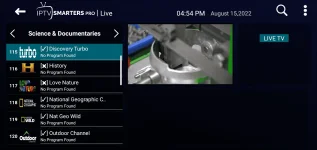
Install mo yung PVR IPTV Simple Client, Input Stream Adaptive, FFmpeg InputStream from Kodi repository:saan pupunta pag kodi yung gamit?
Click Settings > click Add-ons > Click Install from repository > click on Kodi repository > scroll down and click on PVR clients > scroll down and click on PVR IPTV Simple Client at hintaying matapos ang install, may lalabas na notification Add-on installed.
Next, balik ka sa previous page, Kodi repository: click on the two dots on top of the list > scroll down and click on Video Player Inputstream > click on Input Stream Adaptive at hintaying matapos ang install, may lalabas na notification Add-on installed.
Next, click on Inputstream FFmpeg Direct at hintaying matapos ang install, may lalabas uling notification Add-on installed.
And last install, para sa added support, click on RTMP Input at hintaying matapos ang install, may lalabas uling notification Add-on installed.
Click Return once, para bumalik sa Settings.
Configuration:
Click Add-ons > click on My Add-ons > scroll down and click on PVR clients > click on PVR IPTV Simple Cient > click on Configure button > under the General category, select Remote path (internet address) in Location and then type in the AdoboTV url in the -M3U playlist URL. Please refer to the picture.
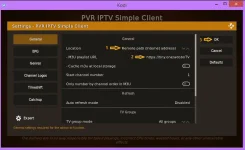
Pagkatapos niyan, click on Disable button and then Enable again para mag-load na siya ng playlist data, may maliit na circle na iikot-ikot sa bandang kanan sa itaas ng screen, kapg natapos iyon, punta ka na sa TV section ni Kodi, ready na siya.
Enjoy!
Edit:
Kung marami kang m3u playlist, yung Playlist Loader add-on ang gamitin mo. Isang playlist lang kasi ang pwedeng ilagay sa IPTV Simple Client.
https://phcorner.org/threads/playlist-loader-for-kodi-users-with-multiple-playlists.1072299/
PHC-chrisdrick71215
Forum Guru
nice effort lods laking help to sa mga bago palang mag kodi player, pero masasabi ko goods din talaga kodiInstall mo yung PVR IPTV Simple Client, Input Stream Adaptive, FFmpeg InputStream from Kodi repository:
Click Settings > click Add-ons > Click Install from repository > click on Kodi repository > scroll down and click on PVR clients > scroll down and click on PVR IPTV Simple Client at hintaying matapos ang install, may lalabas na notification Add-on installed.
Next, balik ka sa previous page, Kodi repository: click on the two dots on top of the list > scroll down and click on Video Player Inputstream > click on Input Stream Adaptive at hintaying matapos ang install, may lalabas na notification Add-on installed.
Next, click on Inputstream FFmpeg Direct at hintaying matapos ang install, may lalabas uling notification Add-on installed.
And last install, para sa added support, click on RTMP Input at hintaying matapos ang install, may lalabas uling notification Add-on installed.
Click Return once, para bumalik sa Settings.
Configuration:
Click Add-ons > click on My Add-ons > scroll down and click on PVR clients > click on PVR IPTV Simple Cient > click on Configure button > under the General category, select Remote path (internet address) in Location and then type in the AdoboTV url in the -M3U playlist URL. Please refer to the picture.
View attachment 2089370
Pagkatapos niyan, click on Disable button and then Enable again para mag-load na siya ng playlist data, may maliit na circle na iikot-ikot sa bandang kanan sa itaas ng screen, kapg natapos iyon, punta ka na sa TV section ni Kodi, ready na siya.
Enjoy!
Galing din kasi ako diyan, nahirapan sa paggamit kay Kodi, hanggang ngayon inaaral pa rin. Malaki kasi ang potential niya as Media Center, parang one-stop shop sa entertainment.nice effort lods laking help to sa mga bago palang mag kodi player, pero masasabi ko goods din talaga kodi
PHC-chrisdrick71215
Forum Guru
agree lods , madami pede gawin sa kodi player, pero naka focus lang ako sa m3u, nakakalito talaga sa umpisa kaya laking help tong tut mo about kodi player keep sharing, pero syempre ganun din kay tsGaling din kasi ako diyan, nahirapan sa paggamit kay Kodi, hanggang ngayon inaaral pa rin. Malaki kasi ang potential niya as Media Center, parang one-stop shop sa entertainment.
chief anong build ang ginagamit mo? kadlasan sa ibang build kasi panay need ng account sa debrid.Galing din kasi ako diyan, nahirapan sa paggamit kay Kodi, hanggang ngayon inaaral pa rin. Malaki kasi ang potential niya as Media Center, parang one-stop shop sa entertainment.
Oo naman, suportahan lang sa kapwa nagsi-share at sa mga bago pa lang na nangangailangan ng assist.agree lods , madami pede gawin sa kodi player, pero naka focus lang ako sa m3u, nakakalito talaga sa umpisa kaya laking help tong tut mo about kodi player keep sharing, pero syempre ganun din kay ts
Paps, iwas ako sa mga builds dahil diyan. Sa mga add-ons lang talaga ang focus ko.chief anong build ang ginagamit mo? kadlasan sa ibang build kasi panay need ng account sa debrid.
mechagojira
Fanatic
salamatInstall mo yung PVR IPTV Simple Client, Input Stream Adaptive, FFmpeg InputStream from Kodi repository:
Click Settings > click Add-ons > Click Install from repository > click on Kodi repository > scroll down and click on PVR clients > scroll down and click on PVR IPTV Simple Client at hintaying matapos ang install, may lalabas na notification Add-on installed.
Next, balik ka sa previous page, Kodi repository: click on the two dots on top of the list > scroll down and click on Video Player Inputstream > click on Input Stream Adaptive at hintaying matapos ang install, may lalabas na notification Add-on installed.
Next, click on Inputstream FFmpeg Direct at hintaying matapos ang install, may lalabas uling notification Add-on installed.
And last install, para sa added support, click on RTMP Input at hintaying matapos ang install, may lalabas uling notification Add-on installed.
Click Return once, para bumalik sa Settings.
Configuration:
Click Add-ons > click on My Add-ons > scroll down and click on PVR clients > click on PVR IPTV Simple Cient > click on Configure button > under the General category, select Remote path (internet address) in Location and then type in the AdoboTV url in the -M3U playlist URL. Please refer to the picture.
View attachment 2089370
Pagkatapos niyan, click on Disable button and then Enable again para mag-load na siya ng playlist data, may maliit na circle na iikot-ikot sa bandang kanan sa itaas ng screen, kapg natapos iyon, punta ka na sa TV section ni Kodi, ready na siya.
Enjoy!
Edit:
Kung marami kang m3u playlist, yung Playlist Loader add-on ang gamitin mo. Isang playlist lang kasi ang pwedeng ilagay sa IPTV Simple Client.
https://phcorner.org/threads/playlist-loader-for-kodi-users-with-multiple-playlists.1072299/

ronanjames1234
Journeyman
Salamat ulit sirOTT Player po hindi po navigator. Iba po yun. Kung naka android ka at gumagamit na ng OTT Navigator, you should be fine.
mechagojira
Fanatic
sir. di ko makita kung saan Inputstream FFmpeg Direct. wala akoInstall mo yung PVR IPTV Simple Client, Input Stream Adaptive, FFmpeg InputStream from Kodi repository:
Click Settings > click Add-ons > Click Install from repository > click on Kodi repository > scroll down and click on PVR clients > scroll down and click on PVR IPTV Simple Client at hintaying matapos ang install, may lalabas na notification Add-on installed.
Next, balik ka sa previous page, Kodi repository: click on the two dots on top of the list > scroll down and click on Video Player Inputstream > click on Input Stream Adaptive at hintaying matapos ang install, may lalabas na notification Add-on installed.
Next, click on Inputstream FFmpeg Direct at hintaying matapos ang install, may lalabas uling notification Add-on installed.
And last install, para sa added support, click on RTMP Input at hintaying matapos ang install, may lalabas uling notification Add-on installed.
Click Return once, para bumalik sa Settings.
Configuration:
Click Add-ons > click on My Add-ons > scroll down and click on PVR clients > click on PVR IPTV Simple Cient > click on Configure button > under the General category, select Remote path (internet address) in Location and then type in the AdoboTV url in the -M3U playlist URL. Please refer to the picture.
View attachment 2089370
Pagkatapos niyan, click on Disable button and then Enable again para mag-load na siya ng playlist data, may maliit na circle na iikot-ikot sa bandang kanan sa itaas ng screen, kapg natapos iyon, punta ka na sa TV section ni Kodi, ready na siya.
Enjoy!
Edit:
Kung marami kang m3u playlist, yung Playlist Loader add-on ang gamitin mo. Isang playlist lang kasi ang pwedeng ilagay sa IPTV Simple Client.
https://phcorner.org/threads/playlist-loader-for-kodi-users-with-multiple-playlists.1072299/
Anong version ni Kodi ang gamit mo? Kung Leia pa rin ang gamit mo, disregard mo na lang si FFmpeg Direct at RTMP Input, yung Input stream Adaptive na lang ang install mo. Version 18.9 ang gamitin mo, kung Leia pa rin ang preferred mong version.sir. di ko makita kung saan Inputstream FFmpeg Direct. wala ako
mechagojira
Fanatic
v18.0 leia-alphaAnong version ni Kodi ang gamit mo? Kung Leia pa rin ang gamit mo, ignore mo na lang. yung Input stream Adaptive na lang ang install mo.
Ok, disregard mo na lang yung dalawa, importante yung InputStream Adaptive. Version 18.9 ang gamitin mo kung mas preferred mong version si Leia.v18.0 leia-alpha
About this Thread
-
16KReplies
-
461KViews
-
1KParticipants
Last reply from:
Hangeul
Hangeul
New Topics
-
NBA: WATCH ANY NBA MATCHES HERE
- Started by DavidSling
- Replies: 0
- 📽️ Video Streaming
-
Sacramento Kings vs LA Clippers 10/22/26
- Started by sioshooo
- Replies: 0
- 📽️ Video Streaming
-
Phoenix Suns vs. Portland Trail Blazers 10/22/26
- Started by sioshooo
- Replies: 0
- 📽️ Video Streaming
-
LAKERS VS GOLDEN STATE WARRIORS 10/22/26
- Started by sioshooo
- Replies: 1
- 📽️ Video Streaming
-
FREE NBA STREAMs AND OTHER SPORTS
- Started by bIOSman26
- Replies: 0
- 📽️ Video Streaming
-
Roch PH Full Dump
- Started by jobmasterlester
- Replies: 2
- 📽️ Video Streaming
-
NBA Games Today Live Streams
- Started by dluploader
- Replies: 1
- 📽️ Video Streaming
-
Combo.txt or Xtreme
- Started by reko266
- Replies: 0
- 📽️ Video Streaming
-
NBA HOU VS DALLAs
- Started by rodeOats27
- Replies: 0
- 📽️ Video Streaming
-
HOA ni nyun, nastock
- Started by noahhh848
- Replies: 3
- 📽️ Video Streaming
Trending Topics
Online now
- Members online
- 1,220
- Guests online
- 11,568
- Total visitors
- 12,788