 PH
PH
D
Deleted member 2028535
Record Every Activity on PC with iTop Screen Recorder
iTop Screen Recorder is an easy-to-use screen recording software that comes with a built-in video editor. It lets you record every important and precious moment in your daily life and make the video you record even better. You should use it to record videoconferences, webinars, lectures, and more. You can also use it to record games, 4K movies, and more. iTop Screen Recorder is a lightweight Windows PC screen recorder that has simple steps, a wide range of recording options, and original graphical video quality. The new version significantly improves game recording performance by utilizing modern GPU rendering and encoding technology.
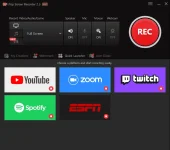
Features and Highlights
- Flexibly Capture Any Area of Your Screen: Record high-quality (4k supported) videos from a full screen, a window, or any selected region.
- Simultaneously Record Video, Audio, and Webcam: You can record your face and voice together in a video with a webcam and microphone for recording tutorials, games, and more. You can also record and save a separate audio file for music or your voice as per your needs.
- Professional Game Recording Mode Without Any Lag: By adopting advanced GPU rendering & encoding technology, the professional game recording mode is totally different from the other common game recording. You can record HD videos for various 2D/3D games.
- Make your own watermark: To keep your videos from being copied, you can make your own watermark with your own characters, fonts, colors, and sizes.
- Easily Add Annotations: To make your videos more attractive, you can add doodles such as Pen drawings, rectangles, Oval, Line, Arrowheads, and Texts in your videos while recording.
- Add Mouse Click Effects: You can add mouse click effects by highlighting the cursor and adding mouse click animation. Thus, it is the ideal tool for recording video conferences, webinars, lectures, presentations, games, etc.
- Supports Popular Video & Audio Formats: When it comes to saving, you have a wide range of video formats to choose from, such as MP4, AVI, FLV, MKV, MOV, TS, and GIF.
- Screen Capture with Hotkey: quickly take screenshots with hotkey while recording.
- Built-in video editor: Trim, cut, and split the captured videos.
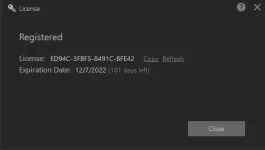
Get iTop Screen Recorder Pro for Free:
- Just download the installer from the You do not have permission to view the full content of this post. Log in or register now..
- Install and launch the app, on the main Window click the “Key” icon.
You do not have permission to view the full content of this post. Log in or register now.
License Key (until December 07, 2022):
ED94C-3FBF5-8491C-BFE42
