 PH
PHsenpaichuchu
Grasshopper
Lightroom not working Sa Develop like mag eedit kana ng picture only show white screen nakaka import sya but di mo ma eedit, parang naka disabled yung DEVELOP page
I'm using M1 Air 2020
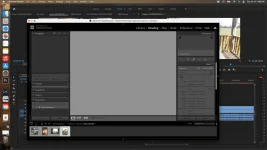
I'm using M1 Air 2020
yan sinabi ng iba check ko pa sunod paàno sya gumanaLightroom not working Sa Develop like mag eedit kana ng picture only show white screen nakaka import sya but di mo ma eedit, parang naka disabled yung DEVELOP page
I'm using M1 Air 2020
View attachment 2456526
Thank u in Advance poyan sinabi ng iba check ko pa sunod paàno sya gumana
 )
)thank you, lotsbroken link po huhu lightroom
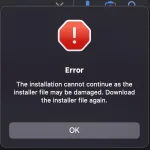
Anong os and cpu mo?Sir pano pag ung AE naiinstall siya pero nag fafailed after ilang percent, "Unable to complete installation Error Code: 127"
MAC M1 sirAnong os and cpu mo?
pm tayo broMAC M1 sir
anong problema?sir PHC_LaCe12 baka matulongan mo ako sa m1 air
anong problema?
Pm tayo need ko remote yan
san po?Pm tayo need ko remote yan
Worked after following this steps. Salamat ng madami! Working on my M1 Macbook AirTRY NYO SA M1 (di sa akin to di ko din na try na procedure kasi busy try nyo then pa feedback)
This is how to solve the greyed out Development module ;
PS : thanx to “LostPerson” who write this answer and i just share you what he and i done to make it work.
Breakdown step guide:
1. Download Adobe Creative Cloud from their offical website and log in with a legitimate account
Note: I did not begin a trial for Lightroom as it is not necessary
After downloading the .dmg there are 3 files and txt file
2. Inside open Lightroom Classic 11.4.1 U2B AIO [RiD] > right click install.app > click show package contents > click contents > click macOS > click Install
If prompted by Adobe DENY EVERY SINGLE REQUEST for keychain. You have already established keychain when you downloaded Adobe CC officially.
If you put your password in for keychain develop mode WILL STOP WORKING
DO put your password in to install Lightroom 11.4.1
3. Install the Lightroom Classic 11.4.1 U2B AIO [RiD].pkg
This is the ρá†ch
I did not need to install AntiCC as downloading the offical Adobe Creative Cloud was sufficient
4. After installing Lightroom 11.4.1 and the ρá†ch.pkg you may be prompted to put your password in for keychain
AGAIN DENY EVERY REQUEST or else develop mode is known to grey out and stop functioning
To prevent the pop up for keychain access:
1. Search for Keychain Access
2. In Default Keychain – Login, search for Adobe and delete every single yellow icon certificate named Adobe
Now if you open Lightroom it will not request for keychain access and it will function properly, including develop mode.