PH
PHlorenz11110
Leecher
Mga boss patulong namn po lang po ko dito.. Alam nyu po ba ang solusyun kung hind makadownload ang phone kahit anong file.. Tinry ko na sa lahat ng browser ehh.. Tnx sa papansin.
S3octa cherry.
S3octa cherry.

Google Play Store Crashing
If Google Play crashes after launching it, you might have a corrupt cache. Most of the time, simply wiping its cache fixes the problem. Most versions of Android use generally the same steps. Go to:
- Settings
- Apps
- Swipe right to locate the “all” tab
- Locate Google Play Store and wipe cache and data
- Restart your You do not have permission to view the full content of this post. Log in or register now.
Remember to restart the device after performing the wipes.
- Google Play Services
- Google Services Framework
Insufficient Space on Device
Android allocates fixed storage space for apps. Users can’t expand it. So you might run into this error even if your device indicates a great deal of remaining storage capacity.
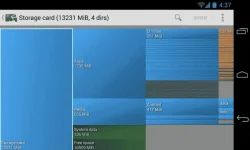
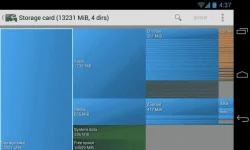
The easiest way to free up space is to begin uninstalling apps. However, if you use music apps, like Spotify, you might not be able to find where the files are being stored. The quickest way to free up space is to use an app like You do not have permission to view the full content of this post. Log in or register now.. If you want to get a visual display of where all your memory is going, try using You do not have permission to view the full content of this post. Log in or register now.. It will visually display your files’ locations and size.
Google Play Store Not Downloading Apps
Sometimes Google Play won’t install applications. There’s two kinds of popular fixes. The first is to wipe Google Play’s cache. The second is to erase Google Play’s history.
Wipe Google Play Cache
In my experience, the best fix is to wipe Google Play’s cache. Go to:
Wipe Google Play History
- Settings
- Apps
- Swipe right to locate the “all” tab
- Locate Google Play Store and wipe cache and data
- Restart your phone
I’m skeptical about this fix. However, for those desperate, give it a shot. Here’s how:
How Do I Install Google Play?
- Open Google Play Store.
- Go to Settings.
- Choose Clear History.
- How to Reinstall the Google Play Store
You can’t uninstall the Google Play Store without root acces (You do not have permission to view the full content of this post. Log in or register now.). Most users who think they’ve deleted Google Play actually have disabled it. To reenable the Play Store, go to:Here’s a video:
- Settings
- Apps
- Swipe right and locate the “disabled” tab.
- Then locate Google Play Store. You can reenable it by tapping on the icon that says “reenable”.
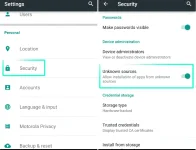
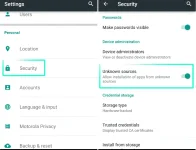
Some imported tablets and smartphones don’t come with the Google Play Store. Users will need to locate an APK (You do not have permission to view the full content of this post. Log in or register now.) from a third party source and then manually install it. Before getting started, you’ll need to enable third party sources. To do so, go to:
Once checked, you can install the Play Store. Here is a link to a legitimate Play Store APK: You do not have permission to view the full content of this post. Log in or register now..
- Settings
- Security
- Then check the box for “unknown sources”
If that fails, try watching this video:
I Need an Older Version of the Google Play Store
Sometimes the newest version of Google Play won’t work on your You do not have permission to view the full content of this post. Log in or register now.. In that case, you can try installing an older version. Here’s an You do not have permission to view the full content of this post. Log in or register now. that includes links to every major version of the Play Store.
How do I Free up Memory on My Android Device?
By memory, you might be referring to RAM. The Android operating system works best with a minimal number of installed applications. That’s because some apps like to run in the background, even when you don’t actually use the app. The more apps installed, the more likely it is that some will run wild in the background. The simplest solution is to uninstall all non-essential applications.
We do You do not have permission to view the full content of this post. Log in or register now. as this will negatively impact the functionality of some of your apps.
System UI Not Working
Sometimes the System User Interface (UI) can stop working. If restarting your device doesn’t fix the problem, I suggest wiping the System UI cache. To wipe the cache, go to:
Downloads Not Working
- Settings
- Apps
- Swipe left to “All” and select System UI
- Then wipe the cache and restart the device
Sometimes downloads will fail. Android includes a dedicated download manager, and its cache can become corrupted. In this case, just wipe the cache.
To wipe the cache, go to:
I Can’t Find My Download
- Settings
- Apps
- Swipe right to “All” and select Download Manager
- Then wipe the cache and restart the device
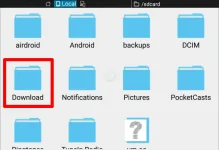
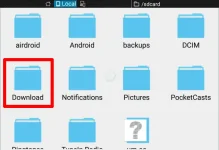
Android by default stores its downloaded files in a folder called “Download”. To locate the Download directory, first install a file manager, like You do not have permission to view the full content of this post. Log in or register now. (ourYou do not have permission to view the full content of this post. Log in or register now.). Once installed, go to sdcard/Download and you should see a complete list of downloaded files.
I Can’t Play a Downloaded Video
Try using You do not have permission to view the full content of this post. Log in or register now. or You do not have permission to view the full content of this post. Log in or register now.. They work on almost every file you can imagine. Sometimes videos in a proprietary format won’t play. There’s no real solution for this issue, other than installing the proprietary video player.
I Installed Malware!
Never install a You do not have permission to view the full content of this post. Log in or register now. or app — it probably has malware on it. But if you already have malware, simply uninstall the culprit. If you’re not sure which app is wreaking mayhem on your phone, try a You do not have permission to view the full content of this post. Log in or register now.. If that fails, use some of our tips on finding You do not have permission to view the full content of this post. Log in or register now..
Out of the three malware scanners we’ve reviewed, my favorite is You do not have permission to view the full content of this post. Log in or register now.. It’s free, lightweight, and catches a large number of malicious applications.
Internet Not Working
The biggest cause of mobile Internet not working: Improperly configured APN settings. If you use a prepaid/MVNO to provide Internet, chances are you needed to set up an APN to get mobile data. If these settings aren’t properly configured, you must manually set them.
I’ve written an article on You do not have permission to view the full content of this post. Log in or register now..
Can’t Connect to WiFi Network
Chances are, it’s your router that’s at fault. Someone could write a book on the number of problems that WiFi networks cause users — the best solution oftentimes is to restart both your router and your phone.
If that fails, try You do not have permission to view the full content of this post. Log in or register now..
How Do I Break an Android Password?
If you’ve set a password and forgotten it, you’re going to have to perform a factory reset from the bootloader. The bootloader is a preboot environment that allows the restoration of your operating system. There are ways to You do not have permission to view the full content of this post. Log in or register now., but don’t count on it.
First, you’ll need to enter the bootloader. The method varies between models of phone. For most models, you can access the bootloader by completely powering down the device. After powering off, you will hold volume down + the power button until the phone boots. Once inside of the bootloader, you can then choose to factory reset your device.
WARNING: if you have a custom ROM, don’t do this, as it can render your device unbootable.
Android Device Crashes on Boot
If your phone no longer boots, you can enter what’s called “safe mode” — we’ve covered You do not have permission to view the full content of this post. Log in or register now. before. Safe Mode allows users to disable all startup apps that might be crashing the phone. Once booted in through safe mode, you can then remove the misbehaving app.
Android Device No Longer Turns On
First try removing the battery. If the battery can’t be removed, hold down the power button for fifteen seconds. If that fails, plug the device into a power source and hold the power button down for fifteen seconds. If that fails, you may need to either have the device serviced or return it.
For more detail, we have an entire article on what to do if You do not have permission to view the full content of this post. Log in or register now..
Android Not Reading microSD Card
This happens all the time. I prefer formatting the SD card from within Android. This solves just a portion of the issues with SD cards — if you haven’t tried it yet, it’s worth a shot.
To format an Android microSD card, go to:
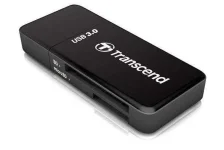
If this fails, you will need to connect the SD card to a PC with a You do not have permission to view the full content of this post. Log in or register now..
- Settings
- Storage
- Scroll down to the bottom and select “Format SD card”
- Then select “Format SD card” again
If your files aren’t readable after connecting to a PC, you will need data recovery software. I recommend using EaseUS’s You do not have permission to view the full content of this post. Log in or register now.. It’s free and effective.
Can’t Connect Android to a Windows PC
There’s two ways (there used to be three) that Android connects to a computer:You do not have permission to view the full content of this post. Log in or register now. (ADB) or Media Transfer Protocol (MTP). ADB lets users interact with Android’s operating system while MTP only permits access to specially designated media storage directories. ADB always causes the most amount of problems.
I have a full-length article on You do not have permission to view the full content of this post. Log in or register now. in Windows. More or less, it’s just a matter of installing Koush’s You do not have permission to view the full content of this post. Log in or register now.. Read the complete article in case that Koush’s drivers aren’t enough.
The Nuclear Option
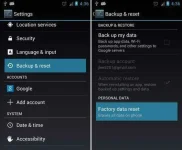
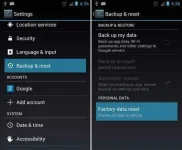
If all else fails, and you’ve even turned to search engines for help, there’s still the Android equivalent of the nuclear option: a factory reset. To perform a factory reset go to:
- Settings
- Backup & reset
- Then choose reset at the bottom of the window