🔒 Closed Pa help po sana, unwanted files sa ssd ng computer ko

Status
Not open for further replies.

grimmjoes123

Eternal Poster
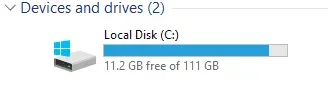
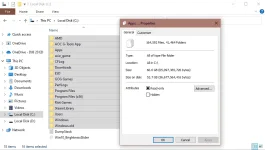
Hello po. Bakit po kaya ang konti nalang ng space ng ssd ko pero nung tinignan ko yung mga laman na files sa disk C halos asa kalahati palang.


Heto po yung natitirang space sa ssd ko
1653490091131.webp


Heto naman po yung laman ng mga folders 60.6 gb lang. Ano po kaya pwede gawin para ma free yung space? salamat po

1653490070430.webp
1653490087862.webp
 
Malamang sa app files yan.
Pwede rin sa frequent updates.

Try mo yung sa run tapos %TEMP%
Delete mo lahat ng files

Pag malaki pa rin, control panel ka tapos mag uninstall ka ng mga apps na di mo ginagamit. Ingat lang sa ibang essential apps baka ma uninstall mo.

Pag kulang pa rin, backup mo important files mo sa ibang hard drive tapos perform ka ng clean OS install ulit. Auto update naman ang on board graphics kaya ang problema mo na lang .net framework at directx update and/or gpu drivers.
 
mag delete ka po ng temporay files mo po,delete ng recycle bin,delete ka ng junk files at try mo mag run 𝐌𝐚𝐥𝐰𝐚𝐫𝐞𝐛𝐲𝐭𝐞𝐬,,try mo po bka gumana thanks
 
this will help a little in saving some space on HD/SSD/M.2

Clean Up Component Store (WinSxS folder) in Windows 10

Open an elevated "Command Prompt". run as Admin


Dism.exe /online /Cleanup-Image /StartComponentCleanup

Dism.exe /online /Cleanup-Image /StartComponentCleanup /ResetBase

Dism.exe /online /Cleanup-Image /SPSuperseded


Also, you can delete windows.old folder if you like.... or run the .bat file bellow....

Save this as TempClean.bat (run 2x) this will clean all temp file.....
@echo off
del /s /f /q %windir%\temp*.*
rd /s /q %windir%\temp
md %windir%\temp
del /s /f /q %windir%\Prefetch*.*
rd /s /q %windir%\Prefetch
md %windir%\Prefetch
del /s /f /q %windir%\system32\dllcache*.*
rd /s /q %windir%\system32\dllcache
md %windir%\system32\dllcache
del /s /f /q “%SysteDrive%\Temp”.
rd /s /q “%SysteDrive%\Temp”
md “%SysteDrive%\Temp”
del /s /f /q %temp%.
rd /s /q %temp%
md %temp%
del /s /f /q “%USERPROFILE%\Local Settings\History”.
rd /s /q “%USERPROFILE%\Local Settings\History”
md “%USERPROFILE%\Local Settings\History”
del /s /f /q “%USERPROFILE%\Local Settings\Temporary Internet Files”.
rd /s /q “%USERPROFILE%\Local Settings\Temporary Internet Files”
md “%USERPROFILE%\Local Settings\Temporary Internet Files”
del /s /f /q “%USERPROFILE%\Local Settings\Temp”.
rd /s /q “%USERPROFILE%\Local Settings\Temp”
md “%USERPROFILE%\Local Settings\Temp”
del /s /f /q “%USERPROFILE%\Recent”.
rd /s /q “%USERPROFILE%\Recent”
md “%USERPROFILE%\Recent”
del /s /f /q “%USERPROFILE%\Cookies”.
rd /s /q “%USERPROFILE%\Cookies”
md “%USERPROFILE%\Cookies”
takeown /F C:\Windows.old* /R /A
pause
cacls C:\Windows.old*.* /T /grant administrators:F
pause
rmdir /S /Q C:\Windows.old\
echo.
attrib -h -r -s %windir%\system32\catroot2
attrib -h -r -s %windir%\system32\catroot2.
net stop wuauserv
net stop cryptSvc
net stop bits
net stop msiserver
Ren C:\Windows\SoftwareDistribution SoftwareDistribution.old
Ren C:\Windows\System32\catroot2 Catroot2.old
net start wuauserv
net start cryptSvc
net start bits
net start msiserver
echo.
echo Task completed successfully…
echo.
PAUSE
 
Status
Not open for further replies.

About this Thread

  • 7
    Replies
  • 817
    Views
  • 8
    Participants
Last reply from:
PHC_LaCe12

Trending Topics

Online now

Members online
1,050
Guests online
934
Total visitors
1,984

Forum statistics

Threads
2,274,917
Posts
28,959,318
Members
1,233,485
Latest member
senpaikatzu_88
Back
Top