 PH
PHMoshiemochi
Elite
Unli data Speed cap bypass
First create a L2TP Account here
You do not have permission to view the full content of this post. Log in or register now.
Then Select Singapore server
Then after you created the L2TP account copy the credentials then go to your phone settings
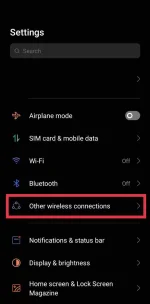
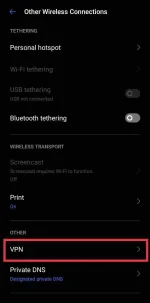
Settings > Other Wireless Connection > Other > VPN
Then click the + icon then add new vpn profile
Sample Account here
-- L2TP ACCOUNT DETAILS --
Username: unlissh.com-Phc
Password: Phc
IP Address: 165.22.104.87
Preshared Key: unlissh
Created: 2022-05-22
Expired: 2022-05-27
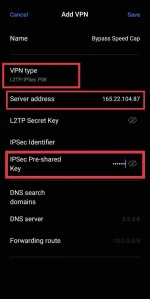
Then Select "L2TP/Ipsec Psk" as a Vpn type
Then paste I.P Address in "Server Address"
Then Preshared key on "IpSec Pre-Shared key"
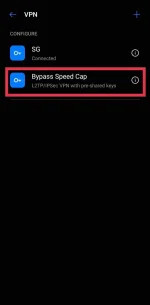
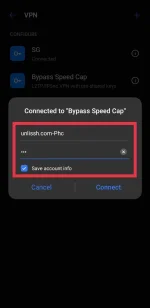
Then click save then connect and it will ask for your username and password then paste your unlissh username and password and click connect then Enjoy!
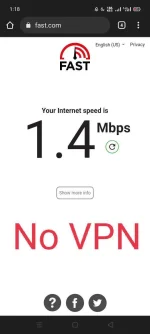
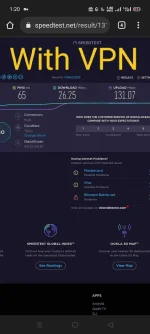
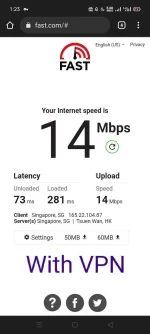
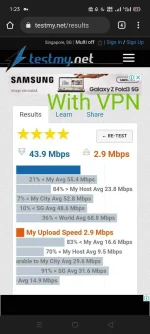
Test your Internet Speed here:
You do not have permission to view the full content of this post. Log in or register now.
You do not have permission to view the full content of this post. Log in or register now.
You do not have permission to view the full content of this post. Log in or register now.
Note: User at your own risk I am not responsible if your sim card got blocked.
(See the Pictures below for more info)

First create a L2TP Account here
You do not have permission to view the full content of this post. Log in or register now.
Then Select Singapore server
Then after you created the L2TP account copy the credentials then go to your phone settings
Settings > Other Wireless Connection > Other > VPN
Then click the + icon then add new vpn profile
Sample Account here
-- L2TP ACCOUNT DETAILS --
Username: unlissh.com-Phc
Password: Phc
IP Address: 165.22.104.87
Preshared Key: unlissh
Created: 2022-05-22
Expired: 2022-05-27
Then Select "L2TP/Ipsec Psk" as a Vpn type
Then paste I.P Address in "Server Address"
Then Preshared key on "IpSec Pre-Shared key"
Then click save then connect and it will ask for your username and password then paste your unlissh username and password and click connect then Enjoy!
Test your Internet Speed here:
You do not have permission to view the full content of this post. Log in or register now.
You do not have permission to view the full content of this post. Log in or register now.
You do not have permission to view the full content of this post. Log in or register now.
Note: User at your own risk I am not responsible if your sim card got blocked.
(See the Pictures below for more info)


