PH
PHNote :Nakaphone lang ako, sorry if may mga typo or medyo fast-paced tutiorlal pero i think for experienced member lang po ito with Openwrt-Related
Hello!
So, In order to bypass unli299 speed capped need po natin mag install ng Openvpn sa Openwrt.
Goto web gui ng Openwrt>System>Software> Install po natin ang tatlo nato :
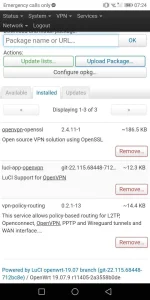
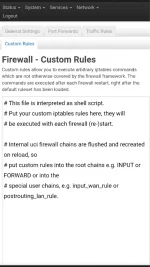
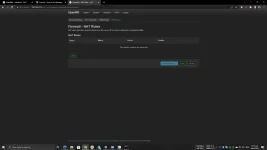
After that punta kayo sa network>firewall>custom rule
Lagay niyo tong code :
# Configure firewall
uci rename firewall.@zone[0]="lan"
uci rename firewall.@zone[1]="wan"
uci del_list firewall.wan.device="tun+"
uci add_list firewall.wan.device="tun+"
uci commit firewall
/etc/init.d/firewall restart
And goods na yan.
Tips ko lang: gumamit ng openvpn both tcp and udp for security and stabilization of latency as well as increase of internet speed, respectively.
Direct Connect sa modem:

At connected sa Openwrt Router With Openvpn Config:

How-to upload and use Openvpn Config :
Goto>Vpn>Openvpn
Go here
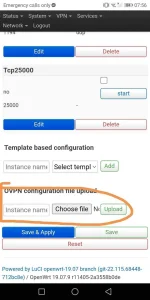
Lagyan mo yung instance name with anything you want
Choose your file kung saan mo nilagay yung config then clicl upload
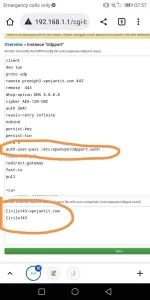
After mo maupload yung file click edit. Tapos follow the picture, copy mo lang yung address na naka close parenthesis sa auth-user-pass para ma guide mo si openwrt saan kukunim username at pass.
Under the nox lagay mo yuny generated username and password
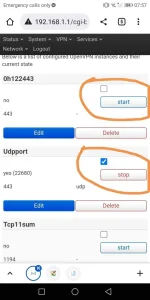
Then lastly, just click checkbox and click start > save and apply
How to know if kumagat na yung config just goto system log
"Initialization Sequence Completed"
Credits :
OPENWRT DEV AND STAFF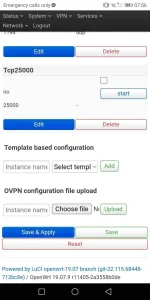
Hello!
So, In order to bypass unli299 speed capped need po natin mag install ng Openvpn sa Openwrt.
Goto web gui ng Openwrt>System>Software> Install po natin ang tatlo nato :
After that punta kayo sa network>firewall>custom rule
Lagay niyo tong code :
# Configure firewall
uci rename firewall.@zone[0]="lan"
uci rename firewall.@zone[1]="wan"
uci del_list firewall.wan.device="tun+"
uci add_list firewall.wan.device="tun+"
uci commit firewall
/etc/init.d/firewall restart
And goods na yan.
Tips ko lang: gumamit ng openvpn both tcp and udp for security and stabilization of latency as well as increase of internet speed, respectively.
Direct Connect sa modem:
At connected sa Openwrt Router With Openvpn Config:
How-to upload and use Openvpn Config :
Goto>Vpn>Openvpn
Go here
Lagyan mo yung instance name with anything you want
Choose your file kung saan mo nilagay yung config then clicl upload
After mo maupload yung file click edit. Tapos follow the picture, copy mo lang yung address na naka close parenthesis sa auth-user-pass para ma guide mo si openwrt saan kukunim username at pass.
Under the nox lagay mo yuny generated username and password
Then lastly, just click checkbox and click start > save and apply
How to know if kumagat na yung config just goto system log
"Initialization Sequence Completed"
Credits :
OPENWRT DEV AND STAFF