 PH
PHPHC-Mentalblock
Elite
Pa help paano ma read ng PC ko ang external camera. Poro camera failed lang po sya. Tsaka black lang.
Lods via USB po ito. Wala naman naka lagay manufacturer huhu. Ito link ng item sa Shopee lods. You do not have permission to view the full content of this post. Log in or register now.TS, kung ang connection ng camera sa pc mo ay via USB, kailangan mong mag-install ng driver na gawa ng manufacturer, download mo sa site nila.
Kung via wi-fi naman, check mo yung site ng manufacturer para sa instruction kung paano ma-access yung camera, usually mag-input ka ng IP address nung camera sa media player.
Ive tried methods yung nasa YT na update driver tsaka CMD command pero wala parin huhuBaka need mo lang ng correct camera drivers
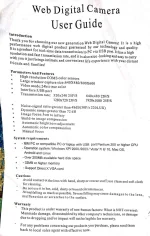
Been trying that one lods. Pero ayaw parin. Camera failed parin however, yung mic naman gumagana sya.TS, pwede pa-screen shot nung manual/instructions na kasama ng unit?
Subukan mo ito: isaksak mo sa USB yung camera, tapos open mo yung Control Panel, click mo yung Devices and Printers, dapat makikita mo roon yung external camera, kung nandoon, i-right click mo at gawin mo siyang default camera.
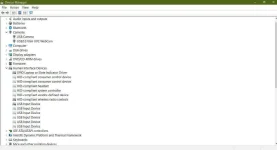
No errror/yellow mark spotted lods.A. TS, paki-check sa Device manager, habang nakasaksak sa USB yung external camera mo:
Device manager > click View tab > click show hidden devices
Kung mayroong naka-yellow exclamation mark sa mga categories na
1. Human Interface Devices
2. Imaging Devices
3. Universal Serial Bus Controllers
Kung mayroon, uninstall yung may yellow mark. Meron o wala, sunod mong gawin itong item B.
B. Restart laptop na nakasaksak sa USB yung external camera. Baka lang hindi nakompleto pag-install ni Windows ng driver niya.
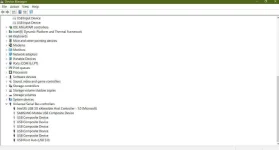
Negative din lods huhu.Wala bang plastic sheet protection yung lense niya?
Mayroon kang dalawang camera sa Device Manager, identify mo kung alin sa dalawa ang external, tapos right click mo siya > Uninstall > restart laptop.
Disable mo muna yung built-in camera bago restart.
Mayroong plastic protection lods pero tinangal ko na.Wala bang plastic sheet protection yung lense niya?
Mayroon kang dalawang camera sa Device Manager, identify mo kung alin sa dalawa ang external, tapos right click mo siya > Uninstall > restart laptop.
Disable mo muna yung built-in camera bago restart.
Heto TS, troubleshooting steps and recommendations:
[Hidden content]
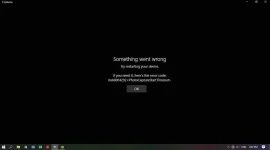
Ito lumalabas lods kapag e try ko mag capture gamit ang camera app. View attachment 1898589
ed lods pero wala parin effect uhuhuh[Hidden content]
Pwede ding sa Camera app ang problema kung pati yung builtin camera mo ay hindi rin gumagana. Kung maayos ang camera app, dapat ay gumagana yung builtin camera, isa yan sa dapat mo ring i-check.Lods ganito then pag sa gmeet eh. Nakakaumay baka sira na laptop ko sigoro
Kung sa camera app ang problem, bakit sa gmeet or skype di rin na dedetect camera lods?
gumagana naman ang built in camera lods, from the thread title itself "external camera." Same scenario sa gmeet camera failed din po lods. huhuhuhPwede ding sa Camera app ang problema kung pati yung builtin camera mo ay hindi rin gumagana. Kung maayos ang camera app, dapat ay gumagana yung builtin camera, isa yan sa dapat mo ring i-check.
Yea po lods. Kaumay lang nasa bundom pa naman kami. 2 hours pa byahe sa drop off center ng Shopee para sa return and refund.kung na try mo sa ibang pc at same issue pa rin, the considered na lemon o defective yun item na naideliver sa iyo... yun risk lang dyan ay kung may warranty ba na binibigay yun seller
