🔒 Closed Help my wifi and Bluetooth driver is not detected

Status
Not open for further replies.

rzhernandez

Eternal Poster
May nakaranas naba dito bigla nalang nawala yung wifi at Bluetooth ng laptop nyo after update? Undetectable din pareho sa device manager....i tried to fix it also using cmd at hp assistant pero wala tlga....
Im using hp omen yung lumang version sana may makatulong
 
TS, hindi ba gumagana yung Scan for hardware changes sa Device manager?
1. Check mo muna kung naka enable yung mga Wi-Fi at Bluetooth adapters mo sa Network and Sharing > Network Connections (Change adapter settings).
2. Typical naman sa laptop na yung mga Wi-fi at Bluetooth adapters ay naka-module, subukan mo kayang i-unplug pareho tapos start mo na hindi sila nakakabit, shutdown at i-plug mo na pareho, tapos start uli at check mo sa Device manager kung nade-detect na sila (with or without yellow exclamation marks).
 
TS, hindi ba gumagana yung Scan for hardware changes sa Device manager?
1. Check mo muna kung naka enable yung mga Wi-Fi at Bluetooth adapters mo sa Network and Sharing > Network Connections (Change adapter settings).
2. Typical naman sa laptop na yung mga Wi-fi at Bluetooth adapters ay naka-module, subukan mo kayang i-unplug pareho tapos start mo na hindi sila nakakabit, shutdown at i-plug mo na pareho, tapos start uli at check mo sa Device manager kung nade-detect na sila (with or without yellow exclamation marks).
Wifi and Bluetooth adapter ko lods parehong naka built in sa loob if ever na iunplug ko need ko pa buksan yung likod ng laptop ko, tapos di ko sya makita dun sa network sharing > network connection... Ethernet lng nkalagay dun kasi kinonnect ko yung laptop sa wifi using wire
 
Wifi and Bluetooth adapter ko lods parehong naka built in sa loob if ever na iunplug ko need ko pa buksan yung likod ng laptop ko, tapos di ko sya makita dun sa network sharing > network connection... Ethernet lng nkalagay dun kasi kinonnect ko yung laptop sa wifi using wire

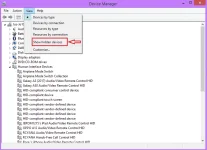
Dito TS, baka mapalabas mo, greyed out sila sa list, re-install mo lang:
Device manager > View > Show hidden devices.

Screenshot (686).webp
 
Status
Not open for further replies.

Similar threads

About this Thread

  • 4
    Replies
  • 490
    Views
  • 3
    Participants
Last reply from:
Pen_J

Trending Topics

Online now

Members online
1,157
Guests online
1,008
Total visitors
2,165

Forum statistics

Threads
2,276,424
Posts
28,969,886
Members
1,231,256
Latest member
Saywhatnowboy
Back
Top