🔒 Closed Always blue screen

Status
Not open for further replies.

lexetmatt

Honorary Poster
Pahelp naman po panu po maiwasan blue screen lagi ko po na eencounter eh kahit freshly installed yung OS
any tips po mga dapat gawen
tas ask naren po mga dapat gawen pag mag iinstall ng OS like for example po after OS DRIVERS ba then antivirus or deepfreeze
currenltly nag iinstal po ule ako ng OS any list po ng mga dapat eenstall before deep freez salamat po sa makaka help
thanks in advance
 
install mo muna lahat bago deep freeze pero ako di natalaga gumagamit ng df. Kailangan lang updated antivirus. And di nako gumagamit ng 3rd party Antivirus. Yung sa windows nalang mismo.
 
install mo muna lahat bago deep freeze pero ako di natalaga gumagamit ng df. Kailangan lang updated antivirus. And di nako gumagamit ng 3rd party Antivirus. Yung sa windows nalang mismo.
palagi kasi ako nagblublu screen pang 3 times kuna ng iinstall ng os tas me na encounter ako ransomware ata inieba name ng ebang app gianagawa PPGH ba yun nakalimutan kona
 
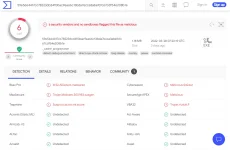
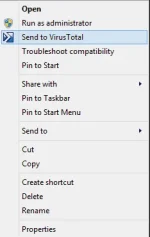
always scan every application(.exe) you run on your pc You do not have permission to view the full content of this post. Log in or register now. or download virustotal app You do not have permission to view the full content of this post. Log in or register now.. Almost every time everything has malware, but some are not really harmful, just don't allow viruses that have the name "rootkit", "worm", "adware" and always check the total of the virus, and check the community. This way you won't need any anti-virus and still be safe as long as you don't accidentally double click a very dangerous file. But still, Windows defender should do the trick for you so just be careful on what you give an exception.

1648707751798.webp 1648708118892.webp
 
always scan every application(.exe) you run on your pc You do not have permission to view the full content of this post. Log in or register now. or download virustotal app You do not have permission to view the full content of this post. Log in or register now.. Almost every time everything has malware, but some are not really harmful, just don't allow viruses that have the name "rootkit", "worm", "adware" and always check the total of the virus, and check the community. This way you won't need any anti-virus and still be safe as long as you don't accidentally double click a very dangerous file. But still, Windows defender should do the trick for you so just be careful on what you give an exception.

View attachment 1879265 View attachment 1879275
salamat lods
 
palagi kasi ako nagblublu screen pang 3 times kuna ng iinstall ng os tas me na encounter ako ransomware ata inieba name ng ebang app gianagawa PPGH ba yun nakalimutan ko

nako ganyan nangyari sa laptop ko, ransomware, 50-50 yan marecover if may important file ka dun. tama po ginawa mo install ka bagong os, pero pwede naman tangalin mo lang yung ransomware.
 
Status
Not open for further replies.

Similar threads

About this Thread

  • 7
    Replies
  • 505
    Views
  • 5
    Participants
Last reply from:
lexetmatt

Trending Topics

Online now

Members online
1,000
Guests online
1,379
Total visitors
2,379

Forum statistics

Threads
2,276,208
Posts
28,968,320
Members
1,231,166
Latest member
williamfreede
Back
Top